# TikZ on Overleaf, in Obsidian, in Typst and on the web (TikZJax)
> TikZ on Overleaf (and its 10-second free compile limit), TikZ in Obsidian with TikZJax plugins, TikZJax on web pages, and CeTZ, the Typst counterpart.
URL: https://www.labcanvas.com/tikz/overleaf
Updated 2026-11-22. Pictures typeset with TeX Live 2026 and PGF 3.1.12; each is made from the code under it, in a standalone document with the preamble lines shown. Code on this page: CC0 1.0 (https://creativecommons.org/publicdomain/zero/1.0/), copy freely. Try any snippet in the TikZ editor: https://www.labcanvas.com/tools/tikz-editor
## Quick answer
On **Overleaf**, TikZ works without installing anything: add `\usepackage{tikz}` (and the `\usetikzlibrary` lines you need) to the preamble of the main `.tex` file. Large figures are the risk, because the free plan stops a compilation after 10 seconds; fewer plot samples, LuaLaTeX for pgfplots, or externalizing finished figures fix that. In **Obsidian**, the TikZJax community plugin renders code blocks marked `tikz` with TeX compiled to WebAssembly. **TikZJax** does the same on any web page. **Typst** cannot run TikZ; its counterpart is the CeTZ package, or a TikZ figure embedded as an image (PDF or SVG).
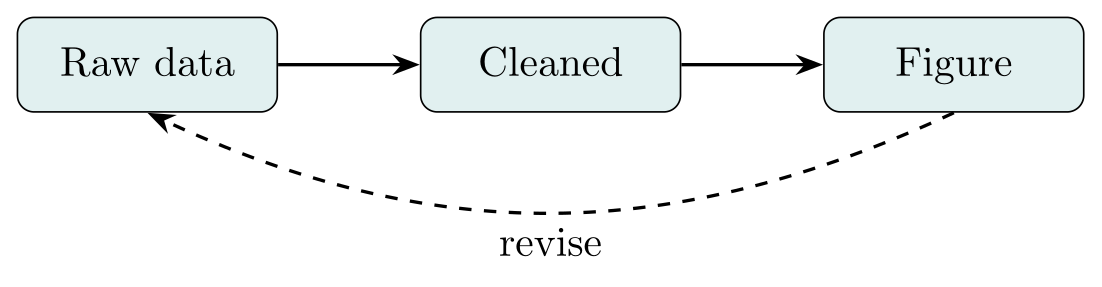
*A small TikZ flowchart that compiles as it is on Overleaf, with arrows.meta and positioning loaded in the preamble*
Preamble: `\usepackage{tikz}`, `\usetikzlibrary{arrows.meta, positioning}`
```latex
\begin{tikzpicture}[node distance=12mm, >=Stealth,
box/.style={draw, rounded corners, fill=teal!12, minimum width=22mm, minimum height=8mm,
text height=1.5ex, text depth=0.25ex}]
\node[box] (raw) {Raw data};
\node[box, right=of raw] (clean) {Cleaned};
\node[box, right=of clean] (fig) {Figure};
\draw[->, thick] (raw) -- (clean);
\draw[->, thick] (clean) -- (fig);
\draw[->, thick, dashed] (fig.south) to[bend left=25] node[below] {revise} (raw.south);
\end{tikzpicture}
```
## TikZ on Overleaf: already installed
Overleaf compiles with TeX Live, which contains TikZ, pgfplots, circuitikz, tikz-cd and the other TikZ packages; new projects use the newest TeX Live (2026 at the time of writing), and the version can be changed per project. A complete document for the flowchart above:
```
\documentclass{article}
\usepackage{tikz}
\usetikzlibrary{arrows.meta, positioning}
\begin{document}
\begin{figure}
\centering
\begin{tikzpicture}
…
\end{tikzpicture}
\caption{Workflow.}
\end{figure}
\end{document}
```
The preamble lines belong in the main `.tex` file, even when the figure itself is in another file that you `\input`. pdfLaTeX is the default compiler; XeLaTeX and LuaLaTeX are under *Settings → Compiler* (the gear icon or the File menu), next to the TeX Live version. Overleaf’s own tutorials cover the basics of TikZ and pgfplots; this site goes into the details, for example [arrows](https://www.labcanvas.com/tikz/arrows) and [plots](https://www.labcanvas.com/tikz/plots).
## Compile timeouts: 10 seconds on the free plan
Overleaf stops a compilation that runs longer than the limit of the plan: **10 seconds on the free plan and 240 seconds on the premium plans** (Overleaf’s plan limits, November 2026). Overleaf’s troubleshooting page names complex TikZ and pgfplots drawings as one of the usual causes, because TeX redraws every picture on every compilation. What helps, roughly in order of effort:
- **Fix errors first.** With *Stop on first error* in the Recompile menu, an error stops the run at once instead of letting LaTeX carry on through many follow-up errors.
- **Lower the sample counts.** A 3D surface with `samples=40` has 40 × 40 = 1600 patches; 25 × 25 is often indistinguishable on paper. For 2D plots of measured data, plot the data rather than thousands of computed points.
- **Compile with LuaLaTeX when the document has pgfplots.** With `compat=1.12` or newer, pgfplots then hands much of its work to Lua; its manual measures surface plots at 25–50 % of the pdfLaTeX time, with the same output. The surface below was compiled that way.
- **Externalize finished figures** (next section), so that a figure is computed once and then included as a PDF.
- **Move heavy figures to a separate project** with `\documentclass[tikz]{standalone}` and include its PDF: Overleaf can upload a file *From another project → from output files*, and `\includegraphics[page=2]{figures.pdf}` picks a figure.
*Fast [draft]* mode replaces included image files with boxes, which helps projects with many large photos, not TikZ code.
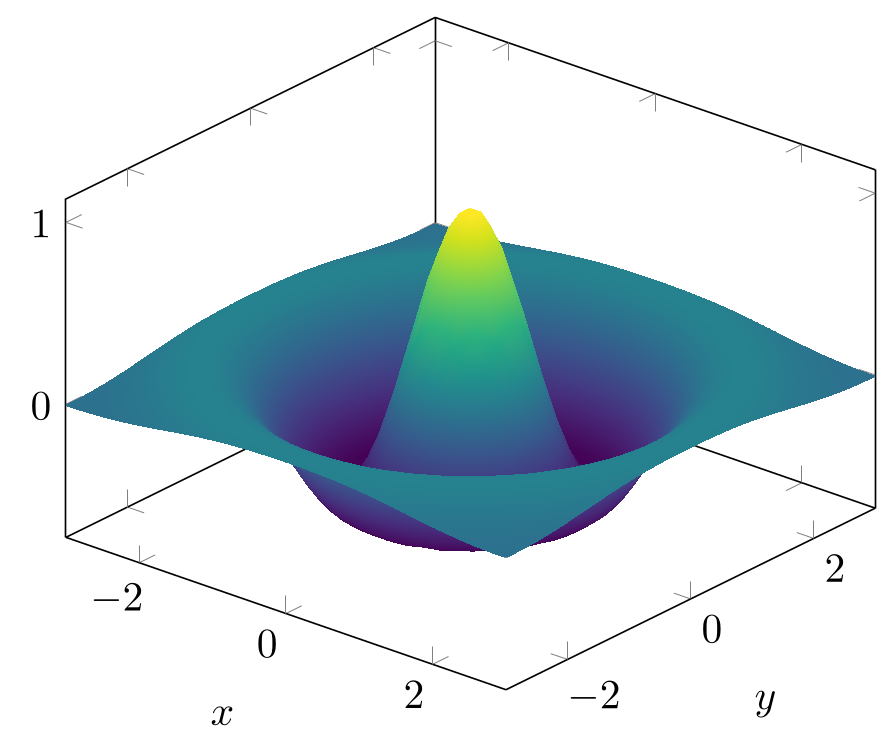
*A pgfplots surface compiled with LuaLaTeX (%! engine: lualatex): the same output, computed faster by the Lua backend*
Preamble: `\usepackage{tikz}`, `\usepackage{pgfplots}`, `\pgfplotsset{compat=1.18}` (compile with LuaLaTeX)
```latex
% compiled with LuaLaTeX: pgfplots computes with Lua (faster, more accurate)
\begin{tikzpicture}
\begin{axis}[view={40}{35}, colormap name=viridis,
xlabel={$x$}, ylabel={$y$}, xtick={-2,0,2}, ytick={-2,0,2}]
\addplot3[surf, shader=interp, domain=-3:3, samples=40]
{cos(deg(2*sqrt(x^2 + y^2))) * exp(-(x^2 + y^2)/4)};
\end{axis}
\end{tikzpicture}
```
## Externalizing TikZ figures on Overleaf
The `external` library works on Overleaf, with three details from Overleaf’s help page:
```
\usetikzlibrary{external}
\tikzexternalize[prefix=tikz/] % in the main .tex file
```
- `\tikzexternalize` must be in the project’s **main** `.tex` file.
- The folder given as `prefix` must exist and must contain a file before TikZ can write into it: create `tikz/` and add any small file, such as an empty `foo.txt`.
- The figure PDFs are *generated files*: hidden from the file list and deleted by Overleaf at intervals, after which the first compilation has to make them all again and may time out. Overleaf sets `\jobname` to `output`, so the files are called `output-figure0.pdf`, `output-figure1.pdf`…; `\tikzsetnextfilename{name}` gives a figure a stable name.
To make the figures permanent, Overleaf suggests compiling the project once on your own computer (`pdflatex -shell-escape main.tex`) and uploading the `.pdf`, `.md5` and `.dpth` files of each figure into `tikz/`: uploaded files are never deleted, and a figure is only regenerated when its code changes. How the library works in general is on the [export page](https://www.labcanvas.com/tikz/export).
## TikZ in Obsidian: TikZJax plugins
Obsidian renders TikZ through community plugins (Settings → Community plugins → Browse). The ones based on TikZJax run TeX inside Obsidian, compiled to WebAssembly, so no TeX installation is needed:
| Plugin | How it renders | Status |
| --- | --- | --- |
| TikZJax (artisticat1/obsidian-tikzjax) | TikZJax (drgrice1’s fork) in the note; packages chemfig, tikz-cd, circuitikz, pgfplots, array, amsmath, amstext, amsfonts, amssymb, tikz-3dplot | The established one: about 65,000 downloads; version 0.5.2, last updated 31 March 2024 |
| TikZJax Next (jackvinati/tikzjax-next) | A fork of the plugin above with a newer WebAssembly TeX: pgfplots, circuitikz, chemfig, tikz-cd, forest and many libraries built in, offline, on desktop and on iPhone/iPad; needs Obsidian 1.7.2+ | Version 0.2.3, updated October 2026; listed as not manually reviewed by Obsidian staff |
| LaTeX and TikZ Renderer, TikZ Native, LaTeX Vault | Call the TeX Live or MiKTeX installed on your computer, so any package works | Need a local TeX installation; listed as not manually reviewed |
With the TikZJax plugin, a note contains a code block whose language is `tikz` (three backticks followed by `tikz`, closed by three backticks). Inside it go the preamble lines and the `document` environment; the plugin uses the `standalone` class:
```
\usepackage{pgfplots}
\begin{document}
\begin{tikzpicture}
…
\end{tikzpicture}
\end{document}
```
Only the packages the plugin bundles can be loaded, so a figure that compiles on Overleaf may fail in Obsidian. Plain TikZ, like the plot below, works everywhere.
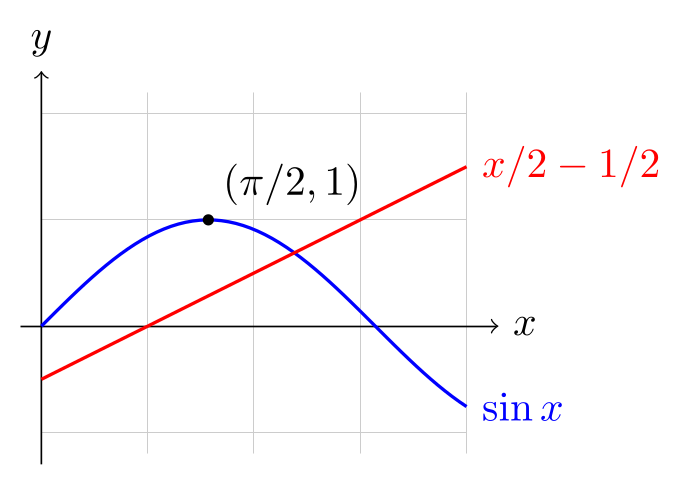
*Plain TikZ without packages or libraries: code like this also runs in TikZJax on a web page or in Obsidian*
Preamble: `\usepackage{tikz}`
```latex
\begin{tikzpicture}[domain=0:4, scale=0.9]
% only TikZ itself: this also runs in TikZJax (web pages, Obsidian)
\draw[very thin, gray!40] (0,-1.2) grid (4,2.2);
\draw[->] (-0.2,0) -- (4.3,0) node[right] {$x$};
\draw[->] (0,-1.3) -- (0,2.4) node[above] {$y$};
\draw[blue, thick, samples=60] plot (\x, {sin(\x r)}) node[right] {$\sin x$};
\draw[red, thick, samples=60] plot (\x, {0.5*\x - 0.5}) node[right] {$x/2 - 1/2$};
\fill (1.5708,1) circle [radius=1.5pt] node[above right] {$(\pi/2, 1)$};
\end{tikzpicture}
```
## TikZJax on web pages
TikZJax, by Jim Fowler, runs TeX in the browser: the Pascal source of TeX is compiled to WebAssembly, a LaTeX format with TikZ preloaded is loaded, and the DVI output is converted to SVG on the page. To use the hosted version, add two lines to the `` and put the TikZ code in a script tag of type `text/tikz`:
```
```
The script tag is replaced by the SVG. The first picture on a page costs a download (the script alone is about 450 kB, plus the TeX engine and format) and a TeX run in the reader’s browser. The fork `drgrice1/tikzjax`, which the Obsidian plugin uses, is meant to be hosted yourself and adds `data-tex-packages` (for `amsmath`, `pgfplots`, `tikz-cd`, `tikz-3dplot`, `array` and a few others), `data-tikz-libraries` and a cache, so an unchanged picture is not compiled again.
For a figure that does not change, rendering once at build time is lighter for readers: convert it to SVG with dvisvgm or pdftocairo (see [export](https://www.labcanvas.com/tikz/export)), or download a PNG from the [LabCanvas TikZ editor](https://www.labcanvas.com/tools/tikz-editor).
## Typst and TikZ: CeTZ, or the figure as an image
Typst does not run TeX, so TikZ code cannot go into a Typst document. There are two routes:
- **Keep the TikZ figure**: compile it with the `standalone` class and include the result with `#image("figure.pdf")` or `#image("figure.svg")`; Typst’s `image` accepts PDF and SVG files.
- **Redraw it with CeTZ** (version 0.5.3 of October 2026 on Typst Universe, needs Typst 0.15), a drawing package for Typst “inspired by TikZ and Processing”. The same picture in both, CeTZ first (shown as code: our renderer runs LaTeX only, but we compiled it with Typst 0.15):
```
#import "@preview/cetz:0.5.3"
#cetz.canvas({
import cetz.draw: *
// axes with arrow tips and labels
line((0, 0), (4, 0), mark: (end: ">"))
content((4, 0), $x$, anchor: "west", padding: .1)
line((0, 0), (0, 2.5), mark: (end: ">"))
content((0, 2.5), $y$, anchor: "south", padding: .1)
// a rectangle, a filled circle with a label, and a curve
rect((0.4, 0.3), (1.6, 1), fill: orange.lighten(60%))
circle((2.8, 1.3), radius: 0.6, fill: blue.lighten(80%))
content((2.8, 1.3), [A])
bezier((0.3, 2.1), (3.8, 0.3), (1.5, 3), (2.5, -0.5), stroke: red)
})
```
The ideas carry over: coordinates in centimetres with y upwards, named elements with anchors, arrow tips (“marks”), styles. The syntax is Typst’s: function calls with named arguments instead of paths and options in brackets, and a Bézier curve lists its end point before the control points. In TikZ, a label is usually a node on the path; in CeTZ it is a separate `content` call.
| | TikZ | CeTZ |
| --- | --- | --- |
| Runs in | LaTeX (any engine), also ConTeXt and plain TeX | Typst only |
| Plots | pgfplots: 2D, 3D, logarithmic axes, error bars, colormaps | cetz-plot 0.1.4: function and data plots, bar and pie charts |
| Diagrams | Libraries and packages for nearly every field: circuitikz, tikz-cd, chemfig, quantikz, forest, graph drawing | fletcher 0.6.0 for diagrams with nodes and arrows (flowcharts, commutative diagrams), cetz-venn, a tree layout in CeTZ itself |
| Speed | A LaTeX run; large pictures take seconds, hence externalizing | Typst compiles incrementally, so the preview follows the code quickly |
| Documentation and examples | A detailed reference manual (tikz.dev) and a large stock of answered questions | An API reference and an online manual that its authors call a work in progress |
For a paper written in LaTeX, stay with TikZ. For a document written in Typst, draw new figures in CeTZ and bring complex existing TikZ figures over as PDF or SVG images; translating them means rewriting every drawing command.
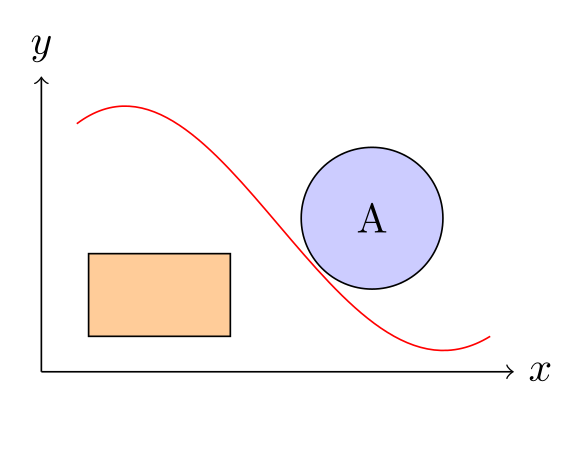
*The TikZ version of the CeTZ example: \draw paths with nodes instead of line, rect, circle and content calls*
Preamble: `\usepackage{tikz}`
```latex
\begin{tikzpicture}
% axes with arrow tips and labels
\draw[->] (0,0) -- (4,0) node[right] {$x$};
\draw[->] (0,0) -- (0,2.5) node[above] {$y$};
% a rectangle, a filled circle with a label, and a curve
\draw[fill=orange!40] (0.4,0.3) rectangle (1.6,1);
\draw[fill=blue!20] (2.8,1.3) circle [radius=0.6] node {A};
\draw[red] (0.3,2.1) .. controls (1.5,3) and (2.5,-0.5) .. (3.8,0.3);
\end{tikzpicture}
```
## Common errors and how to fix them
| LaTeX says (or you see) | Cause and fix |
| --- | --- |
| Environment tikzpicture undefined. | TikZ is not loaded: add \usepackage{tikz} to the preamble of the main.tex file (on Overleaf too; nothing needs to be installed). |
| Package PGF Math Error: Unknown function `of' (in 'of a'). | right=of a and the other “=of” placements need the positioning library: \usetikzlibrary{positioning}. |
| Overleaf stops with a compile timeout (no LaTeX error) | The free plan allows 10 seconds. Lower samples in pgfplots (especially 3D), switch the compiler to LuaLaTeX for pgfplots, externalize finished figures, or compile heavy figures in a separate project and include their PDF. |
| Externalized figures are not created on Overleaf, or disappear later (no error) | \tikzexternalize must be in the main.tex file and the prefix folder must contain a file. Overleaf deletes generated files at intervals: upload locally generated.pdf,.md5 and.dpth files to keep them. |
| A tikz block in Obsidian shows an error or nothing (no error) | The TikZJax plugin only has the packages it bundles (chemfig, tikz-cd, circuitikz, pgfplots, array, the AMS packages, tikz-3dplot), and the block needs \begin{document} … \end{document}. For other packages, use a plugin that calls a local TeX installation. |
## Frequently asked questions
### Does Overleaf support TikZ?
Yes. Overleaf compiles with TeX Live, which includes TikZ, pgfplots, circuitikz, tikz-cd and the other TikZ packages. Write \usepackage{tikz} and your \usetikzlibrary lines in the preamble of the main.tex file; nothing needs to be installed.
### Why does my TikZ figure time out on Overleaf?
The free plan stops each compilation after 10 seconds (premium plans after 240), and TikZ redraws every figure on every run. Reduce plot samples, use LuaLaTeX for pgfplots, externalize finished figures with \tikzexternalize[prefix=tikz/] in the main file, or compile figures in a separate standalone project.
### How do I use TikZ in Obsidian?
Install the TikZJax community plugin (or TikZJax Next), then write the figure in a code block marked tikz, with \usepackage lines for the packages you need and the picture between \begin{document} and \end{document}. Only the packages the plugin bundles are available.
### Can I use TikZ in Typst?
Not directly: Typst does not run TeX. Either embed a TikZ figure, converted to PDF or SVG, with #image("figure.pdf"), or redraw it with CeTZ, the Typst drawing package inspired by TikZ (#import "@preview/cetz:0.5.3").
### What is TikZJax?
TikZJax is TeX and TikZ compiled to WebAssembly, so that TikZ code in a web page or an Obsidian note is turned into an SVG in the browser. Add tikzjax.js and fonts.css from tikzjax.com to the page and put the code in. Only the packages it bundles are available.
## References
- [Overleaf documentation: plan limits (compile timeout)](https://docs.overleaf.com/getting-started/free-and-premium-plans/plan-limits)
- [Overleaf documentation: fixing and preventing compile timeouts](https://docs.overleaf.com/troubleshooting-and-support/fixing-and-preventing-compile-timeouts)
- [Overleaf documentation: reducing the compile time for diagrams (TikZ externalization)](https://docs.overleaf.com/troubleshooting-and-support/fixing-and-preventing-compile-timeouts/reducing-the-compile-time-for-diagrams)
- [Overleaf documentation: selecting a TeX Live version and LaTeX compiler](https://docs.overleaf.com/getting-started/recompiling-your-project/selecting-a-tex-live-version-and-latex-compiler)
- [Overleaf documentation: TeX Live on Overleaf](https://docs.overleaf.com/troubleshooting-and-support/tex-live)
- [Overleaf learn: TikZ package](https://www.overleaf.com/learn/latex/TikZ_package)
- [Overleaf learn: Pgfplots package](https://www.overleaf.com/learn/latex/Pgfplots_package)
- [PGF/TikZ manual, §52 Externalization Library](https://tikz.dev/library-external)
- [pgfplots manual 1.18.3, §6.3.1 Lua (lua backend with LuaLaTeX, p. 535)](https://mirrors.ctan.org/graphics/pgf/contrib/pgfplots/doc/pgfplots.pdf#page=535)
- [TikZJax (kisonecat/tikzjax)](https://github.com/kisonecat/tikzjax)
- [TikZJax demo and hosted files](https://tikzjax.com/)
- [TikZJax fork with packages and libraries (drgrice1/tikzjax)](https://github.com/drgrice1/tikzjax)
- [Obsidian plugin TikZJax (artisticat1/obsidian-tikzjax)](https://github.com/artisticat1/obsidian-tikzjax)
- [Obsidian plugin TikZJax Next (jackvinati/tikzjax-next)](https://github.com/jackvinati/tikzjax-next)
- [CeTZ on Typst Universe (0.5.3, 2026-10-21)](https://typst.app/universe/package/cetz)
- [CeTZ online manual](https://cetz-package.github.io/docs/)
- [cetz-plot on Typst Universe (0.1.4)](https://typst.app/universe/package/cetz-plot)
- [fletcher on Typst Universe (0.6.0)](https://typst.app/universe/package/fletcher)
- [Typst reference: image (accepts SVG and PDF files)](https://typst.app/docs/reference/visualize/image/)
## More TikZ guides
- [TikZ editors, online and desktop, honestly compared](https://www.labcanvas.com/tikz/editors): TikZ editors compared: LabCanvas, Overleaf, TikZ Editor, TikZiT, KtikZ/QtikZ, TikzEdt, TikZJax, quiver, Mathcha: platforms, licences, previews, releases.
- [Converting TikZ to SVG, EPS, PNG and PDF, and plots into TikZ](https://www.labcanvas.com/tikz/export): Export TikZ as a cropped PDF, convert it to SVG, PNG or EPS with pdftocairo, dvisvgm or Ghostscript, and the 2026 status of tikzplotlib and matlab2tikz.
- [TikZ plots with pgfplots: functions, data, scatter, bars and 3D](https://www.labcanvas.com/tikz/plots): Plot in LaTeX with pgfplots: functions, data tables, scatter plots coloured by value, error bars, bar charts, log axes, 3D surfaces and groupplots.
- [Common TikZ errors and how to fix them](https://www.labcanvas.com/tikz/errors): The 30 most common TikZ errors with their exact messages, causes and fixes, tested with TeX Live 2026: semicolons, unknown keys, libraries, arrows, babel.
- [TikZ libraries: what each one adds and how to load it](https://www.labcanvas.com/tikz/libraries): Reference table of TikZ libraries (positioning, calc, arrows.meta, shapes, decorations, patterns, fit, matrix…) with load lines, examples and manual links.
- [The tikzpicture environment: options, scaling and centring](https://www.labcanvas.com/tikz/tikzpicture): The tikzpicture environment: its options, scale vs transform shape vs \resizebox, centring it in a figure with a caption, and inline TikZ with baseline.
- [The PGF/TikZ manual: where to find it and which part to read](https://www.labcanvas.com/tikz/manual): Where the official PGF/TikZ manual is (CTAN PDF, texdoc tikz, the tikz.dev HTML edition), which version it describes, and which section to read for each task.
- [TikZ: what it is and how to use it in LaTeX](https://www.labcanvas.com/tikz): What TikZ (PGF/TikZ) is and how to use it in LaTeX: the minimal document, libraries, coordinates, a first figure in steps, Overleaf and TeX Live.