Journal cover template · Journal covers · Genome editing
Journal cover: genome editing
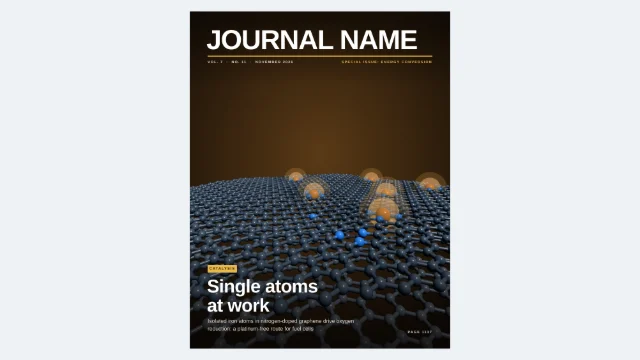
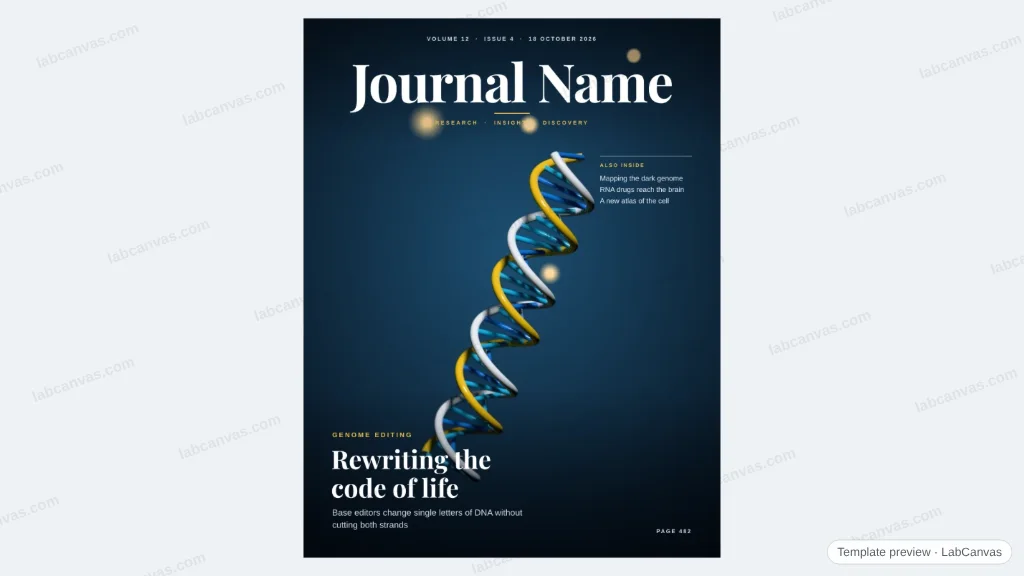
A cover in the style of a top journal: a full-bleed DNA render with glowing particles out of focus, a large serif masthead, the issue line and one cover story. Replace the name and lines; double-click the picture to change the 3D scene.
Updated 3 cited papers14 editable layers
At a glance
- Category
- Journal covers
- Method
- Genome editing
- Product
- Journal cover, US Letter (8.5 × 11 in); the 3D Studio renders its art at 2550 × 3300 px for a 300 dpi print file
- Figure
- 816 × 1056 px (16:9), 14 editable layers
Step by step
- Replace the mastheadType your journal’s name; keep it white over the dark top of the picture.
- Write the cover storyA short kicker, a 4–6 word headline and one line of deck.
- Change the artDouble-click the picture: its 3D scene opens with the cover frame, camera and depth of field. Update it in the figure when done.
- Submit the artJournals set their own masthead and lines, so they ask for the art alone: in the 3D Studio, switch on Ray traced, set Image size to Print (2550 × 3300 px, 300 dpi) and download the PNG. This cover shows how it will look.
Uses
- Cover art submissions
- Inside covers and frontispieces
- Lab website and social posts
Papers this template follows
- Komor, Kim, Packer, Zuris & Liu, “Programmable editing of a target base in genomic DNA without double-stranded DNA cleavage”, Nature 2016. doi:10.1038/nature17946primary
- Watson & Crick, “Molecular structure of nucleic acids: a structure for deoxyribose nucleic acid”, Nature 1953. doi:10.1038/171737a0further reading
- Jinek, Chylinski, Fonfara, Hauer, Doudna & Charpentier, “A programmable dual-RNA-guided DNA endonuclease in adaptive bacterial immunity”, Science 2012. doi:10.1126/science.1225829further reading
Cover story after Komor et al., Nature 2016 (doi:10.1038/nature17946). Art: a schematic B-DNA double helix rendered in the LabCanvas 3D Studio; the journal name and every line are placeholders.
How templates are written and checked: editorial guidelines.
Questions
What does the “Journal cover: genome editing” template show?
A cover in the style of a top journal: a full-bleed DNA render with glowing particles out of focus, a large serif masthead, the issue line and one cover story. Replace the name and lines; double-click the picture to change the 3D scene.
What are the steps shown in “Journal cover: genome editing”?
1. Replace the masthead: Type your journal’s name; keep it white over the dark top of the picture. 2. Write the cover story: A short kicker, a 4–6 word headline and one line of deck. 3. Change the art: Double-click the picture: its 3D scene opens with the cover frame, camera and depth of field. Update it in the figure when done. 4. Submit the art: Journals set their own masthead and lines, so they ask for the art alone: in the 3D Studio, switch on Ray traced, set Image size to Print (2550 × 3300 px, 300 dpi) and download the PNG. This cover shows how it will look.
Which papers is “Journal cover: genome editing” based on?
Komor, Kim, Packer, Zuris & Liu, “Programmable editing of a target base in genomic DNA without double-stranded DNA cleavage”, Nature 2016 (doi:10.1038/nature17946); Watson & Crick, “Molecular structure of nucleic acids: a structure for deoxyribose nucleic acid”, Nature 1953 (doi:10.1038/171737a0); Jinek, Chylinski, Fonfara, Hauer, Doudna & Charpentier, “A programmable dual-RNA-guided DNA endonuclease in adaptive bacterial immunity”, Science 2012 (doi:10.1126/science.1225829).
Can I edit the “Journal cover: genome editing” template?
Yes. Open it in the LabCanvas editor: all 14 layers are editable. Change the text, colours and layout, then export PNG, TIFF, SVG or PDF.
Do I need an account to use this template?
Not to view it here. To open and edit it, sign in to LabCanvas or create a free account (the free plan keeps up to 3 designs). Downloading the figure is part of LabCanvas Pro (US$19 a month or US$199 a year).