Commutative diagrams with tikz-cd
Quick answer
\usepackage{tikz-cd} and write the diagram as a grid inside \begin{tikzcd} … \end{tikzcd}: & separates columns and \\ rows, as in a table, and every cell is in math mode. In a cell, \arrow[r, "f"] (or the shorter \ar) draws an arrow to the cell one step to the right with the label f; the letters r, l, d, u combine, so \arrow[dr] goes one down and one right. Options set the style: hook, two heads, dashed, Rightarrow, equal, bend left, shift left, crossing over.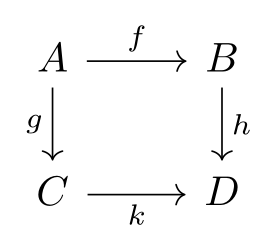
\usepackage{tikz} \usepackage{tikz-cd}\begin{tikzcd}
A \arrow[r, "f"] \arrow[d, "g"'] & B \arrow[d, "h"] \\
C \arrow[r, "k"'] & D
\end{tikzcd}Full document
\documentclass[border=4pt]{standalone}
\usepackage{tikz}
\usepackage{tikz-cd}
\begin{document}
\begin{tikzcd}
  A \arrow[r, "f"] \arrow[d, "g"'] & B \arrow[d, "h"] \\
  C \arrow[r, "k"'] & D
\end{tikzcd}
\end{document}Contents
The tikzcd environment: cells, rows and columns
tikz-cd (by Augusto Stoffel; version 1.0 of 2021-05-04 is the current one, in TeX Live and MiKTeX) is loaded with \usepackage{tikz-cd}, or with \usetikzlibrary{cd} after TikZ: the package, the tikzcd environment and the cd library are the same thing. Internally a diagram is a TikZ matrix of nodes plus one path per arrow, so TikZ options work inside it.
- Cells are separated by
&and rows by\\. Leave cells empty (but keep their&) to place objects on a grid, as in the triangle below. Do not end the last row with\\: tikz-cd adds it itself. - Spacing:
row sepandcolumn septaketiny,small,scriptsize,normal,large,huge(rows 0.45em to 3.6em, columns 0.6em to 4.8em; normal is 1.8em and 2.4em) or any length;sep=sets both. Extra space between two particular columns or rows goes in brackets:&[3em],\\[1.5em]. - Options for one cell go at its start between bars:
|[alias=Z, red]| C; for all cells usecells={nodes={…}}. Cells are in math mode;math mode=falseswitches that off for text diagrams. \tikzcdset{…}sets options for all diagrams. Because the separations are reset at the start of every diagram, change a size there with\tikzcdset{row sep/normal=1cm}rather thanrow sep=1cm.
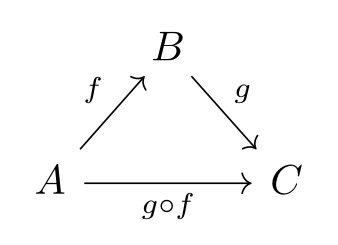
\usepackage{tikz} \usepackage{tikz-cd}\begin{tikzcd}[column sep=small]
& B \arrow[dr, "g"] & \\
A \arrow[ur, "f"] \arrow[rr, "g \circ f"'] & & C
\end{tikzcd}Full document
\documentclass[border=4pt]{standalone}
\usepackage{tikz}
\usepackage{tikz-cd}
\begin{document}
\begin{tikzcd}[column sep=small]
  & B \arrow[dr, "g"] & \\
  A \arrow[ur, "f"] \arrow[rr, "g \circ f"'] & & C
\end{tikzcd}
\end{document}Arrows: \arrow, \ar and their targets
\arrow[⟨options⟩] and its synonym \ar go in the cell where the arrow starts. The target is given by a string of the letters r, l, d, u (right, left, down, up), one letter per step: rr skips a column, dl goes diagonally down-left. Other options are any keys a TikZ \path accepts, plus the tikz-cd styles below.
Instead of a direction you can name both ends with from= and to=, as a cell row-column (to=2-3), a direction relative to the current cell (from=uu) or the name of a node or alias. That lets you write all the arrows after the objects, which is the style graphical editors export, and draw an arrow later than its source cell (arrows are drawn in the order they are read, which matters for crossing over).
Old documents use \arrow{r}{f} (direction and label in braces) and shortcuts such as \rar, \dar and \drar; they still work, but the quotes syntax above is the current one.
Labels and their positions
A label is text in double quotes among the options: \arrow[r, "f"]. It is typeset in \scriptstyle and placed on the left of the arrow’s direction, which is above an arrow going right and to the right of an arrow going down. Then:
"g"': an apostrophe after the closing quote moves the label to the other side (it is TikZ’sswap)."f" near start,near end,very near start,pos=0.3: position along the arrow; an arrow can have several labels."\eta" description: on the arrow, with a white background that cuts the line."\sim" marking: on the arrow without background, for symbols such as / or ∘ crossing the arrow.- Options after the label apply to it alone:
"a" red,"b"' blue. Put text and options in braces when they contain a comma:"{(x,y)}","f"{above, near end}. labels={…}on the diagram adds options to every label, e.g.labels={inner sep=1ex}for more distance from the arrows.
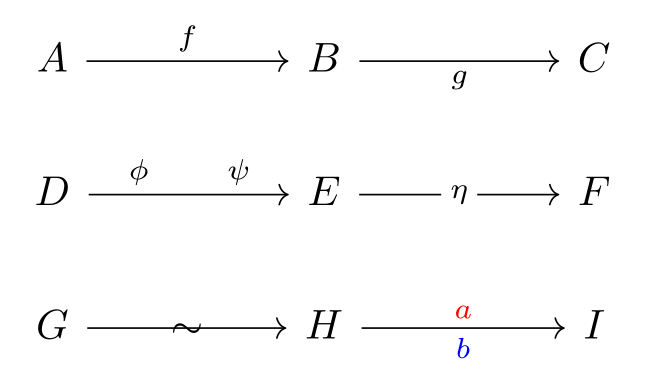
\usepackage{tikz} \usepackage{tikz-cd}\begin{tikzcd}[column sep=huge]
A \arrow[r, "f"] & B \arrow[r, "g"'] & C \\
D \arrow[r, "\phi" near start, "\psi" near end] & E \arrow[r, "\eta" description] & F \\
G \arrow[r, "\sim" marking] & H \arrow[r, "a" red, "b"' blue] & I
\end{tikzcd}Full document
\documentclass[border=4pt]{standalone}
\usepackage{tikz}
\usepackage{tikz-cd}
\begin{document}
\begin{tikzcd}[column sep=huge]
  A \arrow[r, "f"] & B \arrow[r, "g"'] & C \\
  D \arrow[r, "\phi" near start, "\psi" near end] & E \arrow[r, "\eta" description] & F \\
  G \arrow[r, "\sim" marking] & H \arrow[r, "a" red, "b"' blue] & I
\end{tikzcd}
\end{document}Arrow styles: hook, two heads, dashed, Rightarrow, equal
tikz-cd names its arrow styles after what they look like or after the TeX command that makes the same arrow (without the backslash). They draw arrow tips that match Computer Modern, the default math font:
| Kind | Styles |
|---|---|
| Basic | to head, rightarrow (the default), leftarrow, leftrightarrow, Rightarrow, Leftarrow, Leftrightarrow |
| From a bar | maps to, mapsto, mapsfrom, Mapsto, Mapsfrom |
| Hook (inclusions) | hook, hook', hookrightarrow, hookleftarrow |
| Tail (monos) | tail, rightarrowtail, leftarrowtail |
| Two heads (epis) | two heads, twoheadrightarrow, twoheadleftarrow |
| Harpoons | harpoon, harpoon', rightharpoonup, rightharpoondown, leftharpoonup, leftharpoondown |
| Dashed | dashed, dashrightarrow, dashleftarrow |
| Squiggly | squiggly, rightsquigarrow, leftsquigarrow, leftrightsquigarrow (need \usetikzlibrary{decorations.pathmorphing}) |
| No tip | no head, no tail, dash, equal (double line, no tips; equals is accepted too) |
Styles that change different ends combine: \arrow[r, tail, two heads, dashed]. Plain TikZ keys work as well: dotted, thick, red, line width=…. If your document uses another math font, set \tikzcdset{arrow style=math font} (tips made from the font’s own arrow glyphs) or arrow style=tikz (TikZ’s arrows.meta tips, which follow >) in the preamble.
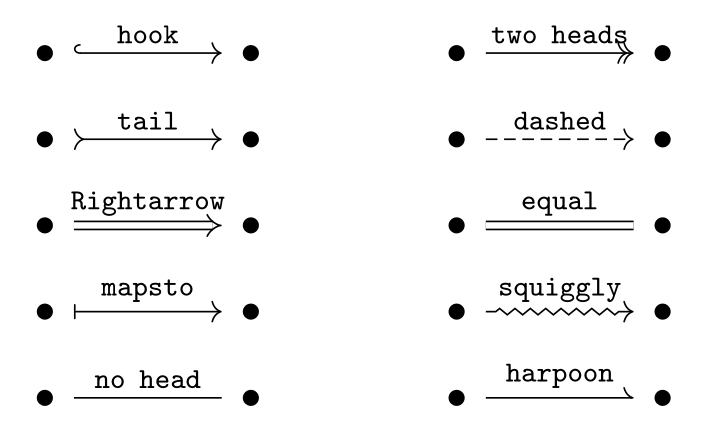
\usepackage{tikz} \usepackage{tikz-cd} \usetikzlibrary{decorations.pathmorphing}\begin{tikzcd}[column sep=large, row sep=small]
\bullet \arrow[r, hook, "\mathtt{hook}"] & \bullet &
\bullet \arrow[r, two heads, "\mathtt{two\ heads}"] & \bullet \\
\bullet \arrow[r, tail, "\mathtt{tail}"] & \bullet &
\bullet \arrow[r, dashed, "\mathtt{dashed}"] & \bullet \\
\bullet \arrow[r, Rightarrow, "\mathtt{Rightarrow}"] & \bullet &
\bullet \arrow[r, equal, "\mathtt{equal}"] & \bullet \\
\bullet \arrow[r, mapsto, "\mathtt{mapsto}"] & \bullet &
\bullet \arrow[r, squiggly, "\mathtt{squiggly}"] & \bullet \\
\bullet \arrow[r, no head, "\mathtt{no\ head}"] & \bullet &
\bullet \arrow[r, harpoon, "\mathtt{harpoon}"] & \bullet
\end{tikzcd}Full document
\documentclass[border=4pt]{standalone}
\usepackage{tikz}
\usepackage{tikz-cd}
\usetikzlibrary{decorations.pathmorphing}
\begin{document}
\begin{tikzcd}[column sep=large, row sep=small]
  \bullet \arrow[r, hook, "\mathtt{hook}"] & \bullet &
  \bullet \arrow[r, two heads, "\mathtt{two\ heads}"] & \bullet \\
  \bullet \arrow[r, tail, "\mathtt{tail}"] & \bullet &
  \bullet \arrow[r, dashed, "\mathtt{dashed}"] & \bullet \\
  \bullet \arrow[r, Rightarrow, "\mathtt{Rightarrow}"] & \bullet &
  \bullet \arrow[r, equal, "\mathtt{equal}"] & \bullet \\
  \bullet \arrow[r, mapsto, "\mathtt{mapsto}"] & \bullet &
  \bullet \arrow[r, squiggly, "\mathtt{squiggly}"] & \bullet \\
  \bullet \arrow[r, no head, "\mathtt{no\ head}"] & \bullet &
  \bullet \arrow[r, harpoon, "\mathtt{harpoon}"] & \bullet
\end{tikzcd}
\end{document}Curved, parallel and looping arrows
bend left/bend rightcurve an arrow (by 30° unless you give an angle, as inbend left=50);in=,out=andcontrolsgive finer control.shift left/shift rightmove an arrow sideways, by 0.56ex by default, which is right for a pair of parallel arrows. A number without unit multiplies that default:shift left=2for the outer arrows of a triple.xshift,yshiftandshift={…}move arrows in fixed directions.loop right(orloop above, …) draws an arrow from a cell to itself.start anchor,end anchorandshorten=adjust where an arrow begins and ends.

\usepackage{tikz} \usepackage{tikz-cd}\begin{tikzcd}
E \arrow[r, "e"] & A \arrow[r, shift left, "f"] \arrow[r, shift right, "g"'] & B
&[3em] X \arrow[r, bend left, "u"] \arrow[r, bend right, "v"'] & Y \arrow[loop right, "1_Y"]
\end{tikzcd}Full document
\documentclass[border=4pt]{standalone}
\usepackage{tikz}
\usepackage{tikz-cd}
\begin{document}
\begin{tikzcd}
  E \arrow[r, "e"] & A \arrow[r, shift left, "f"] \arrow[r, shift right, "g"'] & B
  &[3em] X \arrow[r, bend left, "u"] \arrow[r, bend right, "v"'] & Y \arrow[loop right, "1_Y"]
\end{tikzcd}
\end{document}2-cells: arrows between arrows
For a natural transformation between two parallel functors, give each curved arrow an empty label with a name, ""{name=U, below}, and draw a Rightarrow from=U to=D. The empty labels are nodes on the arrows that the double arrow can start and end at; while placing them, add draw=red to see where they are. Use shorten=… on the 2-cell if it should stop short of the arrows.
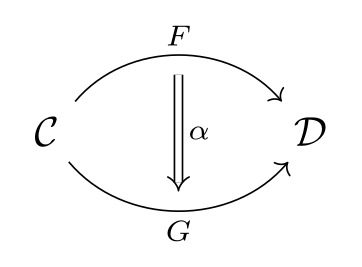
\usepackage{tikz} \usepackage{tikz-cd}\begin{tikzcd}[column sep=huge]
\mathcal{C}
\arrow[r, bend left=50, "F", ""{name=U, below}]
\arrow[r, bend right=50, "G"', ""{name=D}]
& \mathcal{D}
\arrow[Rightarrow, from=U, to=D, "\alpha"]
\end{tikzcd}Full document
\documentclass[border=4pt]{standalone}
\usepackage{tikz}
\usepackage{tikz-cd}
\begin{document}
\begin{tikzcd}[column sep=huge]
  \mathcal{C}
    \arrow[r, bend left=50, "F", ""{name=U, below}]
    \arrow[r, bend right=50, "G"', ""{name=D}]
  & \mathcal{D}
  \arrow[Rightarrow, from=U, to=D, "\alpha"]
\end{tikzcd}
\end{document}Pullbacks, pushouts and phantom arrows
A phantom arrow is invisible, but its labels are drawn, centred on the arrow and in full \textstyle. That is how symbols go where there is no cell: the pullback corner is a phantom arrow from the pullback to the opposite corner with the label "\lrcorner" placed very near start (\lrcorner and \ulcorner come from amssymb). For a pushout put "\ulcorner" very near end on the phantom arrow that ends at the pushout. The same trick puts ≅ or a 2-cell label in the middle of a square.
The universal arrow is dashed with a description label; its text {(x,y)} is in braces because of the comma.
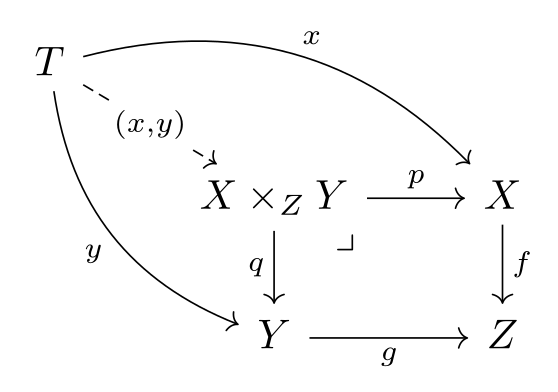
\usepackage{tikz} \usepackage{tikz-cd} \usepackage{amssymb}\begin{tikzcd}
T \arrow[drr, bend left, "x"] \arrow[ddr, bend right, "y"']
\arrow[dr, dashed, "{(x,y)}" description] & & \\
& X \times_Z Y \arrow[r, "p"] \arrow[d, "q"']
\arrow[dr, phantom, "\lrcorner", very near start] & X \arrow[d, "f"] \\
& Y \arrow[r, "g"'] & Z
\end{tikzcd}Full document
\documentclass[border=4pt]{standalone}
\usepackage{tikz}
\usepackage{tikz-cd}
\usepackage{amssymb}
\begin{document}
\begin{tikzcd}
  T \arrow[drr, bend left, "x"] \arrow[ddr, bend right, "y"']
    \arrow[dr, dashed, "{(x,y)}" description] & & \\
  & X \times_Z Y \arrow[r, "p"] \arrow[d, "q"']
    \arrow[dr, phantom, "\lrcorner", very near start] & X \arrow[d, "f"] \\
  & Y \arrow[r, "g"'] & Z
\end{tikzcd}
\end{document}Exact sequences
A sequence is a one-row diagram. One-row diagrams are aligned on their baseline, so they sit correctly in an equation or a line of text. Use hook for the injection and two heads for the surjection if you want to show them; column sep=small tightens long sequences.

\usepackage{tikz} \usepackage{tikz-cd}\begin{tikzcd}
0 \arrow[r] & A \arrow[r, hook, "f"] & B \arrow[r, two heads, "g"] & C \arrow[r] & 0
\end{tikzcd}Full document
\documentclass[border=4pt]{standalone}
\usepackage{tikz}
\usepackage{tikz-cd}
\begin{document}
\begin{tikzcd}
  0 \arrow[r] & A \arrow[r, hook, "f"] & B \arrow[r, two heads, "g"] & C \arrow[r] & 0
\end{tikzcd}
\end{document}The snake lemma: an arrow with its own path
An arrow is drawn with TikZ’s to operation, so to path={…} can replace the straight line with any route. Inside it, \tikztostart and \tikztotarget are the two cells and \tikztonodes is where the labels go. For the connecting map δ:
- A phantom arrow from A down to A′ with the label
""{coordinate, name=Z, pos=.7}makes a point between the two middle rows;\\[1.5em]gives that gap more room. - The two zeros get names with
|[alias=R]| 0and|[alias=L]| 0, so the path can pass outside them. - The arrow is written in the last cell with
from=1-4, to=4-2, so it is drawn after the vertical arrows, andcrossing overcuts a gap in them where δ passes.
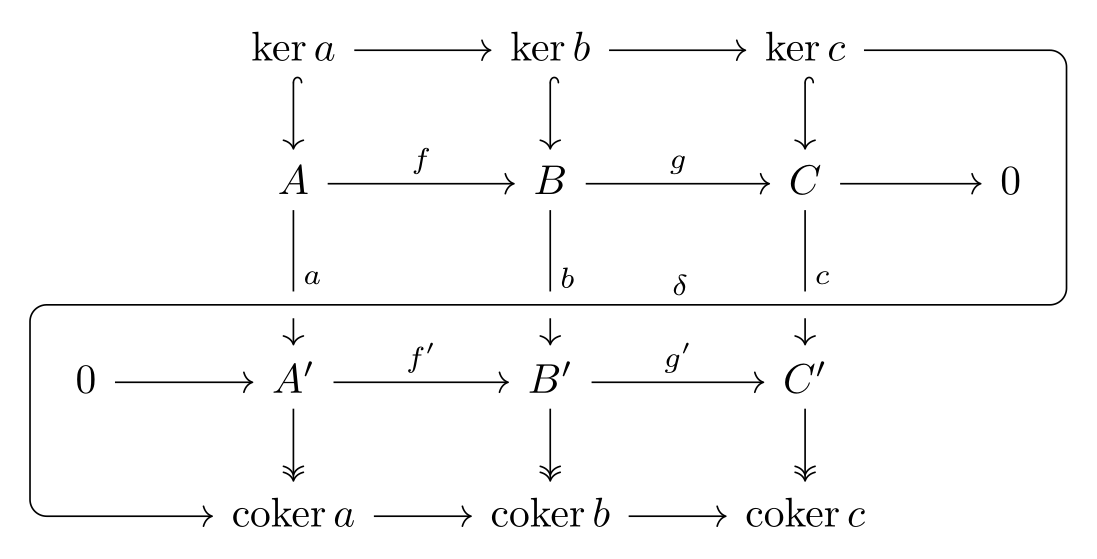
\usepackage{tikz} \usepackage{tikz-cd}\begin{tikzcd}
& \ker a \arrow[r] \arrow[d, hook] & \ker b \arrow[r] \arrow[d, hook]
& \ker c \arrow[d, hook] & \\
& A \arrow[r, "f"] \arrow[d, "a"] \arrow[d, phantom, ""{coordinate, name=Z, pos=.7}]
& B \arrow[r, "g"] \arrow[d, "b"] & C \arrow[r] \arrow[d, "c"] & |[alias=R]| 0 \\[1.5em]
|[alias=L]| 0 \arrow[r] & A' \arrow[r, "f'"] \arrow[d, two heads]
& B' \arrow[r, "g'"] \arrow[d, two heads] & C' \arrow[d, two heads] & \\
& \mathrm{coker}\,a \arrow[r] & \mathrm{coker}\,b \arrow[r] & \mathrm{coker}\,c &
% drawn last (from=...) so that it crosses over the vertical arrows
\arrow[from=1-4, to=4-2, crossing over, rounded corners, "\delta"',
to path={-| ([xshift=1.5ex]R.east) |- (Z) [near end]\tikztonodes
-| ([xshift=-1.5ex]L.west) |- (\tikztotarget)}]
\end{tikzcd}Full document
\documentclass[border=4pt]{standalone}
\usepackage{tikz}
\usepackage{tikz-cd}
\begin{document}
\begin{tikzcd}
  & \ker a \arrow[r] \arrow[d, hook] & \ker b \arrow[r] \arrow[d, hook]
    & \ker c \arrow[d, hook] & \\
  & A \arrow[r, "f"] \arrow[d, "a"] \arrow[d, phantom, ""{coordinate, name=Z, pos=.7}]
    & B \arrow[r, "g"] \arrow[d, "b"] & C \arrow[r] \arrow[d, "c"] & |[alias=R]| 0 \\[1.5em]
  |[alias=L]| 0 \arrow[r] & A' \arrow[r, "f'"] \arrow[d, two heads]
    & B' \arrow[r, "g'"] \arrow[d, two heads] & C' \arrow[d, two heads] & \\
  & \mathrm{coker}\,a \arrow[r] & \mathrm{coker}\,b \arrow[r] & \mathrm{coker}\,c &
  % drawn last (from=...) so that it crosses over the vertical arrows
  \arrow[from=1-4, to=4-2, crossing over, rounded corners, "\delta"',
    to path={-| ([xshift=1.5ex]R.east) |- (Z) [near end]\tikztonodes
             -| ([xshift=-1.5ex]L.west) |- (\tikztotarget)}]
\end{tikzcd}
\end{document}Three-dimensional diagrams: crossing over
crossing over first draws a thick line in the background colour under the arrow, so the arrow seems to pass in front of the ones it crosses. Arrows are drawn in the order they are read, so an arrow that must pass in front of a later one has to be postponed: in the cube, the front edge B → D is written in the cell of D as \arrow[from=uu, crossing over]. The gap is crossing over clearance wide (1.5ex); on a coloured background (a Beamer theme, a coloured box), set \tikzcdset{background color=…} to match, since that colour is also used by description labels.
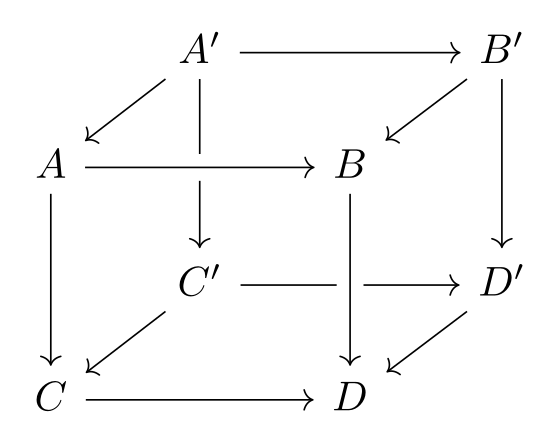
\usepackage{tikz} \usepackage{tikz-cd}\begin{tikzcd}[row sep=scriptsize, column sep=scriptsize]
& A' \arrow[rr] \arrow[dl] \arrow[dd] & & B' \arrow[dl] \arrow[dd] \\
A \arrow[rr, crossing over] \arrow[dd] & & B \\
& C' \arrow[rr] \arrow[dl] & & D' \arrow[dl] \\
C \arrow[rr] & & D \arrow[from=uu, crossing over]
\end{tikzcd}Full document
\documentclass[border=4pt]{standalone}
\usepackage{tikz}
\usepackage{tikz-cd}
\begin{document}
\begin{tikzcd}[row sep=scriptsize, column sep=scriptsize]
  & A' \arrow[rr] \arrow[dl] \arrow[dd] & & B' \arrow[dl] \arrow[dd] \\
  A \arrow[rr, crossing over] \arrow[dd] & & B \\
  & C' \arrow[rr] \arrow[dl] & & D' \arrow[dl] \\
  C \arrow[rr] & & D \arrow[from=uu, crossing over]
\end{tikzcd}
\end{document}Diagrams in equations, in text and in Beamer
A tikzcd is typeset in math mode but is not centred by itself: put it in \[ … \] or in an equation environment. tikz-cd sets baseline=0pt so that the equation number is placed correctly next to multi-row diagrams. In running text, the cramped style removes some of the white space around the cells; for a single labelled arrow, \xrightarrow{f} (amsmath) is usually better.
TikZ makes & an active character inside matrices, which fails when the diagram is read as the argument of another command: a Beamer frame, \fbox, a footnote, a macro of your own. Either give the frame the [fragile] option, or write the diagram with \begin{tikzcd}[ampersand replacement=\&] and \& between the cells. Ampersand replacement is also needed for a matrix (pmatrix) inside a cell or label.
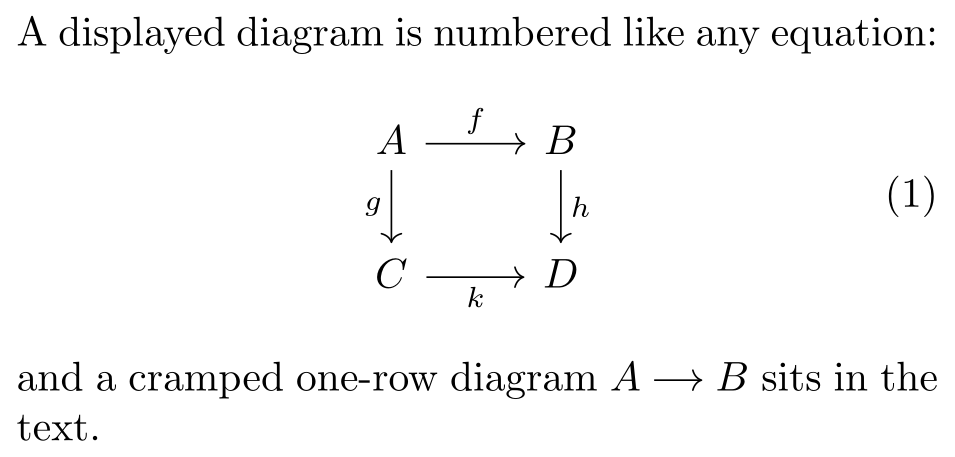
\usepackage{tikz} \usepackage{tikz-cd}% the minipage stands in for your text column
\begin{minipage}{7.8cm}
A displayed diagram is numbered like any equation:
\begin{equation}
\begin{tikzcd}
A \arrow[r, "f"] \arrow[d, "g"'] & B \arrow[d, "h"] \\
C \arrow[r, "k"'] & D
\end{tikzcd}
\end{equation}
and a cramped one-row diagram
\begin{tikzcd}[cramped, sep=small] A \arrow[r] & B \end{tikzcd}
sits in the text.
\end{minipage}Full document
\documentclass[border=4pt]{standalone}
\usepackage{tikz}
\usepackage{tikz-cd}
\begin{document}
% the minipage stands in for your text column
\begin{minipage}{7.8cm}
  A displayed diagram is numbered like any equation:
  \begin{equation}
    \begin{tikzcd}
      A \arrow[r, "f"] \arrow[d, "g"'] & B \arrow[d, "h"] \\
      C \arrow[r, "k"'] & D
    \end{tikzcd}
  \end{equation}
  and a cramped one-row diagram
  \begin{tikzcd}[cramped, sep=small] A \arrow[r] & B \end{tikzcd}
  sits in the text.
\end{minipage}
\end{document}tikz-cd editors: quiver and the LabCanvas TikZ editor
quiver (q.uiver.app, by varkor) is a free graphical editor for commutative and pasting diagrams: you place objects on a grid and drag arrows with the mouse or the keyboard, and it exports LaTeX code for tikz-cd (also Typst code for the fletcher package, and HTML to embed). The export starts with a comment holding a link that reopens the diagram in quiver, writes all arrows after the objects with from= and to=, and draws pullback corners as a \lrcorner label on an arrow with draw=none, as below. Simple exports like this one compile with tikz-cd alone (plus amssymb for the corner), but quiver asks you to load its own package, \usepackage{quiver} (quiver on CTAN, version 1.7.0, in TeX Live), which loads tikz-cd, amssymb and the TikZ libraries that its curved arrows of fixed height, shortened arrows, squiggly and triple arrows need. TeX Live releases can lag behind the website; if an export uses a style your quiver.sty lacks, get the current file from quiver.
The LabCanvas TikZ editor works on the code instead: paste a tikzcd environment (or a quiver export) and it is typeset with TeX Live as you type, with tikz-cd already loaded, so you can adjust labels, spacing and styles by hand and see the result at once. It renders with the same TeX Live as the pictures on this page.
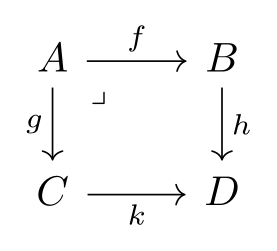
\usepackage{tikz} \usepackage{tikz-cd} \usepackage{amssymb}% https://q.uiver.app/#q=WzAsNCxbMCwwLCJBIl0sWzEsMCwiQiJdLFswLDEsIkMiXSxbMSwxLCJEIl0sWzAsMSwiZiJdLFswLDIsImciLDJdLFsxLDMsImgiXSxbMiwzLCJrIiwyXSxbMCwzLCIiLDEseyJzdHlsZSI6eyJuYW1lIjoiY29ybmVyIn19XV0=
\begin{tikzcd}
A & B \\
C & D
\arrow["f", from=1-1, to=1-2]
\arrow["g"', from=1-1, to=2-1]
\arrow["h", from=1-2, to=2-2]
\arrow["k"', from=2-1, to=2-2]
\arrow["\lrcorner"{anchor=center, pos=0.125}, draw=none, from=1-1, to=2-2]
\end{tikzcd}Full document
\documentclass[border=4pt]{standalone}
\usepackage{tikz}
\usepackage{tikz-cd}
\usepackage{amssymb}
\begin{document}
% https://q.uiver.app/#q=WzAsNCxbMCwwLCJBIl0sWzEsMCwiQiJdLFswLDEsIkMiXSxbMSwxLCJEIl0sWzAsMSwiZiJdLFswLDIsImciLDJdLFsxLDMsImgiXSxbMiwzLCJrIiwyXSxbMCwzLCIiLDEseyJzdHlsZSI6eyJuYW1lIjoiY29ybmVyIn19XV0=
\begin{tikzcd}
	A & B \\
	C & D
	\arrow["f", from=1-1, to=1-2]
	\arrow["g"', from=1-1, to=2-1]
	\arrow["h", from=1-2, to=2-2]
	\arrow["k"', from=2-1, to=2-2]
	\arrow["\lrcorner"{anchor=center, pos=0.125}, draw=none, from=1-1, to=2-2]
\end{tikzcd}
\end{document}Common errors and how to fix them
| LaTeX says (or you see) | Cause and fix |
|---|---|
| LaTeX Error: Environment tikzcd undefined. | Load the package: \usepackage{tikz-cd} in the preamble (or \usetikzlibrary{cd} after \usepackage{tikz}). |
| Package pgf Error: No shape named `tikz@f@1-1-3' is known. | An arrow points to a cell that does not exist (here row 1, column 3): too many r/d letters, a missing &, or a to= beyond the grid. Empty cells still need their &. |
| Package pgfkeys Error: I do not know the key '/tikz/y)"' and I am going to ignore it. | A comma inside a label splits the option list. Put the label text in braces: "{(x,y)}". |
| Undefined control sequence. | The diagram is inside a macro argument or a Beamer frame, where & cannot become active. Use \begin{frame}[fragile], or ampersand replacement=\& with \& between cells. (The tikz-cd manual shows the older wording “Single ampersand used with wrong catcode”.) |
| Argument of \language@active@arg" has an extra }. | babel has made " (or another character) active, as ngerman does, which breaks the quotes syntax of labels. Add \usetikzlibrary{babel} to the preamble. |
| Package tikz-cd Error: You need to say \usetikzlibrary{decorations.pathmorphing} to use squiggly arrows. | Add that line to the preamble; squiggly and the …squigarrow styles need it. |
| Undefined control sequence (at \lrcorner or \ulcorner) | The corner symbols come from amssymb: add \usepackage{amssymb}. |
Frequently asked questions
How do I draw a commutative diagram in LaTeX?
With the tikz-cd package: \usepackage{tikz-cd}, then the objects in a tikzcd grid (& between columns, \\ between rows) and \arrow[r, "f"] in a cell for an arrow to the right labelled f. Put the diagram in \[ … \] to centre it.
Is it tikzcd, tikz-cd or tikz cd?
All three mean the same thing: the package is called tikz-cd (\usepackage{tikz-cd}), the environment is tikzcd, and the TikZ library is cd (\usetikzlibrary{cd}).
Is there a visual editor for tikz-cd?
Yes: quiver (q.uiver.app) is a free graphical editor that exports tikz-cd code (use \usepackage{quiver} for curved and shortened arrows). To edit and preview the code itself, paste it into the LabCanvas TikZ editor, which typesets tikz-cd with TeX Live as you type.
How do I put a label in the middle of an arrow?
Add description after the label, \arrow[r, "f" description]: the label sits on the arrow with a background that cuts the line. marking does the same without the background.
How do I draw the pullback symbol?
Add a phantom arrow from the pullback to the opposite corner with the corner as its label: \arrow[dr, phantom, "\lrcorner", very near start], with \usepackage{amssymb} for \lrcorner.
How do I make the diagram bigger or smaller?
Change the spacing: \begin{tikzcd}[row sep=large, column sep=huge], or sep=small for both; any length such as column sep=3em also works. Labels and objects keep the font size of the surrounding math.
References
- tikz-cd package on CTAN (v1.0, 2021-05-04)ctan.org
- tikz-cd manual (PDF on CTAN)mirrors.ctan.org
- tikz-cd manual, §1.2 Inserting arrows and §1.3 Changing arrow tips (HTML)tikz.dev
- tikz-cd manual, §2.1 General options (row sep, column sep, cells, cramped)tikz.dev
- tikz-cd manual, §2.3 Absolute placement of arrows (from, to)tikz.dev
- tikz-cd manual, §2.4 Phantom arrowstikz.dev
- tikz-cd manual, §2.5 Fine-tuning the placement of arrows (shift left, shorten)tikz.dev
- tikz-cd manual, §2.6 Three-dimensional diagrams (crossing over)tikz.dev
- tikz-cd manual, §2.7 Options for labels (description, marking)tikz.dev
- tikz-cd manual, §3.2 Tweaking to paths and §3.4 Issues with active characterstikz.dev
- PGF/TikZ manual, §17.10.4 The Quotes Syntaxtikz.dev
- PGF/TikZ manual, §20.3.2 Setting and Adjusting Column and Row Spacingtikz.dev
- quiver, a graphical tikz-cd editorq.uiver.app
- quiver.sty on CTAN (v1.7.0, 2026-07-27)ctan.org
The facts on this page were checked against these sources, and every picture is the code with it typeset with TeX Live 2026. Code on this page: CC0 1.0, copy it freely.
Try the code in your browserEvery snippet on this page opens in the free TikZ editor: it is typeset with TeX Live as you type, with errors pointed at their line.
Open the TikZ editor