tikzposter: scientific posters with LaTeX and TikZ
Quick answer
\documentclass[25pt, a0paper, portrait]{tikzposter} instead of a package. After \title, \author, \institute and \usetheme{Default}, the body is \maketitle followed by blocks, \block{Title}{Text}, which stack down the page; inside \begin{columns} \column{0.4} … \column{0.6} … \end{columns} they stack in columns whose relative widths add up to 1. The class sets every size and gap, places the blocks, and draws the whole poster as one TikZ picture. A0, A1 and A2 are built in, with nine themes and five colour palettes. The diagram shows the default layout to scale.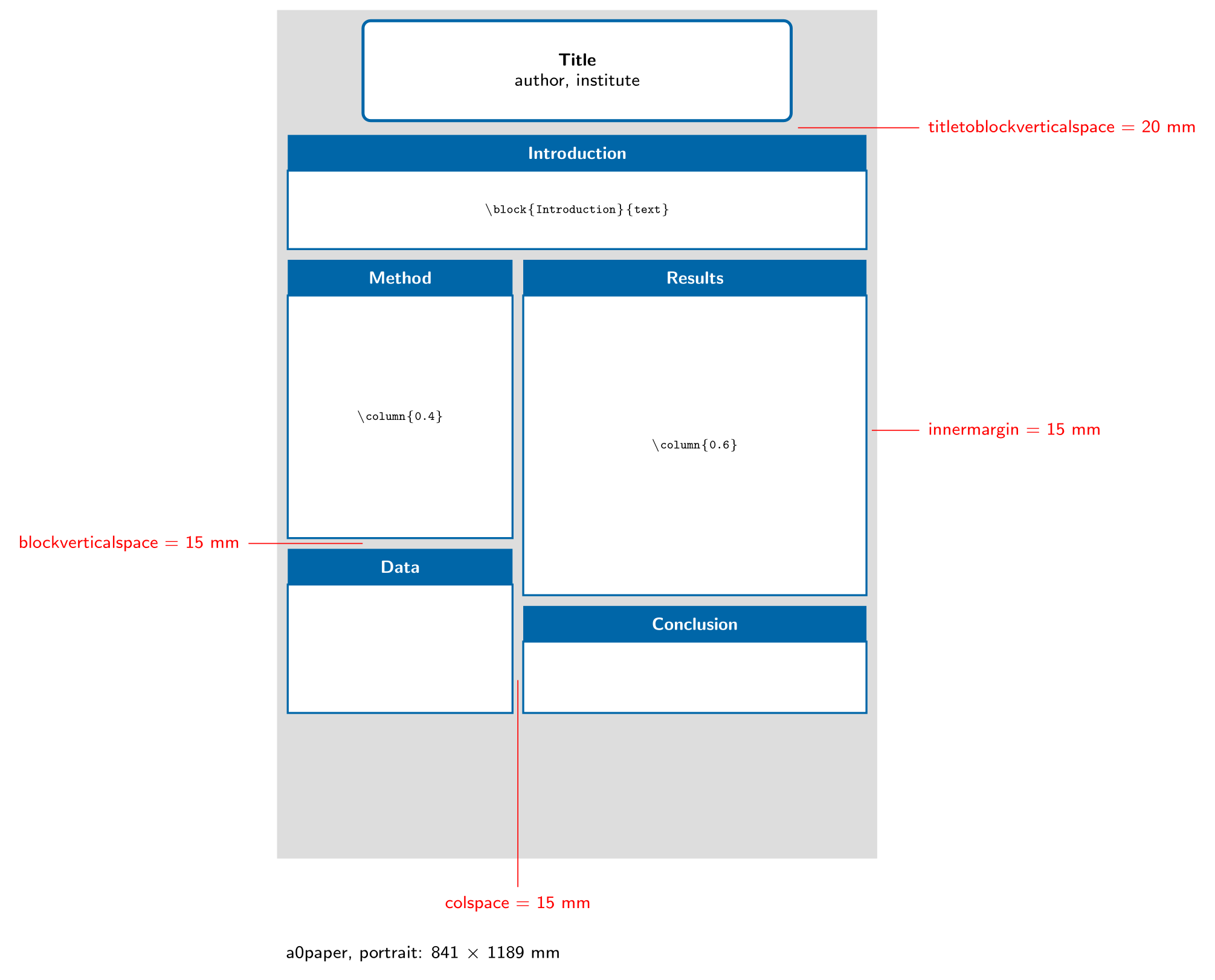
\usepackage{tikz}\begin{tikzpicture}[x=0.1mm, y=0.1mm, font=\sffamily\scriptsize]
% an A0 tikzposter page drawn to scale (1 unit = 1 mm), Default theme colours
\definecolor{tpgray}{HTML}{DDDDDD}
\definecolor{tpblue}{HTML}{0066A8}
\tikzset{
bar/.style={fill=tpblue, text=white, font=\sffamily\scriptsize\bfseries},
body/.style={draw=tpblue, line width=0.8pt, fill=white},
code/.style={font=\ttfamily\tiny},
}
\fill[tpgray] (0,0) rectangle (841,1189);
% \maketitle: 600 mm wide, 15 mm below the top edge
\draw[tpblue, line width=1.2pt, fill=white, rounded corners=3pt] (120.5,1034) rectangle (720.5,1174);
\node[align=center] at (420.5,1104) {\textbf{Title}\\ author, institute};
% a block outside the columns: full width minus the 15 mm inner margins
\fill[bar] (15,1014) rectangle (826,964);
\node[text=white, font=\sffamily\scriptsize\bfseries] at (420.5,989) {Introduction};
\draw[body] (15,964) rectangle (826,854);
\node[code] at (420.5,909) {\textbackslash block\{Introduction\}\{text\}};
% \begin{columns} \column{0.4} ... \column{0.6} ... \end{columns}
\fill[bar] (15,839) rectangle (330,789);
\node[text=white, font=\sffamily\scriptsize\bfseries] at (172.5,814) {Method};
\draw[body] (15,789) rectangle (330,449);
\node[code] at (172.5,619) {\textbackslash column\{0.4\}};
\fill[bar] (15,434) rectangle (330,384);
\node[text=white, font=\sffamily\scriptsize\bfseries] at (172.5,409) {Data};
\draw[body] (15,384) rectangle (330,204);
\fill[bar] (345,839) rectangle (826,789);
\node[text=white, font=\sffamily\scriptsize\bfseries] at (585.5,814) {Results};
\draw[body] (345,789) rectangle (826,369);
\node[code] at (585.5,579) {\textbackslash column\{0.6\}};
\fill[bar] (345,354) rectangle (826,304);
\node[text=white, font=\sffamily\scriptsize\bfseries] at (585.5,329) {Conclusion};
\draw[body] (345,304) rectangle (826,204);
% the spacing options, with their default values
\draw[red] (833.5,600) -- (900,600) node[right] {innermargin = 15 mm};
\draw[red] (337.5,250) -- (337.5,-40) node[below] {colspace = 15 mm};
\draw[red] (120,441.5) -- (-40,441.5) node[left] {blockverticalspace = 15 mm};
\draw[red] (730,1024) -- (900,1024) node[right] {titletoblockverticalspace = 20 mm};
\node[below right, align=left] at (0,-110) {a0paper, portrait: 841 $\times$ 1189 mm};
\end{tikzpicture}Full document
\documentclass[border=4pt]{standalone}
\usepackage{tikz}
\begin{document}
\begin{tikzpicture}[x=0.1mm, y=0.1mm, font=\sffamily\scriptsize]
  % an A0 tikzposter page drawn to scale (1 unit = 1 mm), Default theme colours
  \definecolor{tpgray}{HTML}{DDDDDD}
  \definecolor{tpblue}{HTML}{0066A8}
  \tikzset{
    bar/.style={fill=tpblue, text=white, font=\sffamily\scriptsize\bfseries},
    body/.style={draw=tpblue, line width=0.8pt, fill=white},
    code/.style={font=\ttfamily\tiny},
  }
  \fill[tpgray] (0,0) rectangle (841,1189);
  % \maketitle: 600 mm wide, 15 mm below the top edge
  \draw[tpblue, line width=1.2pt, fill=white, rounded corners=3pt] (120.5,1034) rectangle (720.5,1174);
  \node[align=center] at (420.5,1104) {\textbf{Title}\\ author, institute};
  % a block outside the columns: full width minus the 15 mm inner margins
  \fill[bar] (15,1014) rectangle (826,964);
  \node[text=white, font=\sffamily\scriptsize\bfseries] at (420.5,989) {Introduction};
  \draw[body] (15,964) rectangle (826,854);
  \node[code] at (420.5,909) {\textbackslash block\{Introduction\}\{text\}};
  % \begin{columns} \column{0.4} ... \column{0.6} ... \end{columns}
  \fill[bar] (15,839) rectangle (330,789);
  \node[text=white, font=\sffamily\scriptsize\bfseries] at (172.5,814) {Method};
  \draw[body] (15,789) rectangle (330,449);
  \node[code] at (172.5,619) {\textbackslash column\{0.4\}};
  \fill[bar] (15,434) rectangle (330,384);
  \node[text=white, font=\sffamily\scriptsize\bfseries] at (172.5,409) {Data};
  \draw[body] (15,384) rectangle (330,204);
  \fill[bar] (345,839) rectangle (826,789);
  \node[text=white, font=\sffamily\scriptsize\bfseries] at (585.5,814) {Results};
  \draw[body] (345,789) rectangle (826,369);
  \node[code] at (585.5,579) {\textbackslash column\{0.6\}};
  \fill[bar] (345,354) rectangle (826,304);
  \node[text=white, font=\sffamily\scriptsize\bfseries] at (585.5,329) {Conclusion};
  \draw[body] (345,304) rectangle (826,204);
  % the spacing options, with their default values
  \draw[red] (833.5,600) -- (900,600) node[right] {innermargin = 15 mm};
  \draw[red] (337.5,250) -- (337.5,-40) node[below] {colspace = 15 mm};
  \draw[red] (120,441.5) -- (-40,441.5) node[left] {blockverticalspace = 15 mm};
  \draw[red] (730,1024) -- (900,1024) node[right] {titletoblockverticalspace = 20 mm};
  \node[below right, align=left] at (0,-110) {a0paper, portrait: 841 $\times$ 1189 mm};
\end{tikzpicture}
\end{document}Contents
What tikzposter is, and its status
tikzposter is a document class for scientific posters by Pascal Richter, Elena Botoeva, Richard Barnard and Dirk Surmann (RWTH Aachen), on CTAN and in TeX Live and MiKTeX. The current version is still 2.0 of 15 January 2014; there has been no release since, and the project wiki the manual links to on Bitbucket no longer exists. The class nevertheless works on current TeX Live: the posters described on this page were compiled with TeX Live 2026.
Under the hood it loads extarticle and geometry, the packages xkeyval, calc, ifthen, ae, xstring and etoolbox, and TikZ with its shapes, decorations, shadows, backgrounds, calc, fadings and fit libraries. At \begin{document} it opens a single tikzpicture the size of the page and closes it at \end{document}: every block is drawn into that picture at a position the class computes. This explains most of tikzposter’s quirks (no figure environment, content past the bottom silently cut off) and why a poster cannot be shown as a snippet here: a class cannot be loaded inside another document, so this page shows the poster code as text and draws the layout as to-scale schematics.
A complete poster (code only, not rendered here)
This is a complete tikzposter document. It is not compiled into a picture on this page (the page’s pictures are single TikZ figures), but it was compiled with TeX Live 2026: it gives an A0 portrait page (841 × 1189 mm) with a white, blue-framed title box, a full-width Introduction block, and two columns with Method (including the figure and its caption “Fig. 1”) and Results (with a yellow inner block and a note pointing at it) above Conclusion.
\documentclass[25pt, a0paper, portrait]{tikzposter}
\title{Thermal Drift in MEMS Gyroscopes}
\author{A. Author, B. Author}
\institute{Department of Physics, Example University}
\usetheme{Default}

\begin{document}
\maketitle

\block{Introduction}{
  Gyroscope bias drifts with temperature. We measure it between
  $-20\,^\circ$C and $60\,^\circ$C and fit a linear model.
}

\begin{columns}
  \column{0.4}
  \block{Method}{
    Each device is cycled three times in a climate chamber.
    \begin{tikzfigure}[Bias against temperature]
      \begin{tikzpicture}
        \draw[->] (0,0) -- (8,0) node[right] {$T$};
        \draw[->] (0,0) -- (0,5) node[above] {bias};
        \draw[thick, blue] (0.5,1) -- (7.5,4.2);
      \end{tikzpicture}
    \end{tikzfigure}
  }
  \column{0.6}
  \block{Results}{
    Drift: $0.012\,^\circ/\mathrm{s}$ per kelvin ($R^2 = 0.98$).
    \innerblock{Key number}{90\,\% of the drift is linear.}
  }
  \note[targetoffsetx=8cm, targetoffsety=-4cm, width=10cm, connection]{Repeatable to 3\,\%}
  \block{Conclusion}{A linear correction removes 90\,\% of the drift.}
\end{columns}

\end{document}
It compiles with pdfLaTeX, XeLaTeX and LuaLaTeX (all three tested); on Overleaf, start a blank project and paste it in. The manual’s template (§6) and the example file tikzposter-example.tex, both installed with the class, show more options.
Class options: font size, paper and spacing
| Option | Values (default first) |
|---|---|
| Font size | 25pt, 20pt, 17pt, 14pt, 12pt: the size of body text. With 25pt the class sets the size commands itself (\normalsize 24.88 pt up to \Huge 61.92 pt); the others are passed to extarticle |
| Paper | a0paper, a1paper, a2paper |
| Orientation | portrait, landscape |
margin | 0mm: paper edge to poster edge |
innermargin | 15mm: poster edge to the outer edge of the blocks |
colspace, subcolspace | 15mm, 8mm: gaps between columns and subcolumns |
blockverticalspace | 15mm: gap between consecutive blocks |
The standard fleqn and leqno options also work. The title box is placed by the title style: in the Default theme it is 600 mm wide, 15 mm below the top, with 20 mm down to the first block (\maketitle[width=…, titletotopverticalspace=…, titletoblockverticalspace=…] changes them).
Blocks, columns and subcolumns
\block[options]{Title}{Text}draws a block as wide as the page or the current column. Its height follows its content; an empty title draws no title bar. Options includetitleleft/titlecenter/titleright,titlewidthscaleandbodywidthscale(relative widths),titleoffsetx,titleoffsety,bodyoffsetx,bodyoffsety,roundedcorners,linewidth,titleinnersepandbodyinnersep.- Inside a block:
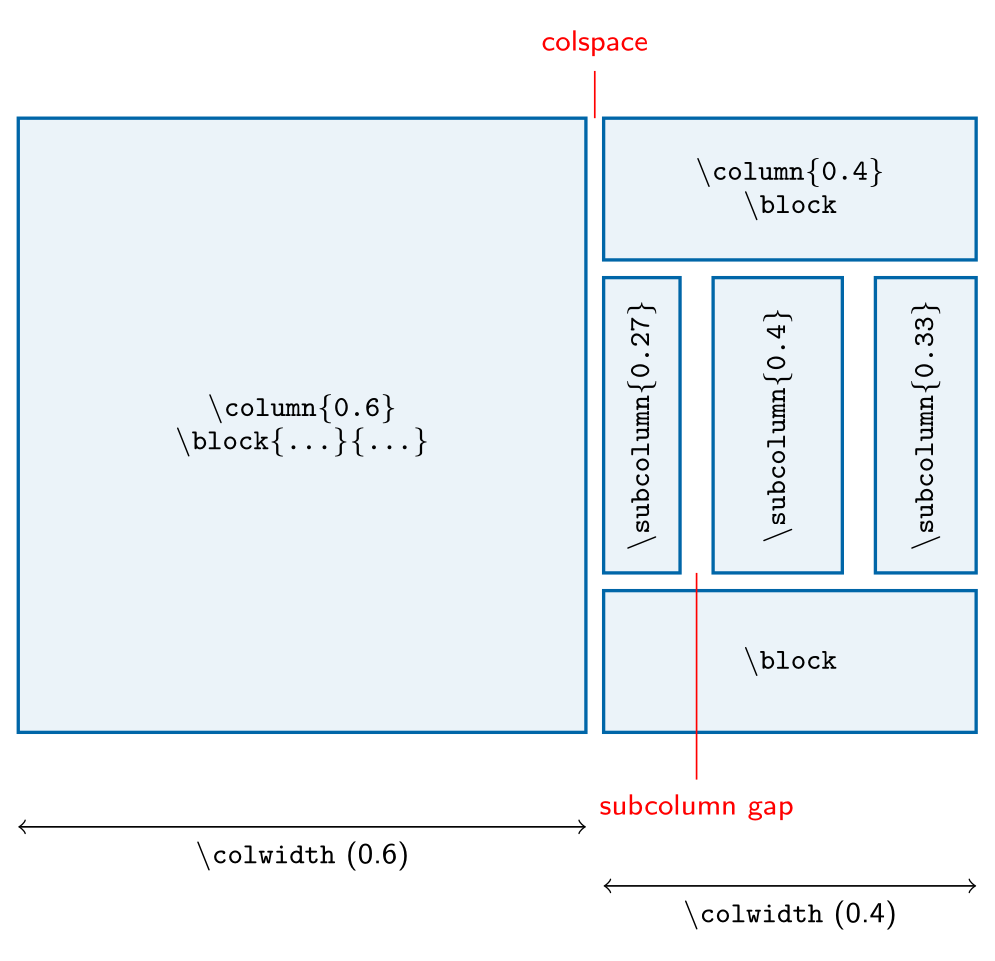
\innerblock[options]{Heading}{Text}(a block within the block),\coloredbox[bgcolor=…, width=…]{Text}to highlight a passage, and thetikzfigureenvironment for figures with captions:\begin{tikzfigure}[Caption] \includegraphics[width=0.9\colwidth]{plot} \end{tikzfigure}. \begin{columns}with\column{0.4}and\column{0.6}splits the page; each block that follows goes into the current column, under the previous one. The class computes the width as w × (text width + colspace) − colspace, so widths that add up to 1 fill the page exactly.\colwidthholds the current width, useful for figures.\begin{subcolumns} \subcolumn{0.27} … \end{subcolumns}does the same inside a column, with widths relative to\colwidth(available as\subcolwidth). After\end{columns}blocks span the full width again, starting below the longest column.
\usepackage{tikz}\begin{tikzpicture}[x=0.1mm, y=0.1mm, font=\sffamily\scriptsize]
% widths as tikzposter computes them on A0 (811 mm between the inner margins),
% Default theme: colspace 15 mm; subcolumn gaps = subcolspace 8 mm + 2 x 10 mm block inner sep
\definecolor{tpblue}{HTML}{0066A8}
\tikzset{blk/.style={draw=tpblue, line width=0.8pt, fill=tpblue!8},
code/.style={font=\ttfamily\scriptsize, align=center}}
% \column{0.6}
\draw[blk] (0,0) rectangle (480.6,520);
\node[code] at (240.3,260) {\textbackslash column\{0.6\}\\ \textbackslash block\{...\}\{...\}};
% \column{0.4}: a block, a subcolumns environment, a block
\draw[blk] (495.6,520) rectangle (811,400);
\node[code] at (653.3,460) {\textbackslash column\{0.4\}\\ \textbackslash block};
\draw[blk] (495.6,385) rectangle (560.3,135);
\draw[blk] (588.3,385) rectangle (697.7,135);
\draw[blk] (725.7,385) rectangle (811,135);
\node[code, rotate=90] at (527.9,260) {\textbackslash subcolumn\{0.27\}};
\node[code, rotate=90] at (643,260) {\textbackslash subcolumn\{0.4\}};
\node[code, rotate=90] at (768.3,260) {\textbackslash subcolumn\{0.33\}};
\draw[blk] (495.6,120) rectangle (811,0);
\node[code] at (653.3,60) {\textbackslash block};
% gaps
\draw[red] (488.1,560) -- (488.1,520) (488.1,560) node[above] {colspace};
\draw[red] (574.3,135) -- (574.3,-40) node[below] {subcolumn gap};
\draw[<->] (0,-80) -- node[below] {\texttt{\textbackslash colwidth} (0.6)} (480.6,-80);
\draw[<->] (495.6,-130) -- node[below] {\texttt{\textbackslash colwidth} (0.4)} (811,-130);
\end{tikzpicture}Full document
\documentclass[border=4pt]{standalone}
\usepackage{tikz}
\begin{document}
\begin{tikzpicture}[x=0.1mm, y=0.1mm, font=\sffamily\scriptsize]
  % widths as tikzposter computes them on A0 (811 mm between the inner margins),
  % Default theme: colspace 15 mm; subcolumn gaps = subcolspace 8 mm + 2 x 10 mm block inner sep
  \definecolor{tpblue}{HTML}{0066A8}
  \tikzset{blk/.style={draw=tpblue, line width=0.8pt, fill=tpblue!8},
           code/.style={font=\ttfamily\scriptsize, align=center}}
  % \column{0.6}
  \draw[blk] (0,0) rectangle (480.6,520);
  \node[code] at (240.3,260) {\textbackslash column\{0.6\}\\ \textbackslash block\{...\}\{...\}};
  % \column{0.4}: a block, a subcolumns environment, a block
  \draw[blk] (495.6,520) rectangle (811,400);
  \node[code] at (653.3,460) {\textbackslash column\{0.4\}\\ \textbackslash block};
  \draw[blk] (495.6,385) rectangle (560.3,135);
  \draw[blk] (588.3,385) rectangle (697.7,135);
  \draw[blk] (725.7,385) rectangle (811,135);
  \node[code, rotate=90] at (527.9,260) {\textbackslash subcolumn\{0.27\}};
  \node[code, rotate=90] at (643,260) {\textbackslash subcolumn\{0.4\}};
  \node[code, rotate=90] at (768.3,260) {\textbackslash subcolumn\{0.33\}};
  \draw[blk] (495.6,120) rectangle (811,0);
  \node[code] at (653.3,60) {\textbackslash block};
  % gaps
  \draw[red] (488.1,560) -- (488.1,520) (488.1,560) node[above] {colspace};
  \draw[red] (574.3,135) -- (574.3,-40) node[below] {subcolumn gap};
  \draw[<->] (0,-80) -- node[below] {\texttt{\textbackslash colwidth} (0.6)} (480.6,-80);
  \draw[<->] (495.6,-130) -- node[below] {\texttt{\textbackslash colwidth} (0.4)} (811,-130);
\end{tikzpicture}
\end{document}Notes: placing a comment next to a block
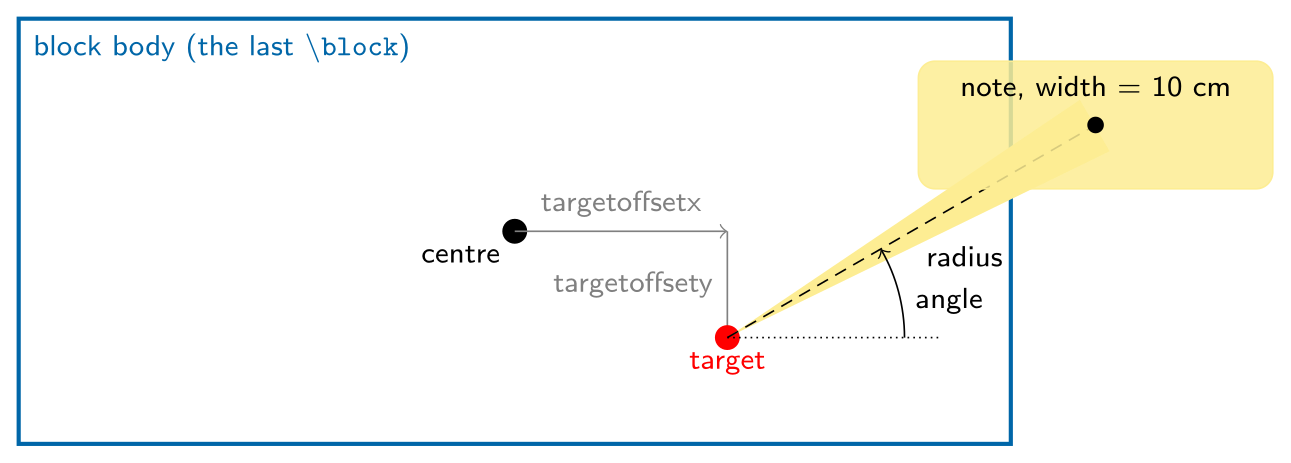
\note[options]{Text} puts a small box near the block written just before it. Notes are placed by geometry, not by the layout: the class takes the centre of the previous block’s body, moves it by targetoffsetx and targetoffsety to get the target, and puts the centre of the note radius away from the target at angle degrees (defaults in the Default note style: angle 0, radius 8 cm, width 8 cm). connection draws a wedge from the note to the target, and rotate tilts the note. Notes are drawn on top of everything and get no spacing of their own, so check that they do not hide text.
\usepackage{tikz} \usetikzlibrary{calc}\begin{tikzpicture}[x=0.3cm, y=0.3cm, font=\sffamily\scriptsize]
% geometry of \note[targetoffsetx=6cm, targetoffsety=-3cm, angle=30,
% radius=12cm, width=10cm, connection]{...}
% drawn to scale: 1 unit = 1 cm on the poster
\definecolor{tpblue}{HTML}{0066A8}
\definecolor{tpyellow}{HTML}{FCE565}
\draw[tpblue, line width=1pt, fill=white] (-14,-6) rectangle (14,6);
\node[anchor=north west, tpblue] at (-14,6) {block body (the last \texttt{\textbackslash block})};
\fill (0,0) circle (3pt) node[below left] {centre};
% target = block centre + (targetoffsetx, targetoffsety)
\draw[->, gray] (0,0) -- node[above] {targetoffsetx} (6,0);
\draw[->, gray] (6,0) -- node[left] {targetoffsety} (6,-3);
\fill[red] (6,-3) circle (3pt) node[below] {target};
% note centre = target + radius at angle; connection draws the wedge
\coordinate (c) at ($(6,-3)+(30:12)$);
\fill[tpyellow!70!white] ($(6,-3)!1!4:(c)$) -- (6,-3) -- ($(6,-3)!1!-4:(c)$) -- cycle;
\draw[densely dashed] (6,-3) -- node[below right] {radius} (c);
\draw[densely dotted] (6,-3) -- (12,-3);
\draw[->] (11,-3) arc[start angle=0, end angle=30, radius=5] node[right, pos=0.4] {angle};
\draw[tpyellow!70!white, fill=tpyellow!70!white, fill opacity=0.85, rounded corners=4pt]
($(c)+(-5,-1.8)$) rectangle ($(c)+(5,1.8)$);
\fill (c) circle (2pt);
\node[above] at ($(c)+(0,0.3)$) {note, width = 10 cm};
\end{tikzpicture}Full document
\documentclass[border=4pt]{standalone}
\usepackage{tikz}
\usetikzlibrary{calc}
\begin{document}
\begin{tikzpicture}[x=0.3cm, y=0.3cm, font=\sffamily\scriptsize]
  % geometry of \note[targetoffsetx=6cm, targetoffsety=-3cm, angle=30,
  %   radius=12cm, width=10cm, connection]{...}
  % drawn to scale: 1 unit = 1 cm on the poster
  \definecolor{tpblue}{HTML}{0066A8}
  \definecolor{tpyellow}{HTML}{FCE565}
  \draw[tpblue, line width=1pt, fill=white] (-14,-6) rectangle (14,6);
  \node[anchor=north west, tpblue] at (-14,6) {block body (the last \texttt{\textbackslash block})};
  \fill (0,0) circle (3pt) node[below left] {centre};
  % target = block centre + (targetoffsetx, targetoffsety)
  \draw[->, gray] (0,0) -- node[above] {targetoffsetx} (6,0);
  \draw[->, gray] (6,0) -- node[left] {targetoffsety} (6,-3);
  \fill[red] (6,-3) circle (3pt) node[below] {target};
  % note centre = target + radius at angle; connection draws the wedge
  \coordinate (c) at ($(6,-3)+(30:12)$);
  \fill[tpyellow!70!white] ($(6,-3)!1!4:(c)$) -- (6,-3) -- ($(6,-3)!1!-4:(c)$) -- cycle;
  \draw[densely dashed] (6,-3) -- node[below right] {radius} (c);
  \draw[densely dotted] (6,-3) -- (12,-3);
  \draw[->] (11,-3) arc[start angle=0, end angle=30, radius=5] node[right, pos=0.4] {angle};
  \draw[tpyellow!70!white, fill=tpyellow!70!white, fill opacity=0.85, rounded corners=4pt]
    ($(c)+(-5,-1.8)$) rectangle ($(c)+(5,1.8)$);
  \fill (c) circle (2pt);
  \node[above] at ($(c)+(0,0.3)$) {note, width = 10 cm};
\end{tikzpicture}
\end{document}Themes, colour palettes and colour styles
\usetheme{…} in the preamble picks one of nine layout themes; each combines a colour style, a background, a title style, a block style, an inner block style and a note style (from tikzposterLayoutthemes.tex):
| Theme | Colour style (palette) | Title | Blocks | Notes |
|---|---|---|---|---|
Default | Default | Default | Default | Default |
Rays | Britain (BlueGrayOrange) | Default | Default | Corner |
Basic | Australia (GreenGrayViolet) | Basic | Basic | Default |
Simple | Denmark (PurpleGrayBlue) | Default | Minimal | Default |
Envelope | Spain (BlueGrayOrange) | Envelope | Envelope | VerticalShading |
Wave | Spain (BlueGrayOrange) | Wave | Corner | VerticalShading |
Board | Sweden (BlueGrayOrange) | Empty | TornOut | Sticky |
Autumn | Germany (BrownBlueOrange) | Filled | Slide | Default |
Desert | Russia (GrayOrangeBlue, which does not exist; see the errors below) | VerticalShading | Slide | Default |
After \usetheme you can replace any part: \usecolorstyle[colorPalette=…]{…}, \usebackgroundstyle{…} (Default, Rays, VerticalGradation, BottomVerticalGradation, Empty), \usetitlestyle{…} (Default, Basic, Envelope, Wave, VerticalShading, Filled, Empty), \useblockstyle{…} (Default, Basic, Minimal, Envelope, Corner, Slide, TornOut), \useinnerblockstyle{…} and \usenotestyle{…} (Default, Corner, VerticalShading, Sticky). For example, these preamble lines (also tested on TeX Live 2026) give the Rays layout in brown and orange with Slide blocks on a white background, without the credit line:
\usetheme{Rays}
\usecolorstyle[colorPalette=BrownBlueOrange]{Germany}
\useblockstyle{Slide}
\usebackgroundstyle{Empty}
\tikzposterlatexaffectionproofoff
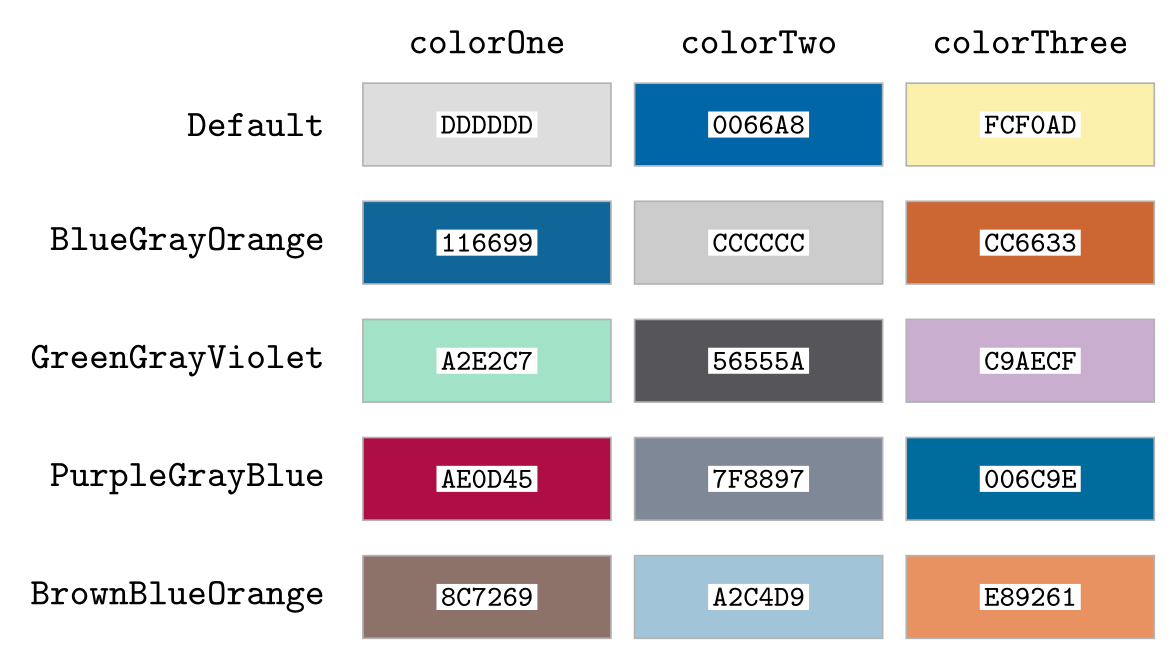
A palette is three colours, colorOne, colorTwo and colorThree; a colour style says which of them each part of the poster uses. The Default colour style replaces the Default palette’s colorThree (FCF0AD) with a stronger yellow, FCE565. Your own palettes and styles are defined with \definecolorpalette and \definecolorstyle (manual §5.1), whose colour names are the ones in the second picture; \definelayouttheme bundles them into a theme.
\usepackage{tikz}\begin{tikzpicture}[font=\sffamily\small]
% the five colour palettes defined in tikzposterColorpalettes.tex (tikzposter 2.0)
\foreach \name/\one/\two/\three [count=\i] in {
Default/DDDDDD/0066A8/FCF0AD,
BlueGrayOrange/116699/CCCCCC/CC6633,
GreenGrayViolet/A2E2C7/56555A/C9AECF,
PurpleGrayBlue/AE0D45/7F8897/006C9E,
BrownBlueOrange/8C7269/A2C4D9/E89261} {
\node[anchor=east] at (-0.2, -\i) {\texttt{\name}};
\foreach \c/\x in {\one/0, \two/2.3, \three/4.6} {
\definecolor{swatch}{HTML}{\c}
\fill[swatch, draw=black!30] (\x, -\i-0.35) rectangle ++(2.1, 0.7);
\node[font=\ttfamily\scriptsize, fill=white, inner sep=1pt] at (\x+1.05, -\i) {\c};
}
}
\foreach \t/\x in {colorOne/1.05, colorTwo/3.35, colorThree/5.65}
\node[font=\ttfamily\small] at (\x, -0.3) {\t};
\end{tikzpicture}Full document
\documentclass[border=4pt]{standalone}
\usepackage{tikz}
\begin{document}
\begin{tikzpicture}[font=\sffamily\small]
  % the five colour palettes defined in tikzposterColorpalettes.tex (tikzposter 2.0)
  \foreach \name/\one/\two/\three [count=\i] in {
      Default/DDDDDD/0066A8/FCF0AD,
      BlueGrayOrange/116699/CCCCCC/CC6633,
      GreenGrayViolet/A2E2C7/56555A/C9AECF,
      PurpleGrayBlue/AE0D45/7F8897/006C9E,
      BrownBlueOrange/8C7269/A2C4D9/E89261} {
    \node[anchor=east] at (-0.2, -\i) {\texttt{\name}};
    \foreach \c/\x in {\one/0, \two/2.3, \three/4.6} {
      \definecolor{swatch}{HTML}{\c}
      \fill[swatch, draw=black!30] (\x, -\i-0.35) rectangle ++(2.1, 0.7);
      \node[font=\ttfamily\scriptsize, fill=white, inner sep=1pt] at (\x+1.05, -\i) {\c};
    }
  }
  \foreach \t/\x in {colorOne/1.05, colorTwo/3.35, colorThree/5.65}
    \node[font=\ttfamily\small] at (\x, -0.3) {\t};
\end{tikzpicture}
\end{document}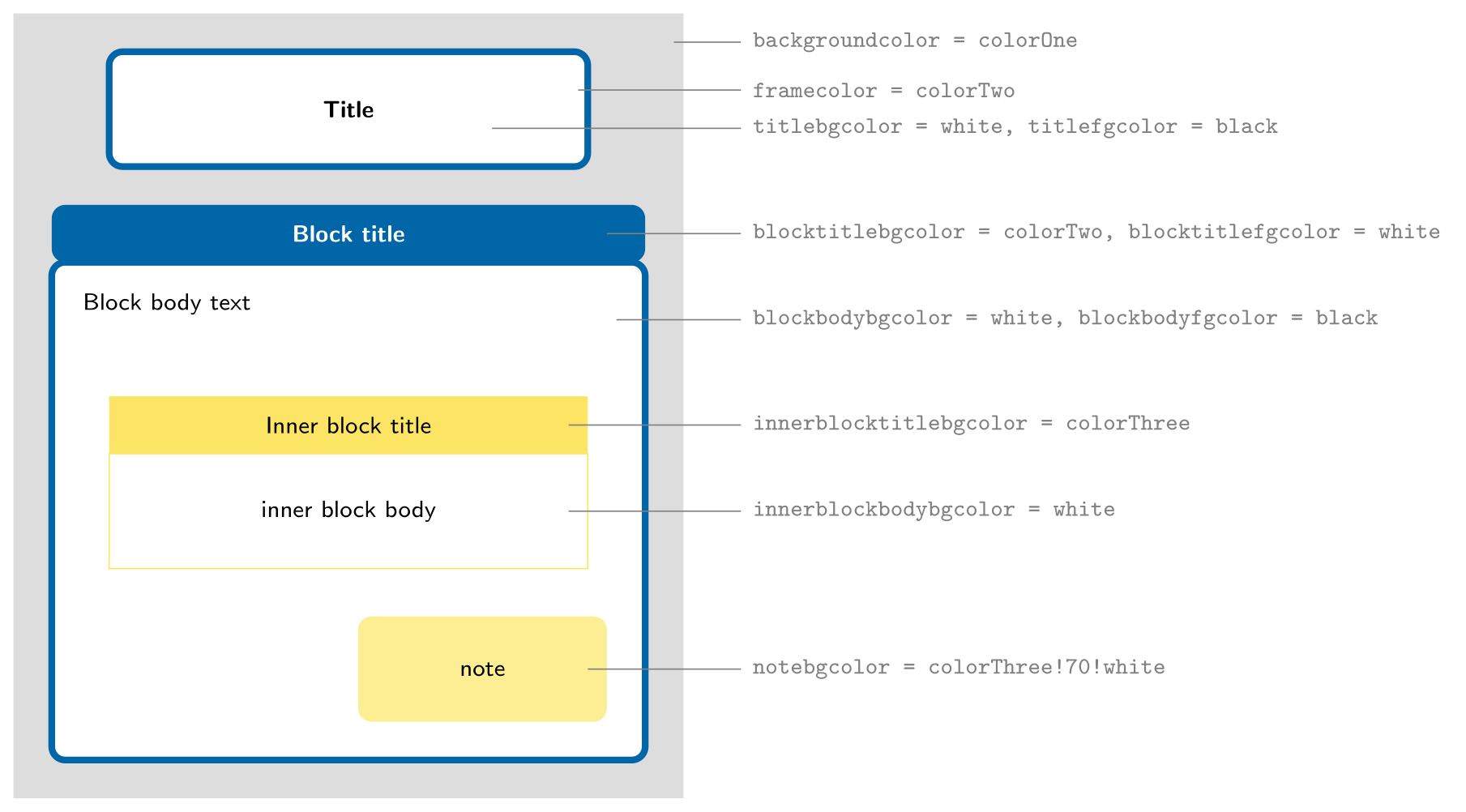
\usepackage{tikz}\begin{tikzpicture}[font=\sffamily\scriptsize]
% where each colour of a tikzposter colour style is used (values of the Default style)
\definecolor{colorOne}{HTML}{DDDDDD}
\definecolor{colorTwo}{HTML}{0066A8}
\definecolor{colorThree}{HTML}{FCE565}
\tikzset{lbl/.style={font=\ttfamily\scriptsize, anchor=west}}
\fill[colorOne] (0,0) rectangle (7,8.2);
% title
\draw[colorTwo, line width=2pt, fill=white, rounded corners=4pt] (1,6.6) rectangle (6,7.8);
\node at (3.5,7.2) {\textbf{Title}};
% block
\fill[colorTwo, rounded corners=4pt] (0.4,5.6) rectangle (6.6,6.2);
\node[text=white] at (3.5,5.9) {\textbf{Block title}};
\draw[colorTwo, line width=2pt, fill=white, rounded corners=4pt] (0.4,0.4) rectangle (6.6,5.6);
\node[anchor=north west] at (0.6,5.4) {Block body text};
% inner block
\fill[colorThree] (1,3.6) rectangle (6,4.2);
\node at (3.5,3.9) {Inner block title};
\draw[colorThree, fill=white] (1,2.4) rectangle (6,3.6);
\node at (3.5,3) {inner block body};
% note
\fill[colorThree!70!white, rounded corners=4pt] (3.6,0.8) rectangle (6.2,1.9);
\node at (4.9,1.35) {note};
% names
\draw[gray] (6.9,7.9) -- (7.6,7.9) node[lbl] {backgroundcolor = colorOne};
\draw[gray] (5.9,7.4) -- (7.6,7.4) node[lbl] {framecolor = colorTwo};
\draw[gray] (5,7.0) -- (7.6,7.0) node[lbl] {titlebgcolor = white, titlefgcolor = black};
\draw[gray] (6.2,5.9) -- (7.6,5.9) node[lbl] {blocktitlebgcolor = colorTwo, blocktitlefgcolor = white};
\draw[gray] (6.3,5.0) -- (7.6,5.0) node[lbl] {blockbodybgcolor = white, blockbodyfgcolor = black};
\draw[gray] (5.8,3.9) -- (7.6,3.9) node[lbl] {innerblocktitlebgcolor = colorThree};
\draw[gray] (5.8,3.0) -- (7.6,3.0) node[lbl] {innerblockbodybgcolor = white};
\draw[gray] (6.0,1.35) -- (7.6,1.35) node[lbl] {notebgcolor = colorThree!70!white};
\end{tikzpicture}Full document
\documentclass[border=4pt]{standalone}
\usepackage{tikz}
\begin{document}
\begin{tikzpicture}[font=\sffamily\scriptsize]
  % where each colour of a tikzposter colour style is used (values of the Default style)
  \definecolor{colorOne}{HTML}{DDDDDD}
  \definecolor{colorTwo}{HTML}{0066A8}
  \definecolor{colorThree}{HTML}{FCE565}
  \tikzset{lbl/.style={font=\ttfamily\scriptsize, anchor=west}}
  \fill[colorOne] (0,0) rectangle (7,8.2);
  % title
  \draw[colorTwo, line width=2pt, fill=white, rounded corners=4pt] (1,6.6) rectangle (6,7.8);
  \node at (3.5,7.2) {\textbf{Title}};
  % block
  \fill[colorTwo, rounded corners=4pt] (0.4,5.6) rectangle (6.6,6.2);
  \node[text=white] at (3.5,5.9) {\textbf{Block title}};
  \draw[colorTwo, line width=2pt, fill=white, rounded corners=4pt] (0.4,0.4) rectangle (6.6,5.6);
  \node[anchor=north west] at (0.6,5.4) {Block body text};
  % inner block
  \fill[colorThree] (1,3.6) rectangle (6,4.2);
  \node at (3.5,3.9) {Inner block title};
  \draw[colorThree, fill=white] (1,2.4) rectangle (6,3.6);
  \node at (3.5,3) {inner block body};
  % note
  \fill[colorThree!70!white, rounded corners=4pt] (3.6,0.8) rectangle (6.2,1.9);
  \node at (4.9,1.35) {note};
  % names
  \draw[gray] (6.9,7.9) -- (7.6,7.9) node[lbl] {backgroundcolor = colorOne};
  \draw[gray] (5.9,7.4) -- (7.6,7.4) node[lbl] {framecolor = colorTwo};
  \draw[gray] (5,7.0) -- (7.6,7.0) node[lbl] {titlebgcolor = white, titlefgcolor = black};
  \draw[gray] (6.2,5.9) -- (7.6,5.9) node[lbl] {blocktitlebgcolor = colorTwo, blocktitlefgcolor = white};
  \draw[gray] (6.3,5.0) -- (7.6,5.0) node[lbl] {blockbodybgcolor = white, blockbodyfgcolor = black};
  \draw[gray] (5.8,3.9) -- (7.6,3.9) node[lbl] {innerblocktitlebgcolor = colorThree};
  \draw[gray] (5.8,3.0) -- (7.6,3.0) node[lbl] {innerblockbodybgcolor = white};
  \draw[gray] (6.0,1.35) -- (7.6,1.35) node[lbl] {notebgcolor = colorThree!70!white};
\end{tikzpicture}
\end{document}Common problems: fonts, size, overflow and printing
- Fonts. The class loads the old
aepackage, Computer Modern in T1 encoding through virtual fonts (the log showsT1+aer). To use another font, load it after\documentclass:\usepackage{lmodern}, or for a sans-serif poster\usepackage[scaled]{helvet}and\renewcommand{\familydefault}{\sfdefault}(tested: titles and blocks switch to Helvetica). With XeLaTeX or LuaLaTeX,fontspecand\setmainfontwork as usual. - Text size. Body text is 25 pt by default. For more text per block choose
20ptor17ptrather than\smalleverywhere; scale only the title with\maketitle[titletextscale=1.2]. - Overflow. If the blocks are taller than the page, the rest is cut off at the bottom edge without any error or warning (the poster picture is clipped to the page); a block that starts below the edge simply disappears. Look at the last page of every draft.
- Other sizes. Only
a0paper,a1paperanda2paperexist;a3paperorletterpaperis ignored (“Unused global option”) and you get A0. For a size such as 48 × 36 in, set it with geometry and recompute the two internal widths the class computed at load time; otherwise blocks run off the right edge. Leave out thelandscapeoption: geometry would swap the width and height you give, producing a 36 × 48 in portrait page.
\documentclass[25pt]{tikzposter}   % no landscape option here
\geometry{paperwidth=48in, paperheight=36in}
\makeatletter
\setlength{\TP@visibletextwidth}{\textwidth-2\TP@innermargin}
\setlength{\TP@visibletextheight}{\textheight-2\TP@innermargin}
\makeatother- Printing. The PDF page is the poster at its final size (A0 is 2383.9 × 3370.4 pt), so it can be printed directly. Text and TikZ drawings print sharp at any size; photos and other raster images should have about 150–300 dpi at their printed size. The small “LaTeX TikZposter” credit at the bottom right is removed with
\tikzposterlatexaffectionproofoffin the preamble.
The tikzposter block look in an ordinary document
For a slide or an A4 handout that should match a poster, the Default block is easy to rebuild with two TikZ nodes: a body with a thick rounded frame and a filled title node on top, in tikzposter’s blue (0066A8, colorTwo of the Default palette). For whole posters made with beamer, the beamerposter package (1.13) is the main alternative: it gives beamer themes and block environments at any paper size.
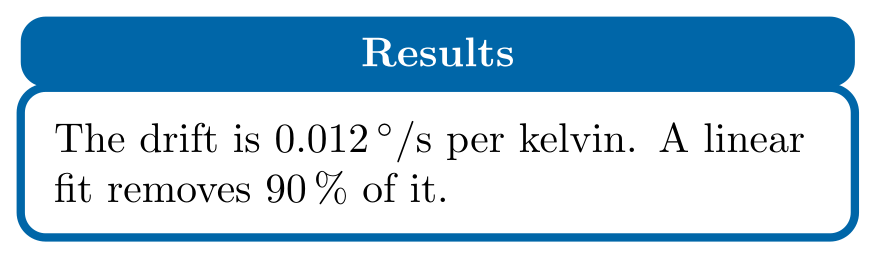
\usepackage{tikz}\begin{tikzpicture}[
block body/.style={draw=tpblue, line width=2pt, fill=white, rounded corners=6pt,
text width=#1, inner sep=8pt, align=left},
block title/.style={fill=tpblue, text=white, font=\bfseries, rounded corners=6pt,
text width=#1, inner xsep=8pt, inner ysep=5pt, align=center},
]
% tikzposter's Default block look in plain TikZ, for a slide or a handout
\definecolor{tpblue}{HTML}{0066A8}
\node[block body=6.5cm] (body) {%
The drift is $0.012\,^\circ/\mathrm{s}$ per kelvin.
A linear fit removes 90\,\% of it.};
\node[block title=6.5cm, anchor=south] at ([yshift=-1pt]body.north) {Results};
\end{tikzpicture}Full document
\documentclass[border=4pt]{standalone}
\usepackage{tikz}
\begin{document}
\begin{tikzpicture}[
    block body/.style={draw=tpblue, line width=2pt, fill=white, rounded corners=6pt,
      text width=#1, inner sep=8pt, align=left},
    block title/.style={fill=tpblue, text=white, font=\bfseries, rounded corners=6pt,
      text width=#1, inner xsep=8pt, inner ysep=5pt, align=center},
  ]
  % tikzposter's Default block look in plain TikZ, for a slide or a handout
  \definecolor{tpblue}{HTML}{0066A8}
  \node[block body=6.5cm] (body) {%
    The drift is $0.012\,^\circ/\mathrm{s}$ per kelvin.
    A linear fit removes 90\,\% of it.};
  \node[block title=6.5cm, anchor=south] at ([yshift=-1pt]body.north) {Results};
\end{tikzpicture}
\end{document}When an interactive poster editor is easier
tikzposter suits authors who want the poster in the same LaTeX source as the paper, with real LaTeX maths and TikZ figures. Moving blocks between columns, balancing column heights and seeing the result means editing code and recompiling, though. LabCanvas Research Poster is a browser editor built on the same idea of blocks that stack in columns: you drag a block to another column and the poster rearranges itself, text re-flows when a block is resized, equations are typed in LaTeX, and templates come in A0, A1 and 48 × 36 in, exported as a PDF at the printed size. It does not read tikzposter files, so choose one tool per poster.
Common errors and how to fix them
| LaTeX says (or you see) | Cause and fix |
|---|---|
| Float(s) lost. | A figure (or table) environment inside a \block: floats cannot live inside the poster’s TikZ picture. Use \begin{tikzfigure}[Caption] … \end{tikzfigure}, with \includegraphics or a tikzpicture inside. |
| Missing } inserted. (at a \block containing \verb) | The block text is a macro argument, where \verb and verbatim environments do not work. Use \texttt{…} (escaping \_, \%, \#). |
| LaTeX Warning: Unused global option(s): [a3paper]. | tikzposter knows only a0paper, a1paper and a2paper; the poster stays A0. Set other sizes with \geometry{paperwidth=…, paperheight=…} as shown above. |
| Package tikzposter Warning: Unknown color palette `GrayOrangeBlue'. | Caused by \usetheme{Desert}, which asks for a palette the class never defines; the poster then uses the Russia style’s own colours (those of BlueGrayOrange). It is harmless; to choose the colours, add \usecolorstyle[colorPalette=BrownBlueOrange]{Russia} after \usetheme{Desert}. |
| The last blocks are missing or cut off at the bottom (no error) | The content is taller than the page and the poster picture is clipped. Shorten the text, use a smaller class font size (20pt), or move blocks to a shorter column. |
| Blocks run off the right edge after changing the paper size with \geometry | The class computes the usable width when it is loaded. Recompute \TP@visibletextwidth and \TP@visibletextheight after \geometry, between \makeatletter and \makeatother. |
| A 48 × 36 in poster comes out portrait (36 × 48 in) | Remove the landscape class option when you give paperwidth and paperheight to geometry: geometry swaps them for landscape. |
Frequently asked questions
How do I make a poster in LaTeX with TikZ?
Use the tikzposter class: \documentclass[25pt, a0paper, portrait]{tikzposter}, \title{…}, \author{…}, \usetheme{Default}, then in the document \maketitle, \block{Introduction}{…} and \begin{columns}\column{0.5}\block{…}{…}\column{0.5}\block{…}{…}\end{columns}. The full example above compiles as it is.
How do I change the tikzposter theme or colours?
Put \usetheme{Rays} (or Default, Basic, Simple, Envelope, Wave, Board, Autumn, Desert) in the preamble, then optionally \usecolorstyle[colorPalette=BrownBlueOrange]{Germany}, \useblockstyle{Slide} or \usebackgroundstyle{Empty} to replace one part of the theme.
How do I add a figure to a tikzposter block?
Use the tikzfigure environment, not figure: \begin{tikzfigure}[Caption] \includegraphics[width=0.9\colwidth]{plot.pdf} \end{tikzfigure}. A figure inside a block fails with “Float(s) lost.”
Can tikzposter make a 48 × 36 inch or A3 poster?
Not with a class option: only A0, A1 and A2 are built in. Use \geometry{paperwidth=48in, paperheight=36in} without the landscape option and recompute \TP@visibletextwidth and \TP@visibletextheight, as in the code above.
How do I remove “LaTeX TikZposter” from the corner?
Add \tikzposterlatexaffectionproofoff to the preamble.
Is tikzposter still maintained?
The current version, 2.0, dates from January 2014 and there has been no release since, but the class works on current TeX Live: the posters on this page were compiled with TeX Live 2026.
References
- tikzposter class on CTAN (v2.0, 2014-01-15)ctan.org
- tikzposter manual (PDF on CTAN)mirrors.ctan.org
- tikzposter manual, §2 Creating a poster (minimal example)mirrors.ctan.org
- tikzposter manual, §3 Options for the document classmirrors.ctan.org
- tikzposter manual, §4.2 Blocks (block options, inner blocks, coloured boxes, tikzfigure)mirrors.ctan.org
- tikzposter manual, §4.3 Notesmirrors.ctan.org
- tikzposter manual, §4.4 Columns and subcolumns and §5 Poster layout (themes)mirrors.ctan.org
- tikzposter manual, §5.1 Setting the colors (palettes, colour styles)mirrors.ctan.org
- tikzposter manual, §5.5 Block stylemirrors.ctan.org
- tikzposter manual, §6 Poster templatemirrors.ctan.org
- ae package on CTAN (the fonts tikzposter loads)ctan.org
- beamerposter package on CTAN (v1.13)ctan.org
- PGF/TikZ manual, §17 Nodes and Edgestikz.dev
The facts on this page were checked against these sources, and every picture is the code with it typeset with TeX Live 2026. Code on this page: CC0 1.0, copy it freely.
Try the code in your browserEvery snippet on this page opens in the free TikZ editor: it is typeset with TeX Live as you type, with errors pointed at their line.
Open the TikZ editor