chemfig tutorial: drawing molecules and reactions in LaTeX
Quick answer
\usepackage{chemfig} and write a molecule as atoms joined by bond characters: \chemfig{H_3C-C(=[1]O)-[7]OH} draws acetic acid. -, = and ~ are single, double and triple bonds; the optional argument after a bond sets its angle, either as a multiple of 45° ([1] = 45°, [7] = 315°) or in degrees ([:30] absolute, [::60] relative to the previous bond); parentheses after an atom hold a branch; and *6(-=-=-=) is a benzene ring. Leave the atoms out and you get a skeletal formula. The current version is 1.84 (14 November 2026), included in TeX Live and MiKTeX; chemfig draws with TikZ, which it loads.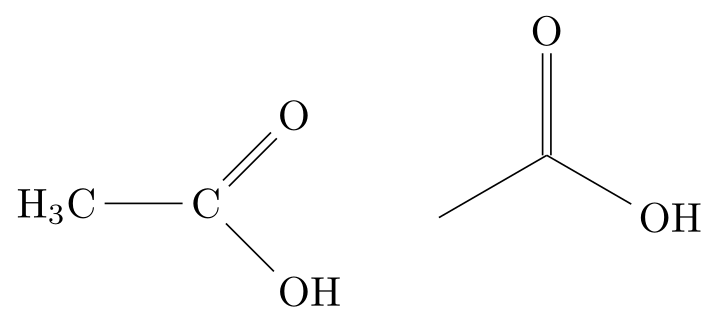
\usepackage{tikz} \usepackage{chemfig}% acetic acid: with its atoms, then as a skeletal formula (empty atoms)
\chemfig{H_3C-C(=[1]O)-[7]OH}
\qquad
\chemfig{-[:30](=[2]O)-[:-30]OH}Full document
\documentclass[border=4pt]{standalone}
\usepackage{tikz}
\usepackage{chemfig}
\begin{document}
% acetic acid: with its atoms, then as a skeletal formula (empty atoms)
\chemfig{H_3C-C(=[1]O)-[7]OH}
\qquad
\chemfig{-[:30](=[2]O)-[:-30]OH}
\end{document}Contents
Loading chemfig, and which version you have
chemfig is by Christian Tellechea (LPPL 1.3c). In LaTeX, load it with \usepackage{chemfig}; in plain TeX, \input chemfig.tex. It loads TikZ and the key–value package simplekv itself. The version in TeX Live 2026 and on CTAN is 1.84 of 2026-11-14. Recent changes worth knowing: 1.7 (October 2025) added horizontal reactions with \hreac, 1.8 (August 2026) the save key, which writes the TikZ code of a molecule to a file, and 1.83 improved the joins between wedge bonds. The English manual of 1.84 is a translation, by Evys Ancede Gallardo, of the French manual of 1.83; in case of doubt the French manual is authoritative, and texdoc chemfig opens both. There is also an unofficial HTML version on tikz.dev, currently of version 1.82.
The command is \chemfig[⟨keys⟩]{⟨molecule⟩}: the keys apply to that molecule only, while \setchemfig{⟨keys⟩} changes them for the rest of the document and \resetchemfig restores the defaults. Atoms are typeset in maths mode, so H_2O gets its subscript and spaces are ignored. chemfig does not work with ConTeXt, and CTAN lists it as incompatible with tagged PDF.
Bonds: the nine bond types
A bond is one or two characters between two groups of atoms:
| Code | Bond |
|---|---|
-, =, ~ | single, double, triple |
>, < | wedge (Cram bond, plain) |
>:, <: | hashed wedge (Cram bond, dashed) |
>|, <| | hollow wedge |
The direction is easy to get backwards: with >, >: and >| the narrow end is at the atom after the bond, with <, <: and <| at the atom before it, just as the characters themselves open towards one side. The keys that change their look: double bond sep (spacing of double and triple bonds, 2pt), cram width (base of the wedge, 1.5ex), cram dash width (1pt) and cram dash sep (2pt), and cram rectangle=true for rectangular wedges. Two bonds in a row, A-=B, get an empty group between them.
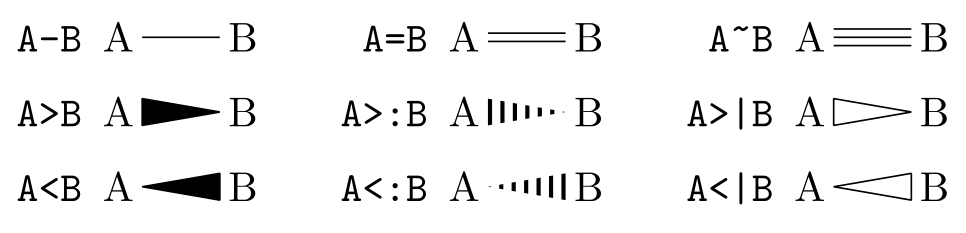
\usepackage{tikz} \usepackage{chemfig}\begin{tabular}{@{}r@{\enspace}l@{\qquad}r@{\enspace}l@{\qquad}r@{\enspace}l@{}}
\texttt{A-B} & \chemfig{A-B} & \texttt{A=B} & \chemfig{A=B} & \texttt{A\string~B} & \chemfig{A~B} \\[6pt]
\texttt{A>B} & \chemfig{A>B} & \texttt{A>:B} & \chemfig{A>:B} & \texttt{A>|B} & \chemfig{A>|B} \\[6pt]
\texttt{A<B} & \chemfig{A<B} & \texttt{A<:B} & \chemfig{A<:B} & \texttt{A<|B} & \chemfig{A<|B}
\end{tabular}Full document
\documentclass[border=4pt]{standalone}
\usepackage{tikz}
\usepackage{chemfig}
\begin{document}
\begin{tabular}{@{}r@{\enspace}l@{\qquad}r@{\enspace}l@{\qquad}r@{\enspace}l@{}}
  \texttt{A-B}  & \chemfig{A-B}  & \texttt{A=B}   & \chemfig{A=B}   & \texttt{A\string~B} & \chemfig{A~B}   \\[6pt]
  \texttt{A>B}  & \chemfig{A>B}  & \texttt{A>:B}  & \chemfig{A>:B}  & \texttt{A>|B}       & \chemfig{A>|B}  \\[6pt]
  \texttt{A<B}  & \chemfig{A<B}  & \texttt{A<:B}  & \chemfig{A<:B}  & \texttt{A<|B}       & \chemfig{A<|B}
\end{tabular}
\end{document}Bond angles: [n], [:angle] and [::angle]
The first field of the optional argument after a bond is its angle, in one of three forms:
[n], an integer: n × 45°, so[2]is straight up,[6]straight down and[7]is −45°.angle increment=30makes the steps 30° instead of 45°.[:30]: an absolute angle in degrees from the horizontal.[::60]: an angle relative to the previous bond. A chain written only with relative angles can be rotated as a whole by giving a starting angle at the very beginning,\chemfig{[:15]…}.
A bond without an angle does not continue in the direction of the previous one: it takes the molecule’s default, 0° unless the code starts with a different one. The full optional argument is [⟨angle⟩,⟨length factor⟩,⟨departure atom⟩,⟨arrival atom⟩,⟨TikZ options⟩], with empty fields allowed: -[,1.5] makes one bond 1.5 times as long, -[,,,,red] colours it, and -[:-30,,,,dashed] combines an angle with a style. Written at the start of the molecule, the same argument sets the defaults for all its bonds.

\usepackage{tikz} \usepackage{chemfig}\begin{tabular}{@{}c@{\qquad}c@{\qquad}c@{\qquad}c@{}}
\chemfig{-[1]-[7]-[1]-[7]}
& \chemfig{-[:30]-[:-30]-[:30]-[:-30]}
& \chemfig{-[:30]-[::-60]-[::60]-[::-60]}
& \chemfig[angle increment=30]{-[1]-[-1]-[1]-[-1]} \\[4pt]
\texttt{[1]}, \texttt{[7]}: $n \times 45^\circ$
& \texttt{[:30]}: absolute
& \texttt{[::-60]}: relative
& \texttt{angle increment=30}
\end{tabular}Full document
\documentclass[border=4pt]{standalone}
\usepackage{tikz}
\usepackage{chemfig}
\begin{document}
\begin{tabular}{@{}c@{\qquad}c@{\qquad}c@{\qquad}c@{}}
  \chemfig{-[1]-[7]-[1]-[7]}
  & \chemfig{-[:30]-[:-30]-[:30]-[:-30]}
  & \chemfig{-[:30]-[::-60]-[::60]-[::-60]}
  & \chemfig[angle increment=30]{-[1]-[-1]-[1]-[-1]} \\[4pt]
  \texttt{[1]}, \texttt{[7]}: $n \times 45^\circ$
  & \texttt{[:30]}: absolute
  & \texttt{[::-60]}: relative
  & \texttt{angle increment=30}
\end{tabular}
\end{document}Branches
Code in parentheses right after an atom is a branch attached to that atom; several branches are several pairs of parentheses, and branches can contain branches. After the branches, the main chain continues from the same atom: H_3C-C(-[2]CH_3)(-[6]CH_3)-OH is tert-butanol, with methyl groups up and down and the chain going on to OH. Each branch can start with its own default angle, ([:60]-D-E), or with a relative one.
Leaving an atom empty gives a corner of a skeletal formula, so (-[2])(-[4])(-[6])-OH is the same molecule in skeletal form and the third structure is 3-ethyl-2-methylpentane, a main chain with a one-carbon and a two-carbon branch. Atoms far apart in the code can also be joined with “hooks”: a ? after two atoms connects them (manual §2.8).
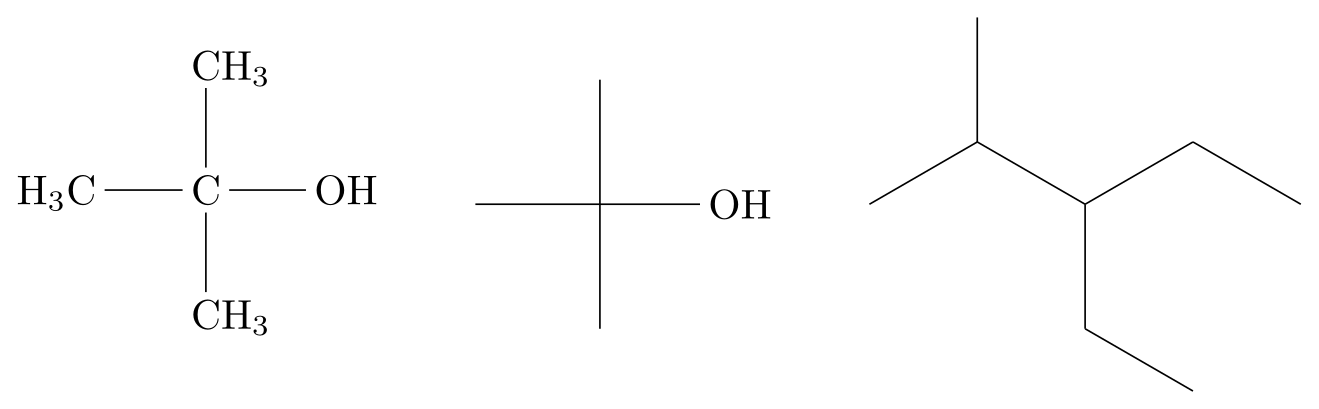
\usepackage{tikz} \usepackage{chemfig}% tert-butanol: three branches on the central carbon, then the main chain
\chemfig{H_3C-C(-[2]CH_3)(-[6]CH_3)-OH}
\qquad
% the same molecule as a skeletal formula
\chemfig{(-[2])(-[4])(-[6])-OH}
\qquad
% branches can be nested: 3-ethyl-2-methylpentane
\chemfig{-[:30](-[:90])-[:-30](-[:-90]-[:-30])-[:30]-[:-30]}Full document
\documentclass[border=4pt]{standalone}
\usepackage{tikz}
\usepackage{chemfig}
\begin{document}
% tert-butanol: three branches on the central carbon, then the main chain
\chemfig{H_3C-C(-[2]CH_3)(-[6]CH_3)-OH}
\qquad
% the same molecule as a skeletal formula
\chemfig{(-[2])(-[4])(-[6])-OH}
\qquad
% branches can be nested: 3-ethyl-2-methylpentane
\chemfig{-[:30](-[:90])-[:-30](-[:-90]-[:-30])-[:30]-[:-30]}
\end{document}Groups of atoms: which atom a bond starts from
chemfig splits a group such as HOOC into atoms: each atom runs up to the next capital letter or one of the characters - = ~ ( ! * < > @, and text in braces is never split, so HOOC is the four atoms H, O, O, C and H_3C the two atoms H3 and C. When a bond joins two groups, the angle decides which atoms it connects: for angles strictly between −90° and 90°, from the last atom of the first group to the first atom of the second; for all other angles, from the first atom of the first group to the last atom of the second. That is why H_3C-C works on the left of a structure and why a bond leaving HOOC straight down starts at the H.
The third and fourth fields of the bond’s optional argument override the choice: -[6,,4]R starts at atom 4 of the group, the C, and -[,,,2] ends at the second atom of the next group. A | inside a group cuts it at that point, which helps when the automatic split gives the wrong atoms.
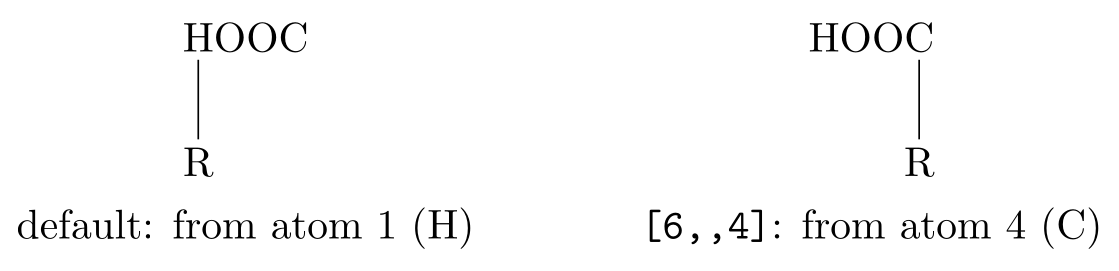
\usepackage{tikz} \usepackage{chemfig}\begin{tabular}{@{}c@{\qquad\qquad}c@{}}
\chemfig{HOOC-[6]R} & \chemfig{HOOC-[6,,4]R} \\
\rule{0pt}{3.5ex}default: from atom 1 (H) & \texttt{[6,,4]}: from atom 4 (C)
\end{tabular}Full document
\documentclass[border=4pt]{standalone}
\usepackage{tikz}
\usepackage{chemfig}
\begin{document}
\begin{tabular}{@{}c@{\qquad\qquad}c@{}}
  \chemfig{HOOC-[6]R} & \chemfig{HOOC-[6,,4]R} \\
  \rule{0pt}{3.5ex}default: from atom 1 (H) & \texttt{[6,,4]}: from atom 4 (C)
\end{tabular}
\end{document}Rings
⟨atom⟩*⟨n⟩(⟨code⟩) draws a regular polygon with n sides attached to the atom; the code lists the bonds and atoms around the ring and must start with a bond. *6(------) is cyclohexane, *5(-----) cyclopentane; groups can stay empty, a ring can be left incomplete, and bonds beyond n are ignored. At the start of a molecule the attachment atom is the lower-left vertex, the ring is drawn counter-clockwise and its last bond comes vertically down onto the attachment atom, so a hexagon has vertical sides; a starting angle, [:30]*6(…), turns it. When the ring follows a bond, the incoming bond bisects the ring’s first and last sides instead.
A branch on a vertex is the usual parentheses after that vertex’s atom, *6(---(-CH_3)---), and leaves along the bisector of the two sides unless you give an angle. For fused rings, follow a vertex with a new ring: in *6(-=-*6(-=-=-)=-=) the second ring starts at vertex 4, shares the next side of the first ring and therefore needs only five bonds; this is naphthalene.
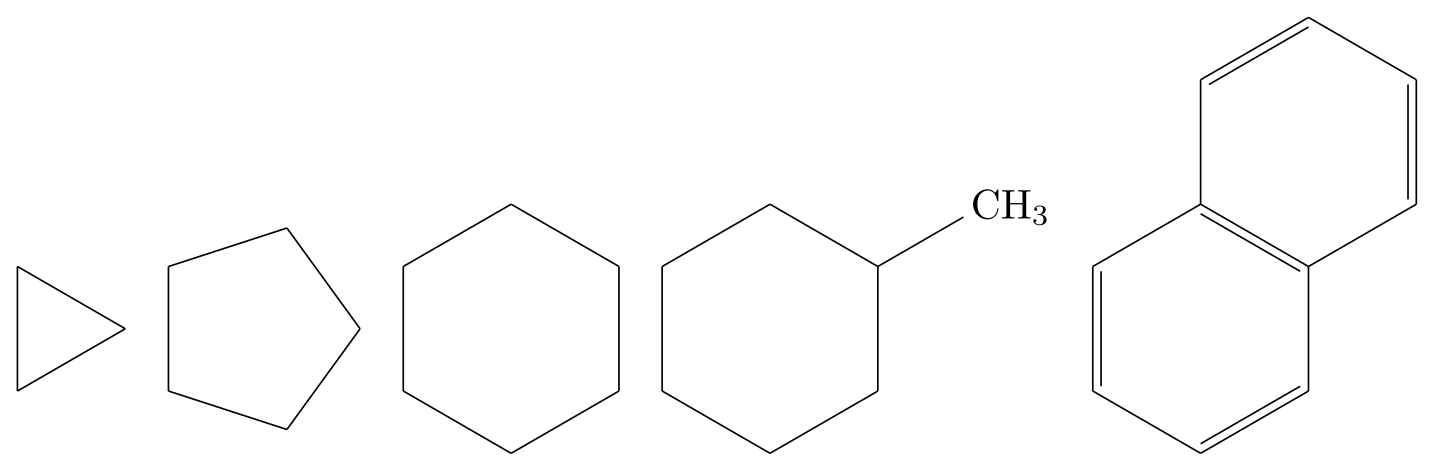
\usepackage{tikz} \usepackage{chemfig}\chemfig{*3(---)}\quad
\chemfig{*5(-----)}\quad
\chemfig{*6(------)}\quad
% a branch on a vertex: methylcyclohexane
\chemfig{*6(---(-CH_3)---)}\quad
% fused rings: a second ring started on vertex 4 (naphthalene)
\chemfig{*6(-=-*6(-=-=-)=-=)}Full document
\documentclass[border=4pt]{standalone}
\usepackage{tikz}
\usepackage{chemfig}
\begin{document}
\chemfig{*3(---)}\quad
\chemfig{*5(-----)}\quad
\chemfig{*6(------)}\quad
% a branch on a vertex: methylcyclohexane
\chemfig{*6(---(-CH_3)---)}\quad
% fused rings: a second ring started on vertex 4 (naphthalene)
\chemfig{*6(-=-*6(-=-=-)=-=)}
\end{document}Benzene and aromatic rings
Benzene can be drawn two ways. The Kekulé structure alternates single and double bonds, *6(-=-=-=). Two asterisks draw a circle inside instead, **6(------), with all bonds single; its size is set by cycle radius coeff (0.75), and **[30,330]6(…) draws only an arc. A hexagon with vertical sides is chemfig’s default; [:30] in front gives horizontal top and bottom sides.
Substituents go on the vertices, which are numbered counter-clockwise from the attachment atom at the lower left: in *6(-=-=(-OH)-=) the OH sits on vertex 5, at the top (phenol). With the ring attached to a group on its left, as in the next example, vertex 4 is opposite the attachment point, the para position; vertices 2 and 6 are ortho, 3 and 5 meta.
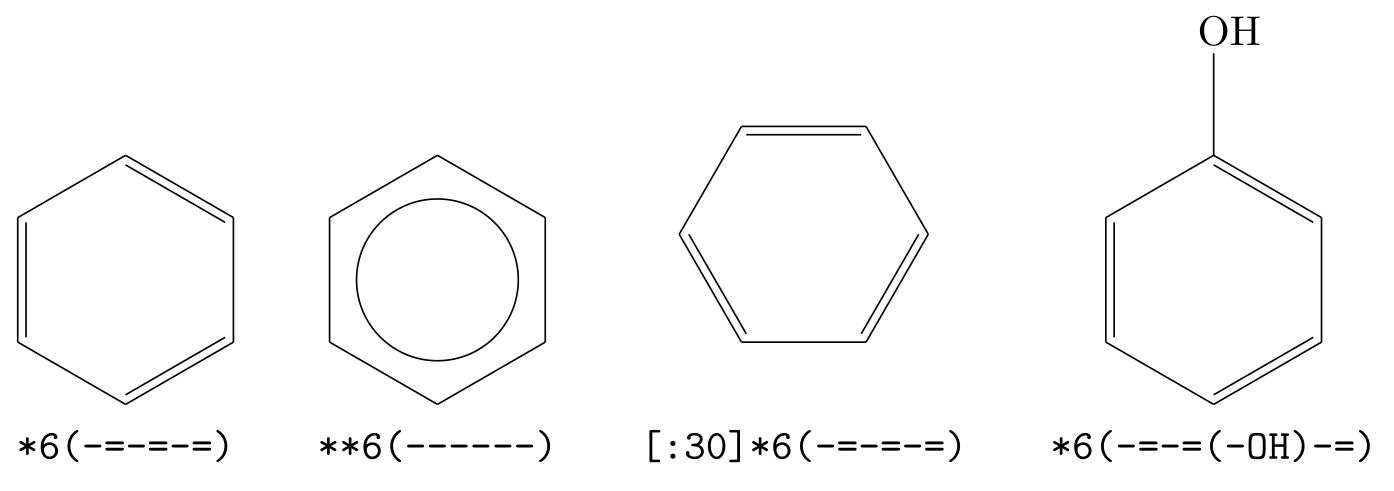
\usepackage{tikz} \usepackage{chemfig}\begin{tabular}{@{}c@{\qquad}c@{\qquad}c@{\qquad}c@{}}
\chemfig{*6(-=-=-=)} & \chemfig{**6(------)} & \chemfig{[:30]*6(-=-=-=)}
& \chemfig{*6(-=-=(-OH)-=)} \\
\rule{0pt}{3ex}\texttt{*6(-=-=-=)} & \texttt{**6(------)} & \texttt{[:30]*6(-=-=-=)}
& \texttt{*6(-=-=(-OH)-=)}
\end{tabular}Full document
\documentclass[border=4pt]{standalone}
\usepackage{tikz}
\usepackage{chemfig}
\begin{document}
\begin{tabular}{@{}c@{\qquad}c@{\qquad}c@{\qquad}c@{}}
  \chemfig{*6(-=-=-=)} & \chemfig{**6(------)} & \chemfig{[:30]*6(-=-=-=)}
  & \chemfig{*6(-=-=(-OH)-=)} \\
  \rule{0pt}{3ex}\texttt{*6(-=-=-=)} & \texttt{**6(------)} & \texttt{[:30]*6(-=-=-=)}
  & \texttt{*6(-=-=(-OH)-=)}
\end{tabular}
\end{document}A complete molecule: paracetamol
Paracetamol (acetaminophen), N-(4-hydroxyphenyl)acetamide, combines most of the above in one line. HO-*6(…) attaches the ring to HO with a horizontal bond, so the ring is oriented with that bond as its axis. The amide group hangs on vertex 4, the para position: -N continues horizontally, then (-[::-60]H) puts the N–H 60° below, and -[::60]C(=[::60]O)-[::-60]CH_3 zigzags with relative angles. Because every angle in the side chain is relative, the whole chain would follow if the ring were turned.
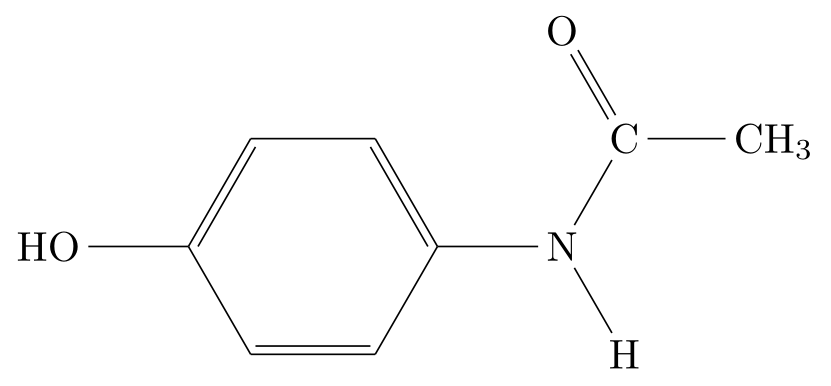
\usepackage{tikz} \usepackage{chemfig}% paracetamol (acetaminophen): a ring with a branch on its 4th vertex,
% written with relative angles so the side chain zigzags whatever its direction
\chemfig{HO-*6(-=-(-N(-[::-60]H)-[::60]C(=[::60]O)-[::-60]CH_3)=-=)}Full document
\documentclass[border=4pt]{standalone}
\usepackage{tikz}
\usepackage{chemfig}
\begin{document}
% paracetamol (acetaminophen): a ring with a branch on its 4th vertex,
% written with relative angles so the side chain zigzags whatever its direction
\chemfig{HO-*6(-=-(-N(-[::-60]H)-[::60]C(=[::60]O)-[::-60]CH_3)=-=)}
\end{document}Charges, lone pairs and radicals: \charge
\charge{⟨angle⟩=⟨content⟩, …}{⟨atom⟩} places charges around an atom at the given angles: \charge{90=\:,270=\:}{O} puts lone pairs above and below an O. The content can be anything, typically $\oplus$, $\ominus$ or $\delta^+$, and four shortcuts draw Lewis notation: \: a pair of dots, \. a single electron (radical), \| a lone pair as a bar, and \" a small rectangle (an empty orbital in French notation). \: and \" turn with their angle (lewisautorot). A position can carry a shift, 30:3pt=…, and the angle can be an anchor name such as south east.
\charge leaves the charges outside the bounding box; \Charge takes them into account, which matters next to other material. \setcharge{extra sep=3.5pt} moves all charges further from their atoms (the default is 1.5pt), and \setcharge{debug=true} shows the nodes used. For a charge written after the formula, maths in the atom is enough: \chemfig{NH_4^+}.
No \lewis any more. Older tutorials use \lewis and \Lewis; they were declared obsolete in version 1.5 (2020) and removed from the package in 1.6 (2021), so in 1.84 they are undefined. Their code was moved to a separate file, now chemfig-lewis.tex, which TeX Live still installs, but in our test with 1.84, \input chemfig-lewis.tex followed by \lewis{0:,O} still stopped with “Undefined control sequence”. Rewrite such code with \charge.
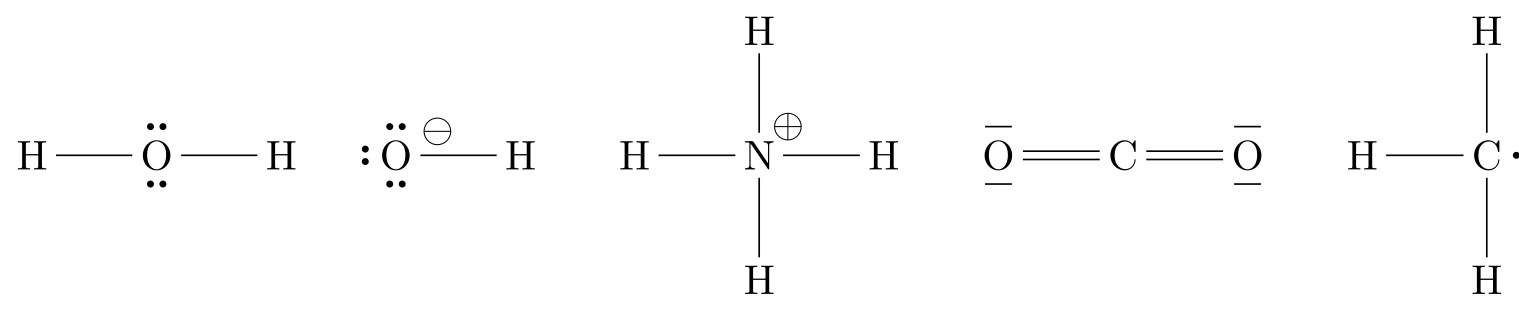
\usepackage{tikz} \usepackage{chemfig}% \charge{angle=content, ...}{atom}; \: is a lone pair, \. a single electron,
% \| a lone pair drawn as a bar; extra sep moves them away from the letter
\setcharge{extra sep=3.5pt}%
\chemfig{H-\charge{90=\:,270=\:}{O}-H}\qquad
\chemfig{\charge{90=\:,180=\:,270=\:,30:3pt=$\ominus$}{O}-H}\qquad
\chemfig{H-\charge{45=$\oplus$}{N}(-[2]H)(-[6]H)-H}\qquad
\chemfig{\charge{90=\|,270=\|}{O}=C=\charge{90=\|,270=\|}{O}}\qquad
\chemfig{H-\charge{0=\.}{C}(-[2]H)-[6]H}Full document
\documentclass[border=4pt]{standalone}
\usepackage{tikz}
\usepackage{chemfig}
\begin{document}
% \charge{angle=content, ...}{atom}; \: is a lone pair, \. a single electron,
% \| a lone pair drawn as a bar; extra sep moves them away from the letter
\setcharge{extra sep=3.5pt}%
\chemfig{H-\charge{90=\:,270=\:}{O}-H}\qquad
\chemfig{\charge{90=\:,180=\:,270=\:,30:3pt=$\ominus$}{O}-H}\qquad
\chemfig{H-\charge{45=$\oplus$}{N}(-[2]H)(-[6]H)-H}\qquad
\chemfig{\charge{90=\|,270=\|}{O}=C=\charge{90=\|,270=\|}{O}}\qquad
\chemfig{H-\charge{0=\.}{C}(-[2]H)-[6]H}
\end{document}Stereochemistry: wedges and hashed wedges
A stereocentre is drawn with two bonds in the plane, one wedge towards the viewer and one hashed wedge away from it. For bonds written from the stereocentre outwards, as in the branches of the alanine below, use < and <:, which put the narrow end at the stereocentre; a bond written towards the stereocentre needs > or >:. The drawing is L-alanine, which is (S): with H on the hashed wedge pointing away, the other substituents in priority order, NH2 → COOH → CH3, run counter-clockwise. Swapping the wedge and the hash, or two substituents, gives D-alanine. The hollow wedges <| and >| follow the same direction rule.
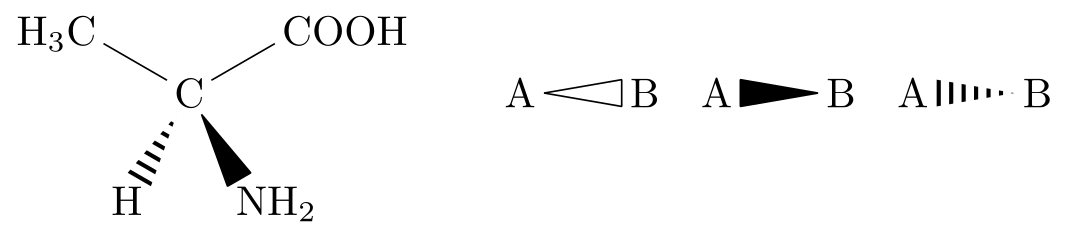
\usepackage{tikz} \usepackage{chemfig}% L-alanine, (S): with < and <: the narrow end is at the atom before the bond
\chemfig{C(-[:150]H_3C)(-[:30]COOH)(<[:300]NH_2)(<:[:240]H)}
\qquad
% hollow wedge, and > and >: (narrow end at the atom after the bond)
\chemfig{A<|B}\quad \chemfig{A>B}\quad \chemfig{A>:B}Full document
\documentclass[border=4pt]{standalone}
\usepackage{tikz}
\usepackage{chemfig}
\begin{document}
% L-alanine, (S): with < and <: the narrow end is at the atom before the bond
\chemfig{C(-[:150]H_3C)(-[:30]COOH)(<[:300]NH_2)(<:[:240]H)}
\qquad
% hollow wedge, and > and >: (narrow end at the atom after the bond)
\chemfig{A<|B}\quad \chemfig{A>B}\quad \chemfig{A>:B}
\end{document}\setchemfig: bond length and other options
There is no bond length key; chemfig accepts the line without an error and nothing changes. The spacing is atom sep, the distance between the centres of two bonded atoms (3em by default), so bonds between wide atoms look shorter; with fixed length=true, atom sep becomes the length of the bond itself (ring bonds stay regular). The options used most, with their defaults from the manual:
| Key | Default | Effect |
|---|---|---|
atom sep | 3em | distance between bonded atoms |
bond offset | 2pt | gap between an atom and its bonds |
double bond sep | 2pt | spacing of the lines of double and triple bonds |
angle increment | 45 | the step of [n] angles |
bond style | empty | TikZ options for every bond (colour, line width) |
fixed length | false | atom sep as bond length |
bond join | false | joins adjacent bonds neatly, useful with thick lines |
cram width, cram dash width, cram dash sep | 1.5ex, 1pt, 2pt | wedge base, hash thickness and spacing |
baseline | 0pt | vertical position of the molecule in the line |
debug | false | shows the atoms’ boxes and names |
For journal figures, a common choice is a smaller atom sep (about 2em) with a slightly thicker bond style, set once with \setchemfig in the preamble so that every structure matches.
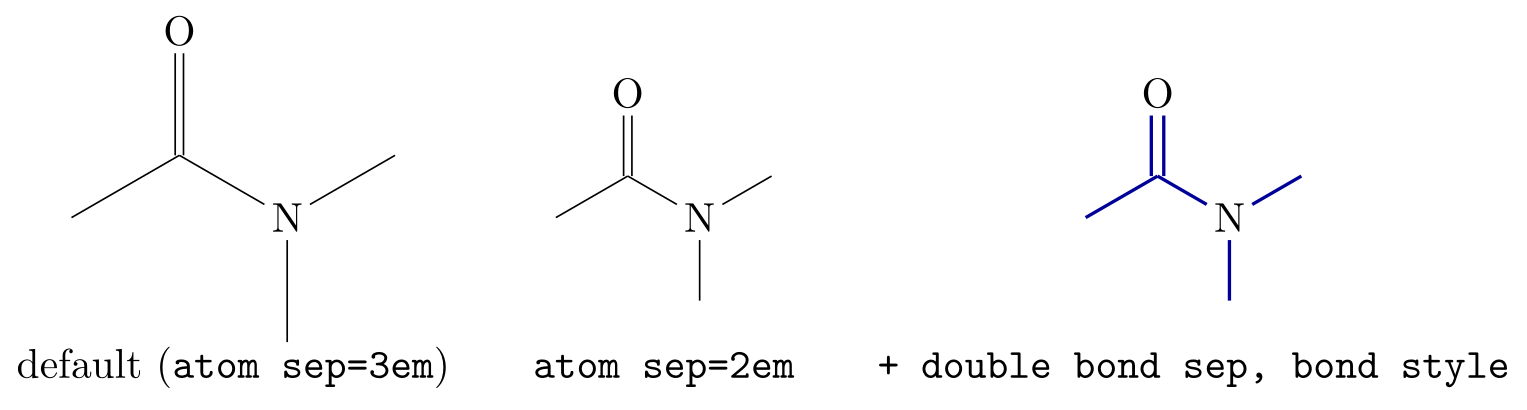
\usepackage{tikz} \usepackage{chemfig}\begin{tabular}{@{}c@{\qquad}c@{\qquad}c@{}}
\chemfig{-[:30](=[2]O)-[:-30]N(-[6])-[:30]}
& \chemfig[atom sep=2em]{-[:30](=[2]O)-[:-30]N(-[6])-[:30]}
& \chemfig[atom sep=2em, double bond sep=3pt,
bond style={line width=0.8pt, blue!60!black}]{-[:30](=[2]O)-[:-30]N(-[6])-[:30]} \\[4pt]
default (\texttt{atom sep=3em})
& \texttt{atom sep=2em}
& \texttt{+ double bond sep, bond style}
\end{tabular}Full document
\documentclass[border=4pt]{standalone}
\usepackage{tikz}
\usepackage{chemfig}
\begin{document}
\begin{tabular}{@{}c@{\qquad}c@{\qquad}c@{}}
  \chemfig{-[:30](=[2]O)-[:-30]N(-[6])-[:30]}
  & \chemfig[atom sep=2em]{-[:30](=[2]O)-[:-30]N(-[6])-[:30]}
  & \chemfig[atom sep=2em, double bond sep=3pt,
             bond style={line width=0.8pt, blue!60!black}]{-[:30](=[2]O)-[:-30]N(-[6])-[:30]} \\[4pt]
  default (\texttt{atom sep=3em})
  & \texttt{atom sep=2em}
  & \texttt{+ double bond sep, bond style}
\end{tabular}
\end{document}Reaction schemes: \schemestart … \schemestop
Between \schemestart and \schemestop, everything between two \arrow commands is a compound, \+ draws a plus sign, and \chemname{\chemfig{…}}{name} writes a name under a structure, aligned across the scheme (finish with \chemnameinit{} so that the next scheme starts afresh). The arrow is \arrow{⟨type⟩[⟨above⟩][⟨below⟩]}[⟨angle⟩,⟨length factor⟩,⟨style⟩]:
- types:
->(default),-/>(crossed: no reaction),<-,<->(resonance),<=>(equilibrium),<<->and<->>(equilibrium lying to the left or right),0(invisible) and-U>(with an arc for a reagent in and a product out); - the texts above and below are typeset as text, not maths, so write
H$_2$SO$_4$or\chemfig{H_2SO_4}there; [90]after the arrow turns it,[,1.8]lengthens it relative tocompound sep(5em by default), as here, so that its labels fit.
Arrows connect the centres of the compounds; \arrow(a--b) names the compounds at its ends, \arrow(.mid east--.mid west) chooses anchors for better alignment, and later arrows can start from a named compound, \arrow(@a--)[-90], to build branched schemes (manual §6.4–§6.8).

\usepackage{tikz} \usepackage{chemfig}% Fischer esterification; arrow labels are text, so formulas need $...$
\setchemfig{atom sep=2em, compound sep=4em}%
\schemestart
\chemname{\chemfig{H_3C-C(=[1]O)-[7]OH}}{acetic acid}
\+
\chemname{\chemfig{HO-CH_2-CH_3}}{ethanol}
\arrow{<=>[H$_2$SO$_4$][heat]}[,1.8]
\chemname{\chemfig{H_3C-C(=[1]O)-[7]O-CH_2-CH_3}}{ethyl acetate}
\+
\chemname{\chemfig{H_2O}}{water}
\schemestop
\chemnameinit{}Full document
\documentclass[border=4pt]{standalone}
\usepackage{tikz}
\usepackage{chemfig}
\begin{document}
% Fischer esterification; arrow labels are text, so formulas need $...$
\setchemfig{atom sep=2em, compound sep=4em}%
\schemestart
  \chemname{\chemfig{H_3C-C(=[1]O)-[7]OH}}{acetic acid}
  \+
  \chemname{\chemfig{HO-CH_2-CH_3}}{ethanol}
  \arrow{<=>[H$_2$SO$_4$][heat]}[,1.8]
  \chemname{\chemfig{H_3C-C(=[1]O)-[7]O-CH_2-CH_3}}{ethyl acetate}
  \+
  \chemname{\chemfig{H_2O}}{water}
\schemestop
\chemnameinit{}
\end{document}Horizontal reactions: \hreac
For a simple left-to-right equation, chemfig 1.7 and later offer a lighter syntax: between \hreac and \endhreac, + and > are reserved and separate the compounds, and all compounds are centred on one horizontal line. >{⟨type⟩}[⟨above⟩][⟨below⟩] takes the same arrow types and labels as \arrow; the arrow is 3em long and grows to fit its labels. \name{…} after a compound writes its name below it, and \>{…} and \^{…} shift a compound horizontally or vertically.

\usepackage{tikz} \usepackage{chemfig}% \hreac ... \endhreac (chemfig 1.7 and later): + and > are reserved
\hreac
\chemfig{CH_4} + 2\,\chemfig{O_2} >[combustion] \chemfig{CO_2} + 2\,\chemfig{H_2O}
\endhreacFull document
\documentclass[border=4pt]{standalone}
\usepackage{tikz}
\usepackage{chemfig}
\begin{document}
% \hreac ... \endhreac (chemfig 1.7 and later): + and > are reserved
\hreac
  \chemfig{CH_4} + 2\,\chemfig{O_2} >[combustion] \chemfig{CO_2} + 2\,\chemfig{H_2O}
\endhreac
\end{document}Formulas in the text: mhchem or chemformula
chemfig draws structures. For formulas and equations in running text, such as H2SO4 or a balanced equation in a sentence, use a formula package instead, which sets subscripts, charges, arrows and spacing correctly without a picture:
- mhchem (version 4.10, 2024-01-29):
\usepackage[version=4]{mhchem}, then\ce{H2SO4},\ce{SO4^2-},\ce{A + B -> C},\ce{<=>}; - chemformula (version 4.17, 2022-01-23), by Clemens Niederberger:
\ch{H2SO4}with a very similar syntax and more options for customising the output.
Both can be loaded in the same document, as here, and chemfig works next to either. The LabCanvas chemical equation balancer balances an equation and gives it as \ce{} code to paste.
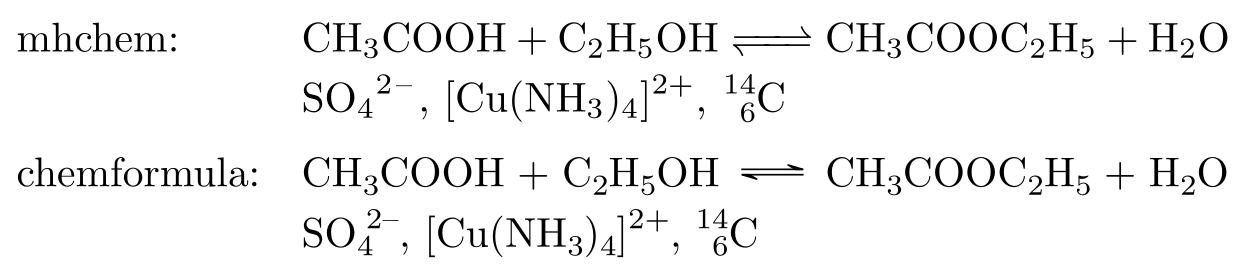
\usepackage{tikz} \usepackage[version=4]{mhchem} \usepackage{chemformula}\begin{tabular}{@{}l@{\quad}l@{}}
mhchem: & \ce{CH3COOH + C2H5OH <=> CH3COOC2H5 + H2O} \\[2pt]
& \ce{SO4^2-}, \ce{[Cu(NH3)4]^2+}, \ce{^{14}_{6}C} \\[6pt]
chemformula: & \ch{CH3COOH + C2H5OH <=> CH3COOC2H5 + H2O} \\[2pt]
& \ch{SO4^2-}, \ch{[Cu(NH3)4]^2+}, \ch{^{14}_{6}C}
\end{tabular}Full document
\documentclass[border=4pt]{standalone}
\usepackage{tikz}
\usepackage[version=4]{mhchem}
\usepackage{chemformula}
\begin{document}
\begin{tabular}{@{}l@{\quad}l@{}}
  mhchem:      & \ce{CH3COOH + C2H5OH <=> CH3COOC2H5 + H2O} \\[2pt]
               & \ce{SO4^2-}, \ce{[Cu(NH3)4]^2+}, \ce{^{14}_{6}C} \\[6pt]
  chemformula: & \ch{CH3COOH + C2H5OH <=> CH3COOC2H5 + H2O} \\[2pt]
               & \ch{SO4^2-}, \ch{[Cu(NH3)4]^2+}, \ch{^{14}_{6}C}
\end{tabular}
\end{document}Drawing molecules without code
For a structure that would take long to write by hand, draw it instead: MolDraw, the LabCanvas structure editor, draws molecules and reactions with the mouse, reads and writes SMILES and shows molecules in 3D. To test chemfig code, the TikZ editor has chemfig loaded and typesets \chemfig{…} as you type, with TeX Live 2026, the same renderer that made the pictures on this page.
Common errors and how to fix them
| LaTeX says (or you see) | Cause and fix |
|---|---|
| Undefined control sequence. (at \chemfig) | chemfig is not loaded. Add \usepackage{chemfig} to the preamble. |
| Undefined control sequence. (at \lewis) | \lewis and \Lewis were removed in version 1.6. Use \charge, for example \charge{90=\:,270=\:}{O}; inputting chemfig-lewis.tex did not make \lewis work with 1.84 in our test. |
| Package pgf Error: No shape named `n1-3' is known. | A departure or arrival atom that does not exist, here \chemfig{AB-[,,3]C}: the group AB has two atoms. Count the atoms of the group as chemfig splits them (at capitals and bond characters). |
| File ended while scanning use of \CF_grabsubmol_a. | A ring or branch without its closing parenthesis, as in \chemfig{*6(-=-=-=}. |
| Undefined control sequence. (at \arrow) | \arrow and \+ exist only between \schemestart and \schemestop. |
| Missing $ inserted. (in an arrow label) | Arrow labels are text: \arrow{->[H_2SO_4]} fails. Write H$_2$SO$_4$ or \chemfig{H_2SO_4}. |
| \setchemfig{bond length=…} has no effect (no error) | chemfig has no such key and ignores it silently. Use atom sep (with fixed length=true if the bonds themselves must have that length). |
| A wedge points the wrong way (no error) | > is narrow at the atom after the bond, < at the atom before. For a bond leaving a stereocentre use < or <:. |
Frequently asked questions
How do I draw a molecule in LaTeX?
Load \usepackage{chemfig} and write the molecule as atoms and bonds: \chemfig{H_3C-CH_2-OH} draws ethanol. Use [:30] or [2] after a bond for its angle, parentheses for branches and *6(...) for rings; empty atoms give a skeletal formula.
How do I draw benzene with chemfig?
\chemfig{*6(-=-=-=)} draws the Kekulé structure and \chemfig{**6(------)} a hexagon with a circle. Put substituents on vertices with parentheses, e.g. \chemfig{*6(-=-=(-OH)-=)} for phenol, and turn the ring with [:30] at the start.
How do I change the bond length in chemfig?
With atom sep, the distance between bonded atoms (default 3em): \setchemfig{atom sep=2em} for the whole document or \chemfig[atom sep=2em]{...} for one molecule. A single bond can be lengthened with its second optional field, -[,1.5]. There is no bond length key.
How do I draw lone pairs and charges in chemfig?
With \charge: \chemfig{H-\charge{90=\:,270=\:}{O}-H} puts lone pairs above and below the O, and \charge{45=$\oplus$}{N} a circled plus. \. draws a single electron and \| a bar. The old \lewis command was removed in version 1.6.
How do I put text above and below a reaction arrow in chemfig?
In a \schemestart ... \schemestop scheme, give the labels in brackets after the arrow type: \arrow{->[above][below]}. The labels are text, so write formulas as H$_2$O or \chemfig{H_2O}. With \hreac the same labels follow >: >[above][below].
Should I use chemfig or mhchem?
Both, for different things: chemfig draws structural formulas and reaction schemes with structures; mhchem (\ce{H2SO4}) or chemformula (\ch{H2SO4}) typeset formulas and equations in running text. They can be loaded together.
References
- chemfig on CTAN (1.84, 2026-11-14)ctan.org
- chemfig manual (English, PDF)mirrors.ctan.org
- chemfig manual, §1.3 Parameters of \chemfig (all keys and defaults)mirrors.ctan.org
- chemfig manual, §2.3 Bonds between groups of atomsmirrors.ctan.org
- chemfig manual, §2.4 Optional argument of a bond (angles, length, departure and arrival atoms)mirrors.ctan.org
- chemfig manual, §2.7 Branchesmirrors.ctan.org
- chemfig manual, §3 Ringsmirrors.ctan.org
- chemfig manual, §5.8 The macro \chargemirrors.ctan.org
- chemfig manual, §6 Reaction schemesmirrors.ctan.org
- chemfig manual, §6.9 Optional arguments of arrowsmirrors.ctan.org
- chemfig manual, §7 Horizontal reactionsmirrors.ctan.org
- chemfig manual, §10 Change historymirrors.ctan.org
- chemfig manual in French (authoritative)mirrors.ctan.org
- mhchem on CTAN (4.10, 2024-01-29)ctan.org
- chemformula on CTAN (4.17, 2022-01-23)ctan.org
The facts on this page were checked against these sources, and every picture is the code with it typeset with TeX Live 2026. Code on this page: CC0 1.0, copy it freely.
Try the code in your browserEvery snippet on this page opens in the free TikZ editor: it is typeset with TeX Live as you type, with errors pointed at their line.
Open the TikZ editor