TikZ editors, online and desktop, honestly compared
Quick answer
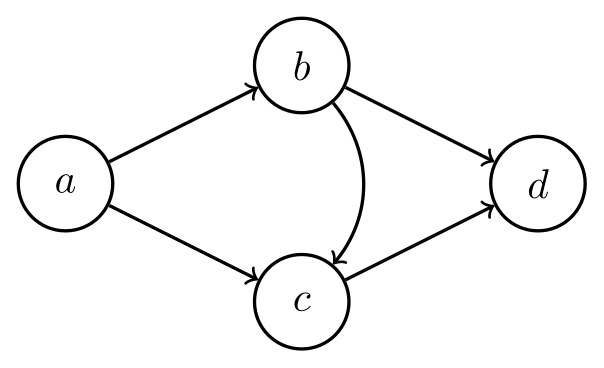
\usepackage{tikz}\begin{tikzpicture}[every node/.style={draw, circle, thick, minimum size=8mm},
every edge/.style={draw, thick, ->}]
\node (a) at (0,0) {$a$};
\node (b) at (2,1) {$b$};
\node (c) at (2,-1) {$c$};
\node (d) at (4,0) {$d$};
\path (a) edge (b) edge (c)
(b) edge (d)
(c) edge (d)
(b) edge[bend left=40] (c);
\end{tikzpicture}Full document
\documentclass[border=4pt]{standalone}
\usepackage{tikz}
\begin{document}
\begin{tikzpicture}[every node/.style={draw, circle, thick, minimum size=8mm},
                    every edge/.style={draw, thick, ->}]
  \node (a) at (0,0)    {$a$};
  \node (b) at (2,1)    {$b$};
  \node (c) at (2,-1)   {$c$};
  \node (d) at (4,0)    {$d$};
  \path (a) edge (b) edge (c)
        (b) edge (d)
        (c) edge (d)
        (b) edge[bend left=40] (c);
\end{tikzpicture}
\end{document}Contents
How we compared (checked November 2026)
LabCanvas makes the LabCanvas TikZ editor, so read this page with that in mind; we say where other tools are better. Every fact about a product (what it does, platforms, licence, price, last release) was checked on 22 November 2026 from the project’s own website or source repository, listed under each tool and in the references. Where we could not confirm something, we left it out.
Two distinctions matter more than feature lists. Visual or code: visual editors let you move nodes with the mouse and write the TikZ for you; code editors show a preview of code you type. Real TeX or its own renderer: some tools compile with LaTeX, so the preview is exactly what your paper will show; others draw TikZ with their own program, which is faster and allows dragging but can differ from LaTeX for features they do not fully support.
The editors at a glance
| Editor | What it is | Runs on | Licence and price | Preview | Editing | Latest release or activity |
|---|---|---|---|---|---|---|
| LabCanvas TikZ editor | Online editor for one TikZ figure | Web browser | Free; 30 new renders a day without an account, no daily limit with a free account | TeX Live on a server, after each pause in typing | Code | Live service |
| Overleaf | Online LaTeX editor for whole documents | Web browser | Free plan; Standard $199 a year; Community Edition AGPL-3.0 | LaTeX on Overleaf’s servers, on Recompile or with Auto Compile | Code | Live service |
| TikZ Editor (Dominik Peters) | WYSIWYG editor, canvas and code kept in sync | Web; desktop for macOS, Windows, Linux | Free, MIT | Its own TikZ renderer (not LaTeX) | Visual and code | 1.3.0, 19 Nov 2026 |
| TikZiT | Editor for graphs and string diagrams | Windows, macOS, Linux; VS Code extension | Free, GPL-3.0 (extension Apache-2.0) | Its own drawing; LaTeX preview with your pdflatex | Visual, with a source view | 2.1.6, Aug 2020 (last commit Sep 2023); extension 0.5.2, Feb 2026 |
| KtikZ / QtikZ | Code editor with an automatic preview | Linux (Qt, KDE); build notes for Windows | Free, GPL-2.0 or later | Your local LaTeX | Code | 0.13.2, Apr 2021 (last commit Jul 2025) |
| TikzEdt | “Semigraphical” editor | Windows (.NET 4.0); older Linux and OS X builds | Free, GPL-3.0 | Your local LaTeX | Code with a preview overlay | 0.2.3, Jun 2013 |
| TikZJax | TeX compiled to WebAssembly, rendering TikZ in the browser | Web pages; Obsidian plugin | Free, LPPL 1.3c (plugin MIT) | TeX running in your browser | Code in your page or note | Last commit May 2024; plugin 0.5.2, Mar 2024 |
| quiver | Commutative-diagram editor that writes tikz-cd | Web browser | Free, MIT | Its own drawing; labels with KaTeX | Visual | Last commit Sep 2026 |
| Mathcha | Online maths editor with a diagram tool | Web; desktop “Notebook” version | Proprietary (prices not checked) | Its own drawing | Visual, exports TikZ | Site © 2018–2026 |
LabCanvas TikZ editor (ours)
The LabCanvas TikZ editor is a code editor in the browser with a real TeX Live preview: each time you pause typing, the code is typeset on a LabCanvas server with pdfLaTeX, LuaLaTeX or XeLaTeX, and errors point to the line that caused them. pgfplots, circuitikz, tikz-cd, chemfig and the common TikZ libraries are preloaded, and a library of 179 figures from open-source collections gives you code to start from. You can download the figure as a transparent PNG at 300 or 600 dpi, or open it in the LabCanvas figure editor as editable shapes next to your plots and images; the download is always a PNG. It is free: 30 new renders a day without an account and no daily limit with a free account; a render is limited to 25 seconds and the code to 100 KB, and shell escape is off.
Where others are better: it is not a visual TikZ editor (you write code; the shape editing in LabCanvas does not write TikZ back), it handles one figure rather than a document (use Overleaf for papers), it needs an internet connection, and it cannot use the external library or other shell-escape features.
Overleaf
Overleaf is an online LaTeX editor for complete documents, with real-time collaboration; TikZ is just LaTeX there, compiled on Overleaf’s servers when you click Recompile, or on every edit if you switch on Auto Compile in the Recompile menu. The free plan allows one collaborator per project and has a basic compile timeout; the Standard plan costs $199 a year (or $25 monthly) with 10 collaborators per project and 24 times the basic compile timeout (Overleaf’s plans page). Overleaf’s own documentation lists complex TikZ and pgfplots drawings among the causes of compile timeouts and suggests externalising them. The software is open source as Overleaf Community Edition (AGPL-3.0), which you can host yourself.
Choose it when the figure belongs in a paper you write with others. It has no visual TikZ drawing tool.
TikZ Editor by Dominik Peters
The TikZ Editor, by the author of the tikz.dev HTML manual, is a WYSIWYG editor: you drag elements on a canvas and the TikZ code updates instantly “without disturbing your formatting” (line breaks and spacing are kept), and edits in the code show up on the canvas. You can start from scratch, paste an existing figure or open a whole paper’s .tex file to edit its pictures. Its README lists drawing tools (shapes, paths, Bézier curves, freehand), syntax highlighting and autocompletion, support for \foreach, trees and matrices, partial support for decorations, graphs and plots, and no support yet for the let operation. It can import SVG, Ipe and PowerPoint (PPTX) files. Its README lists PDF and PNG files among its export formats.
It runs in the browser and as a desktop app for macOS, Windows and Linux (the desktop app adds native file dialogs, an AI assistant and automatic updates). It is free and open source under the MIT licence, and very active: release 1.3.0 is dated 19 November 2026. The canvas is drawn by the editor’s own TikZ renderer (a parser and an SVG back end, per its developer notes), not by LaTeX, so check the final figure with LaTeX for features it supports only partly.
Choose it for fine-tuning positions visually in hand-written TikZ; it is the most capable visual TikZ editor we found.
TikZiT
TikZiT describes itself as “a super simple GUI editor for graphs and string diagrams”. Its files are a subset of TikZ (a list of nodes, then a list of edges, with styles kept in a separate .tikzstyles file), so they can be included directly in LaTeX with its tikzit.sty. Since version 2.1 it can show a LaTeX preview (Ctrl+R), which needs pdflatex installed, and the preview can be saved as PNG, JPG or the original PDF. Builds exist for Windows, Linux and macOS, plus a VS Code extension with the same interface.
Licence GPL-3.0 (the VS Code extension: Apache-2.0). The last tagged release is 2.1.6 (August 2020); the code was last changed in September 2023, when the version number in the source moved to 2.2 without a tagged release. The VS Code extension is newer: 0.5.2, February 2026.
Choose it for diagrams made of nodes and edges, such as graphs and string diagrams. It is not meant for general TikZ drawings such as plots or free-form paths.
\usepackage{tikz}\begin{tikzpicture}[every node/.style={draw, circle, thick, minimum size=8mm},
every edge/.style={draw, thick, ->}]
\node (a) at (0,0) {$a$};
\node (b) at (2,1) {$b$};
\node (c) at (2,-1) {$c$};
\node (d) at (4,0) {$d$};
\path (a) edge (b) edge (c)
(b) edge (d)
(c) edge (d)
(b) edge[bend left=40] (c);
\end{tikzpicture}Full document
\documentclass[border=4pt]{standalone}
\usepackage{tikz}
\begin{document}
\begin{tikzpicture}[every node/.style={draw, circle, thick, minimum size=8mm},
                    every edge/.style={draw, thick, ->}]
  \node (a) at (0,0)    {$a$};
  \node (b) at (2,1)    {$b$};
  \node (c) at (2,-1)   {$c$};
  \node (d) at (4,0)    {$d$};
  \path (a) edge (b) edge (c)
        (b) edge (d)
        (c) edge (d)
        (b) edge[bend left=40] (c);
\end{tikzpicture}
\end{document}KtikZ and QtikZ
KtikZ and QtikZ are one project: “You write the TikZ code in the editor and KtikZ automatically generates the image in a preview panel.” KtikZ integrates with KDE; QtikZ is the Qt-only build of the same program. Both need a local LaTeX installation with pgf and the preview package. Licence GPL-2.0 or later. The last tagged release is 0.13.2 (April 2021), but the code is still maintained: a port to KDE Frameworks 6 was merged in July 2025. The repository has build instructions for Linux and a separate file for Windows.
Choose it for a light offline code editor with a live preview on Linux.
TikzEdt
TikzEdt calls itself “a semigraphical Tikz-editor”: code editing combined with an overlay on the preview. Its last release, 0.2.3, was uploaded in June 2013 as a Windows installer and zip that need .NET Framework 4.0 and a LaTeX installation; Linux and OS X builds (0.2.2, December 2012) needed Mono, and the OS X build was later marked deprecated. Licence GPL-3.0. The project now survives only in the Google Code archive, and its website, tikzedt.org, no longer resolved when we checked.
Choose it only if you already rely on it; the TikZ Editor above covers the same idea and is maintained.
TikZJax
TikZJax runs TeX itself in the browser: the Pascal source of TeX is compiled to WebAssembly, a LaTeX format with TikZ is preloaded, and every <script type="text/tikz"> element in a web page is replaced by the typeset drawing, an inline SVG graphic. Everything happens in the reader’s browser, with no server. Licence LPPL 1.3c; the last change to the repository was in May 2024, and there are no tagged releases.
The Obsidian TikZJax plugin uses it to render tikz code blocks in Obsidian notes, with chemfig, tikz-cd, circuitikz, pgfplots, array, amsmath, amsfonts, amssymb and tikz-3dplot available; MIT licence, version 0.5.2 (March 2024), last change July 2024. TikZJax is a renderer rather than an editor: you write the code in your page or note.
Choose it to show TikZ on a website or in notes without making pictures first. The plugin offers a fixed list of packages, and TikZJax cannot load packages from your own LaTeX installation.
quiver
quiver is “a modern, graphical editor for commutative and pasting diagrams”: you place objects on a grid and draw arrows with the mouse or entirely with the keyboard, then export LaTeX that uses the tikz-cd package (or Typst). The export embeds a link back to the diagram, so you can reopen it later. Labels are typeset in the browser with KaTeX. MIT licence; the repository was last changed in September 2026.
Choose it for commutative diagrams: it is much faster than writing tikz-cd by hand. It is not a general TikZ editor.
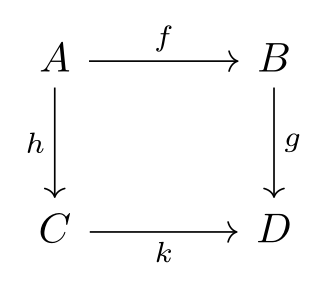
\usepackage{tikz} \usepackage{tikz-cd}\begin{tikzcd}[row sep=large, column sep=large]
A \arrow[r, "f"] \arrow[d, "h"'] & B \arrow[d, "g"] \\
C \arrow[r, "k"'] & D
\end{tikzcd}Full document
\documentclass[border=4pt]{standalone}
\usepackage{tikz}
\usepackage{tikz-cd}
\begin{document}
\begin{tikzcd}[row sep=large, column sep=large]
  A \arrow[r, "f"] \arrow[d, "h"'] & B \arrow[d, "g"] \\
  C \arrow[r, "k"']                & D
\end{tikzcd}
\end{document}Mathcha
Mathcha is an online WYSIWYG mathematics editor for whole documents. Its drawing tools make graphs and diagrams, and its site says they can be exported to TikZ (LaTeX); there is also an offline desktop version called Notebook. It is proprietary software; we did not verify its prices.
Choose it if you write maths visually and want a diagram as TikZ code without learning the syntax.
Other routes to TikZ
- GeoGebra (desktop version): File → Export → Graphics View as PGF/TikZ writes a construction as TikZ code. The manual says this works only for the 2D view and cannot export implicit curves or loci.
- Inkscape with svg2tikz: svg2tikz converts SVG graphics to TikZ code, as an Inkscape 1.4 extension or a command-line tool (
pip install svg2tikz). GPL-2.0 or later; release 3.3.6, June 2026. - Ipe is not a TikZ editor but a drawing program whose text is LaTeX, with strong snapping for geometric figures; figures are saved as PDF. GPL-3.0 or later; Windows, macOS, Unix, a web edition and a VS Code extension; current version 7.3.1-beta3. The TikZ Editor above can import Ipe files.
- draw.io (diagrams.net) has no TikZ export of its own: in its source repository (release 32.7.4, November 2026) no menu, plugin or interface text mentions TikZ.
- “TikZmaker”: we found no current tool with this name; people searching for it usually want a visual TikZ editor, such as the TikZ Editor or TikZiT.
Which TikZ editor should you use?
- You want to drag things and get TikZ: the TikZ Editor (any figure) or TikZiT (nodes and edges).
- You are writing a paper: Overleaf, or your own LaTeX setup, so figures and text share fonts and settings.
- You need one figure as an image quickly, in the browser: the LabCanvas TikZ editor (real TeX Live, PNG at 300 or 600 dpi).
- Offline, code first: KtikZ/QtikZ on Linux, or any LaTeX editor with a PDF preview.
- Commutative diagrams: quiver.
- TikZ on a web page or in Obsidian: TikZJax.
- Geometry constructions: GeoGebra’s PGF/TikZ export or Ipe.
Whatever you draw with, keep the TikZ code: it is the editable source of the figure.
Frequently asked questions
What is the best TikZ editor?
It depends on the job. For editing TikZ visually, the TikZ Editor by Dominik Peters (web and desktop, free, MIT) is the most capable tool we found, and TikZiT is good for node-and-edge diagrams. For writing code, Overleaf is best for whole papers, KtikZ/QtikZ for offline use, and the LabCanvas TikZ editor (made by us) for a single figure as a PNG in the browser.
Is there a WYSIWYG editor for TikZ?
Yes. The TikZ Editor (tikz.dev/editor) keeps a canvas and the code in sync in both directions; TikZiT edits graphs and string diagrams visually; Mathcha and quiver draw diagrams and export TikZ or tikz-cd code. TikzEdt was an early semigraphical editor but has not been updated since 2013.
What is TikZJax?
A way to render TikZ in a web browser without a server: TeX is compiled to WebAssembly and turns <script type="text/tikz"> elements of a web page into drawings. The Obsidian TikZJax plugin uses it to render tikz code blocks in notes.
Are QtikZ and KtikZ the same program?
Yes, they are one project. KtikZ is the version integrated with KDE and QtikZ the build that needs only Qt; both show a live preview of the TikZ code you type, using your local LaTeX installation.
Can I edit TikZ online for free?
Yes: the LabCanvas TikZ editor (real TeX Live preview, PNG download), Overleaf’s free plan (whole documents), the web version of the TikZ Editor (visual editing) and quiver (commutative diagrams) all work in the browser without paying.
Which TikZ editors work offline?
TikZiT, KtikZ/QtikZ and the desktop version of the TikZ Editor run on your computer. TikZiT and KtikZ use your own LaTeX installation for their previews, so install TeX Live or MiKTeX first.
References
- LabCanvas TikZ editorlabcanvas.com
- Overleaf plans and pricing (checked 22 November 2026)overleaf.com
- Overleaf: Learn LaTeX in 30 minutes (Auto Compile)overleaf.com
- Overleaf docs: Fixing and preventing compile timeoutsdocs.overleaf.com
- Overleaf Community Edition source (AGPL-3.0)github.com
- TikZ Editor source and releasesgithub.com
- TikZiT websitetikzit.github.io
- TikZiT sourcegithub.com
- TikZiT for VS Codegithub.com
- KtikZ / QtikZ sourcegithub.com
- TikzEdt in the Google Code archivecode.google.com
- TikZJax websitetikzjax.com
- TikZJax sourcegithub.com
- Obsidian TikZJax plugingithub.com
- quiverq.uiver.app
- quiver sourcegithub.com
- Mathchamathcha.io
- Ipe extensible drawing editoripe.otfried.org
- GeoGebra manual: Export to LaTeX (PGF, PSTricks) and Asymptotegeogebra.github.io
- svg2tikz sourcegithub.com
- draw.io source (checked for TikZ export)github.com
The facts on this page were checked against these sources, and every picture is the code with it typeset with TeX Live 2026. Code on this page: CC0 1.0, copy it freely.
Try the code in your browserEvery snippet on this page opens in the free TikZ editor: it is typeset with TeX Live as you type, with errors pointed at their line.
Open the TikZ editor