Common TikZ errors and how to fix them
Quick answer
\usetikzlibrary line), maths outside $…$ in a node (Missing $ inserted), arrow tips with options but without braces (write -{Stealth[length=3mm]}), and numbers beyond TeX’s limit (Dimension too large). Read the first error and the line number after l. in the log; later errors are often consequences of the first.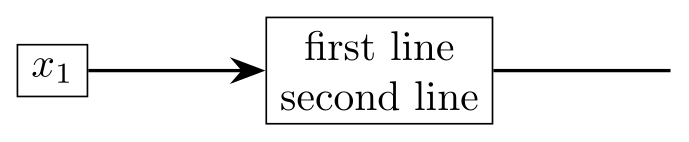
\usepackage{tikz} \usetikzlibrary{arrows.meta, positioning}\begin{tikzpicture}[node distance=15mm]
\node[draw] (a) {$x_1$}; % was {x_1}: Missing $ inserted
\node[draw, align=center, right=of a] (b) % was: no align, so \\ did nothing
{first line\\second line};
\draw[-{Stealth[length=3mm]}, thick] (a) -- (b); % was -Stealth[length=3mm]: no braces
\draw[thick] (b.east) -- ++(1.5,0); % was: no semicolon at the end
\end{tikzpicture}Full document
\documentclass[border=4pt]{standalone}
\usepackage{tikz}
\usetikzlibrary{arrows.meta, positioning}
\begin{document}
\begin{tikzpicture}[node distance=15mm]
  \node[draw] (a) {$x_1$};                          % was {x_1}: Missing $ inserted
  \node[draw, align=center, right=of a] (b)         % was: no align, so \\ did nothing
    {first line\\second line};
  \draw[-{Stealth[length=3mm]}, thick] (a) -- (b);  % was -Stealth[length=3mm]: no braces
  \draw[thick] (b.east) -- ++(1.5,0);               % was: no semicolon at the end
\end{tikzpicture}
\end{document}Contents
How to read a TikZ error
LaTeX stops at the first error and prints a message, a context line and the line number. In the log it looks like this (shortened):
./main.tex:5: Package pgfkeys Error: I do not know the key '/tikz/thik' and I am going to ignore it. Perhaps you misspelled it.
See the pgfkeys package documentation for explanation.
l.5 \draw[thik]
The part after Package … Error: says which layer complained: tikz for the drawing syntax, pgfkeys for options, PGF Math for numbers and expressions, pgf for shapes and arrow tips, xcolor for colours. The line after l.5 shows the code up to the point where TeX noticed the problem, so the mistake is at the end of that line or just before it. When the error mentions \end{tikzpicture}, the real problem is usually in the last path before it. Fix the first error and compile again: one mistake often causes several messages.
Semicolons and malformed paths
Package tikz Error: Giving up on this path. Did you forget a semicolon? Every \draw, \fill, \path, \node and \coordinate ends with ;. Without it, TikZ reads on into the next command, gives up, and reports the error at the next line, often \end{tikzpicture}. The same message appears when a coordinate contains parentheses, because the first ) ends the coordinate:
\draw (0,0) -- (1,sin(30));     % error
\draw (0,0) -- (1,{sin(30)});   % braces around the expression
Package tikz Error: Cannot parse this coordinate. Something between two coordinates is not a path operation, for example a single dash, (0,0) - (1,1) instead of --.
Package tikz Error: A node must have a (possibly empty) label text. A node needs braces even when it has no text: \node at (0,0) {};.
Paragraph ended before \pgffor@next was complete. A \foreach without braces takes everything up to the next semicolon as its body; if the command in the loop has no semicolon, it runs into the end of the picture. Add the ;, or put the body in braces.
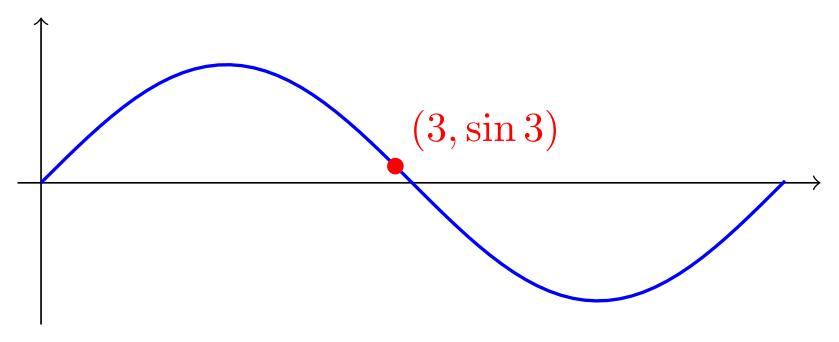
\usepackage{tikz}\begin{tikzpicture}
\draw[->] (-0.2,0) -- (6.6,0);
\draw[->] (0,-1.2) -- (0,1.4);
% (\x, sin(\x r)) would end the coordinate at the first ")": put it in braces
\draw[thick, blue] (0,0) foreach \x in {0.1,0.2,...,6.3} { -- (\x, {sin(\x r)}) };
\fill[red] (3, {sin(3 r)}) circle (2pt) node[above right] {$(3, \sin 3)$};
\end{tikzpicture}Full document
\documentclass[border=4pt]{standalone}
\usepackage{tikz}
\begin{document}
\begin{tikzpicture}
  \draw[->] (-0.2,0) -- (6.6,0);
  \draw[->] (0,-1.2) -- (0,1.4);
  % (\x, sin(\x r)) would end the coordinate at the first ")": put it in braces
  \draw[thick, blue] (0,0) foreach \x in {0.1,0.2,...,6.3} { -- (\x, {sin(\x r)}) };
  \fill[red] (3, {sin(3 r)}) circle (2pt) node[above right] {$(3, \sin 3)$};
\end{tikzpicture}
\end{document}I do not know the key: typos and missing libraries
Package pgfkeys Error: I do not know the key '/tikz/thik' and I am going to ignore it. Perhaps you misspelled it. An option TikZ does not recognise. Either it is misspelt (thik, ultrathick instead of ultra thick, a colour name that does not exist), or it is defined by a library that is not loaded. When the option has a value, the message adds it: I do not know the key '/tikz/name path', to which you passed 'a'. Common keys and the library they need:
| Key or syntax | Library |
|---|---|
diamond, ellipse (as node shapes), regular polygon, star, trapezium, cylinder | shapes.geometric |
cloud, single arrow, rectangle split, ellipse callout, rounded rectangle | shapes.symbols, shapes.arrows, shapes.multipart, shapes.callouts, shapes.misc |
right=of a, node distance … and …, on grid | positioning |
name path, name intersections | intersections |
fit; on background layer; matrix of nodes | fit; backgrounds; matrix |
drop shadow; blur shadow | shadows; shadows.blur |
pic {angle=…}; "label" syntax | angles; quotes |
Some libraries give a clearer message of their own:
- Package tikz Error: You need to say \usetikzlibrary{calc} for coordinate calculation. for a
($…$)coordinate; - Package tikz Error: You need to say \usetikzlibrary{patterns}. for
pattern=…; - Package tikz Error: You need to load a decoration library. for
decorate(loaddecorations.pathmorphing,decorations.pathreplacing,decorations.markingsordecorations.text); - Package PGF Math Error: Unknown function `of' (in 'of a'). for
right=of awithoutpositioning: without the library,rightexpects a length and tries to compute of a; - Package tikz Error: Unknown shape ``cloud.'' Using ``rectangle'' instead. for
shape=cloudwithoutshapes.symbols.
A misspelt library name stops at the \usetikzlibrary line: Package tikz Error: I did not find the tikz library 'positionning'. I looked for files named tikzlibrarypositionning.code.tex and pgflibrarypositionning.code.tex, but neither could be found in the current texmf trees. The TikZ libraries page lists what each library adds.
Arrow tips
Package pgf Error: Unknown arrow tip kind 'Stealth'. The capitalised tips (Stealth, Latex, Triangle, Circle…) come from \usetikzlibrary{arrows.meta}. The same message for an old name, Unknown arrow tip kind 'triangle 45', means the deprecated arrows library is not loaded; switch to -Triangle from arrows.meta.
Package pgfkeys Error: I do not know the key 'length[' and I am going to ignore it. An arrow tip with options must be put in braces, because the ] of the tip would otherwise end the options of the path:
\draw[-Stealth[length=3mm]] (0,0) -- (1,0);     % error
\draw[-{Stealth[length=3mm]}] (0,0) -- (1,0);   % braces around the tip
The TikZ arrows page shows every tip and its options.
Values TikZ cannot use
Many options take a length or a number, which TikZ evaluates with its maths parser. A word in that place gives a PGF Math error:
- Package PGF Math Error: Unknown function `thick' (in 'thick'). from
line width=thick: named widths are options of their own,\draw[thick], or give a length,line width=0.8pt. - Package PGF Math Error: Unknown function `top' (in 'top'). from
anchor=top: anchors are compass names,north,south,east,west,north east…, or an angle. - Package PGF Math Error: Unknown operator `x' or `x@' (in '2x'). from a coordinate like
(2x,1): multiplication must be written,(2*\x,1). A misspelt unit gives the same kind of message:circle (1cmm)reports Unknown operator `m' or `m@' (in '1cmm'). - Package PGF Math Error: You've asked me to divide `1' by `0', but I cannot divide any number by `0' (in '1/0'). A division by zero, often in a formula evaluated at x = 0; change the domain or the samples.
- Package pgfkeys Error: The key '/tikz/line width' requires a value. I am going to ignore this key. An option written without its value.
Node text: maths, line breaks and fonts
Missing $ inserted. Node text is normal LaTeX text, so subscripts, superscripts and Greek letters need maths mode: {$x_1$}, not {x_1}. An underscore in a word (a file name) needs \_.
No error, but \\ does nothing. A line break inside a node only works when the node has align=center (or left, right) or a text width. Without one, TikZ quietly runs the lines together, as in the first box below.
Extra }, or forgotten \endgroup. with font=\textbf: font needs a font switch, not a command that takes an argument. Use font=\bfseries, \itshape, \small, \sffamily, or several, font=\small\bfseries.
Undefined control sequence. in node text is usually a command from a package that is not loaded, such as \mathbb (load amssymb) or \SI (load siunitx). The l. line in the log ends with the unknown command.
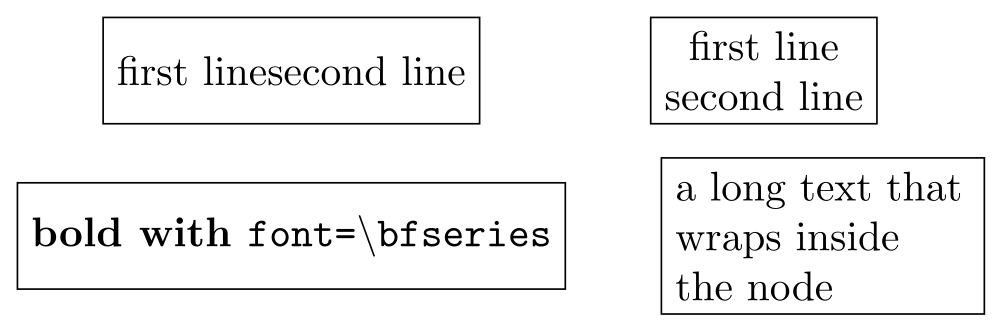
\usepackage{tikz}\begin{tikzpicture}[every node/.style={draw, minimum height=9mm}]
\node at (0,0) {first line\\second line}; % no align: \\ is ignored
\node[align=center] at (4,0) {first line\\second line}; % with align
\node[font=\bfseries] at (0,-1.4) {bold with \texttt{font=\textbackslash bfseries}};
\node[text width=25mm, align=left] at (4.5,-1.4) {a long text that wraps inside the node};
\end{tikzpicture}Full document
\documentclass[border=4pt]{standalone}
\usepackage{tikz}
\begin{document}
\begin{tikzpicture}[every node/.style={draw, minimum height=9mm}]
  \node at (0,0) {first line\\second line};                   % no align: \\ is ignored
  \node[align=center] at (4,0) {first line\\second line};      % with align
  \node[font=\bfseries] at (0,-1.4) {bold with \texttt{font=\textbackslash bfseries}};
  \node[text width=25mm, align=left] at (4.5,-1.4) {a long text that wraps inside the node};
\end{tikzpicture}
\end{document}Node names: No shape named … is known
Package pgf Error: No shape named `a' is known. A coordinate like (a) refers to a node or named coordinate that does not exist at that point: a typo, a node defined later in the code, or a node in another tikzpicture. Names are case-sensitive. To connect nodes in different pictures, both pictures need remember picture, the drawing one also overlay, and the document must be compiled twice. A stray character also lands here: (1;2) gives No shape named `1;2' is known, because anything in parentheses that is not a coordinate is taken as a name.
Colours
Package xcolor Error: Undefined color `darkgreen'. from fill=darkgreen, and I do not know the key '/tikz/darkgreen' when the colour is written on its own, \fill[darkgreen]. Without options, xcolor knows only the basic names (red, green, blue, cyan, magenta, yellow, black, white, gray, darkgray, lightgray, brown, lime, olive, orange, pink, purple, teal, violet). Mix your own (green!50!black), define one with \definecolor{darkgreen}{RGB}{0,100,0}, or load more names with \usepackage[dvipsnames]{xcolor} (ForestGreen, NavyBlue…) or svgnames. Loading xcolor with options before tikz is the traditional safe order; in our TeX Live 2026 test, loading it after tikz worked too.
Package xcolor Error: Undefined color `'. An empty colour name, usually from a style with a parameter used without a value: with box/.style={fill=#1!20}, writing box alone makes the colour !20. Give a value, box=red, or a default, box/.default=blue.
Dimension too large and other limits
Dimension too large. TeX stores lengths with a maximum of about 16384pt (5.75 m; TeX’s help text says “about 19 feet”). A coordinate of 600 cm is beyond it, and so is an intermediate result: ({exp(10)},0) fails although you only wanted to plot a curve. Scale the data before drawing it (plot \x/1000 and label the axis in thousands), or use pgfplots, which computes with floating point. On very long decorated paths the decoration code can hit the same limit; the decorations chapter of the manual has a section on it.
TeX capacity exceeded, sorry [input stack size=10000]. Usually an endless recursion, for example a style that uses itself, \tikzset{a/.style={a, thick}} (use /.append style to add to an existing style). With a different bracket, such as [main memory size=…], the picture is simply too big for TeX: fewer plot samples, fewer loop iterations, or externalised pictures help.
Trigonometry looks flat. Not an error: TikZ’s sin, cos and tan take degrees. sin(\x) for x from 0 to 6.28 barely leaves zero; write sin(\x r) to read x as radians.
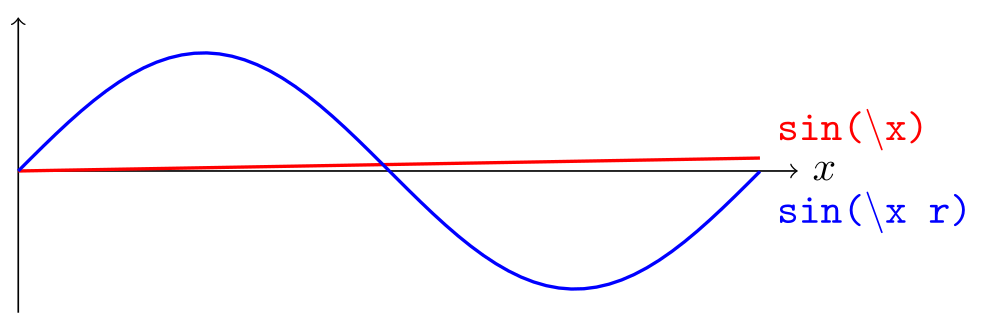
\usepackage{tikz}\begin{tikzpicture}[domain=0:6.28, samples=60]
\draw[->] (0,0) -- (6.6,0) node[right] {$x$};
\draw[->] (0,-1.2) -- (0,1.3);
\draw[thick, red] plot (\x, {sin(\x)}); % degrees: sin(6.28) is almost 0
\draw[thick, blue] plot (\x, {sin(\x r)}); % r: read x as radians
\node[red, right] at (6.3,0.35) {\texttt{sin(\textbackslash x)}};
\node[blue, right] at (6.3,-0.35) {\texttt{sin(\textbackslash x r)}};
\end{tikzpicture}Full document
\documentclass[border=4pt]{standalone}
\usepackage{tikz}
\begin{document}
\begin{tikzpicture}[domain=0:6.28, samples=60]
  \draw[->] (0,0) -- (6.6,0) node[right] {$x$};
  \draw[->] (0,-1.2) -- (0,1.3);
  \draw[thick, red]  plot (\x, {sin(\x)});     % degrees: sin(6.28) is almost 0
  \draw[thick, blue] plot (\x, {sin(\x r)});   % r: read x as radians
  \node[red, right]  at (6.3,0.35) {\texttt{sin(\textbackslash x)}};
  \node[blue, right] at (6.3,-0.35) {\texttt{sin(\textbackslash x r)}};
\end{tikzpicture}
\end{document}Environments and missing packages
- LaTeX Error: Environment tikzcd undefined. or Environment axis undefined. These environments come from packages, not from TikZ:
\usepackage{tikz-cd}fortikzcd,\usepackage{pgfplots}foraxis,\usepackage{circuitikz}forcircuitikz. - Undefined control sequence. at
\usetikzlibrary: the line comes before\usepackage{tikz}. - Extra }, or forgotten \endgroup. at
\end{tikzpicture}: a\begin{scope}without its\end{scope}(or an unbalanced brace) inside the picture. - Missing \endgroup inserted. at
\end{document}: the\end{tikzpicture}itself is missing.
babel and active characters
Some babel languages turn characters into commands (shorthands): Spanish makes < and > active, German ". TikZ syntax uses these characters, so pictures can break. In our TeX Live 2026 tests:
\usepackage[spanish]{babel}
\usepackage{tikz}
…
\draw[<->] (0,0) -- (3,0);
stopped with Argument of \language@active@arg> has an extra }., and ngerman with the quotes syntax to["a"] with Argument of \language@active@arg" has an extra }. The fix for both is one line, \usetikzlibrary{babel}, which resets the character codes at the start of every picture and restores them inside node text. French (:, !, ;, ?) and Turkish (=) did not break our test pictures with current babel and TikZ, but the library does no harm, so load it whenever you use babel.
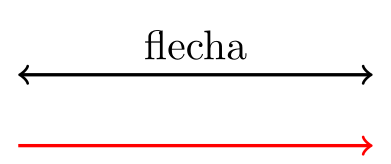
\usepackage{tikz} \usepackage[spanish]{babel} \usetikzlibrary{babel}\begin{tikzpicture}
\draw[<->, thick] (0,0) -- (3,0) node[midway, above] {flecha};
\draw[->, thick, red] (0,-0.6) -- (3,-0.6);
\end{tikzpicture}Full document
\documentclass[border=4pt]{standalone}
\usepackage{tikz}
\usepackage[spanish]{babel}
\usetikzlibrary{babel}
\begin{document}
\begin{tikzpicture}
  \draw[<->, thick] (0,0) -- (3,0) node[midway, above] {flecha};
  \draw[->, thick, red] (0,-0.6) -- (3,-0.6);
\end{tikzpicture}
\end{document}A matrix inside another command
Undefined control sequence. with \pgf@matrix@last@nextcell@options in the log appears when a \matrix is inside the argument of another command, such as your own macro or \resizebox (both reproduced): the & between cells has already been read with the wrong meaning. Tell the matrix to use another separator:
\matrix[matrix of nodes, ampersand replacement=\&] {a \& b \\ c \& d \\};The external library and shell escape
Package tikz Error: Sorry, the system call 'pdflatex -halt-on-error -interaction=batchmode -jobname "main-figure0" "\def\tikzexternalrealjob{main}\input{main}"' did NOT result in a usable output file 'main-figure0' (expected one of .pdf:.jpg:.jpeg:.png:). Please verify that you have enabled system calls. For pdflatex, this is 'pdflatex -shell-escape'. The document uses \tikzexternalize, which runs LaTeX once per picture and needs shell escape for it. Compile with pdflatex -shell-escape, use \tikzexternalize[mode=list and make] and run the makefile yourself, or remove the two external lines. Online renderers that do not allow shell escape, including LabCanvas, cannot externalise. Details on the libraries page.
Pictures that are too big for the page
A picture wider than the text gives no error, only a warning in the log, Overfull \hbox (…pt too wide) in paragraph, and sticks into the margin. Three ways to fit it:
[scale=0.8]on the picture shrinks coordinates, but not text, line widths or node sizes (middle box below), so labels can collide; addtransform shapeto scale nodes too (right).[x=0.8cm, y=0.8cm]shrinks only unit-less coordinates, which is often what you want for a diagram.\resizebox{\linewidth}{!}{…}(graphicx) scales everything, text included, to the exact width; text can end up smaller than the caption, which journals dislike.
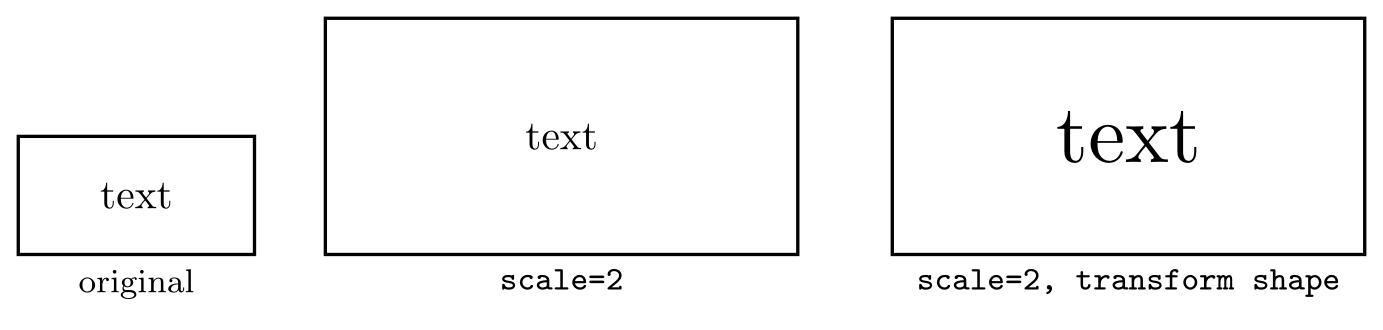
\usepackage{tikz}\begin{tikzpicture}
\draw[thick] (0,0) rectangle (2,1) node[midway] {text};
\node[below] at (1,0) {\footnotesize original};
\begin{scope}[xshift=2.6cm, scale=2] % positions doubled, text not
\draw[thick] (0,0) rectangle (2,1) node[midway] {text};
\end{scope}
\node[below] at (4.6,0) {\footnotesize \texttt{scale=2}};
\begin{scope}[xshift=7.4cm, scale=2, transform shape] % text scaled too
\draw[thick] (0,0) rectangle (2,1) node[midway] {text};
\end{scope}
\node[below] at (9.4,0) {\footnotesize \texttt{scale=2, transform shape}};
\end{tikzpicture}Full document
\documentclass[border=4pt]{standalone}
\usepackage{tikz}
\begin{document}
\begin{tikzpicture}
  \draw[thick] (0,0) rectangle (2,1) node[midway] {text};
  \node[below] at (1,0) {\footnotesize original};
  \begin{scope}[xshift=2.6cm, scale=2]      % positions doubled, text not
    \draw[thick] (0,0) rectangle (2,1) node[midway] {text};
  \end{scope}
  \node[below] at (4.6,0) {\footnotesize \texttt{scale=2}};
  \begin{scope}[xshift=7.4cm, scale=2, transform shape]   % text scaled too
    \draw[thick] (0,0) rectangle (2,1) node[midway] {text};
  \end{scope}
  \node[below] at (9.4,0) {\footnotesize \texttt{scale=2, transform shape}};
\end{tikzpicture}
\end{document}Warnings worth fixing
- Package pgfplots Warning: running in backwards compatibility mode (unsuitable tick labels; missing features). Consider writing \pgfplotsset{compat=1.18} into your preamble. Add that line after
\usepackage{pgfplots}; without it, pgfplots keeps old defaults for compatibility, as the warning says. - A
\foreachrange misses its last value. Fractional steps are rounded:{0,0.1,...,0.5}ends at 0.40002. End a little higher,{0,0.1,...,0.501}, or loop over integers and divide. - The last line of a grid is missing. The same rounding: extend the grid’s far corner slightly.
Common errors and how to fix them
| LaTeX says (or you see) | Cause and fix |
|---|---|
| Package tikz Error: Giving up on this path. Did you forget a semicolon? | Add the ; at the end of the path. Also appears for a coordinate with parentheses inside, such as (1,sin(30)): write (1,{sin(30)}). |
| Package tikz Error: Cannot parse this coordinate. | Something between coordinates is not a path operation, such as a single - instead of --. |
| Package tikz Error: A node must have a (possibly empty) label text. | Give the node braces: \node at (0,0) {};. |
| Paragraph ended before \pgffor@next was complete. | The command in a \foreach without braces needs its semicolon. |
| Package pgfkeys Error: I do not know the key '/tikz/…' and I am going to ignore it. Perhaps you misspelled it. | A typo, or a key from a library that is not loaded (diamond and ellipse need shapes.geometric, name path needs intersections). |
| Package PGF Math Error: Unknown function `of' (in 'of a'). | right=of a needs \usetikzlibrary{positioning}. |
| Package tikz Error: You need to say \usetikzlibrary{calc} for coordinate calculation. | Load calc for ($…$) coordinates. |
| Package tikz Error: You need to load a decoration library. | Load decorations.pathmorphing, .pathreplacing, .markings or .text. |
| Package tikz Error: You need to say \usetikzlibrary{patterns}. | Load patterns for pattern=…. |
| Package tikz Error: Unknown shape ``cloud.'' Using ``rectangle'' instead. | Load the shape library (shapes.symbols for cloud). |
| Package tikz Error: I did not find the tikz library 'positionning'. | A misspelt library name. |
| Package pgf Error: Unknown arrow tip kind 'Stealth'. | Load arrows.meta (or, for old names like triangle 45, switch to -Triangle). |
| Package pgfkeys Error: I do not know the key 'length[' and I am going to ignore it. | Put braces around a tip with options: -{Stealth[length=3mm]}. |
| Package PGF Math Error: Unknown function `thick' (in 'thick'). | line width needs a length; use thick on its own. |
| Package PGF Math Error: Unknown function `top' (in 'top'). | Anchors are compass names: anchor=north. |
| Package PGF Math Error: Unknown operator `x' or `x@' (in '2x'). | Write the multiplication, 2*\x, and check units for typos (1cmm). |
| Package PGF Math Error: You've asked me to divide `1' by `0', but I cannot divide any number by `0' (in '1/0'). | Avoid evaluating the formula where the divisor is zero. |
| Package pgfkeys Error: The key '/tikz/line width' requires a value. I am going to ignore this key. | Give the option its value. |
| Missing $ inserted. | Put subscripts, superscripts and Greek letters in node text inside $…$. |
| Extra }, or forgotten \endgroup. | font=\textbf: use font=\bfseries. At \end{tikzpicture}: a scope or brace is not closed. |
| Undefined control sequence. | A command from a package that is not loaded (\mathbb needs amssymb), or \usetikzlibrary before \usepackage{tikz}; in a matrix inside a macro, use ampersand replacement=\&. |
| Package pgf Error: No shape named `a' is known. | The node name is misspelt, defined later, or in another picture (use remember picture and compile twice). |
| Package xcolor Error: Undefined color `darkgreen'. | Use a defined colour, mix one (green!50!black), \definecolor it, or load xcolor with dvipsnames or svgnames. |
| Package xcolor Error: Undefined color `'. | A style with #1 used without a value: give one or set /.default. |
| Dimension too large. | A coordinate or intermediate value above about 16384pt: scale the numbers down or use pgfplots. |
| TeX capacity exceeded, sorry [input stack size=10000]. | A style that calls itself; use /.append style to extend a style. |
| LaTeX Error: Environment tikzcd undefined. | Load the package that defines it: tikz-cd (tikzcd), pgfplots (axis), circuitikz. |
| Missing \endgroup inserted. | The \end{tikzpicture} is missing. |
| Argument of \language@active@arg> has an extra }. | A babel shorthand clashes with TikZ syntax: add \usetikzlibrary{babel}. |
| Package tikz Error: Sorry, the system call 'pdflatex …' did NOT result in a usable output file | external needs shell escape: pdflatex -shell-escape, or mode=list and make. |
| \\ in a node has no effect | Add align=center (or left, right) or a text width to the node. |
| Overfull \hbox (…pt too wide) | The picture is wider than the text: x= and y=, scale (with transform shape for text) or \resizebox. |
Frequently asked questions
Why does TikZ say "Did you forget a semicolon?" when every path has one?
The message also appears when TikZ cannot read a coordinate, most often because it contains parentheses: (1,sin(30)) ends at the first closing parenthesis. Put the expression in braces, (1,{sin(30)}). Check also the path just before the line the error points to.
What does "I do not know the key" mean in TikZ?
An option is not defined: it is misspelt (thik, ultrathick) or it comes from a library you have not loaded. The message names the key; look it up in the manual to find its library, then add \usetikzlibrary{…} to the preamble.
How do I find the line that causes a TikZ error?
The log gives the line number after the file name and repeats the code up to the problem after l. followed by the number. The mistake is at the end of that shown code or just before. If the line is \end{tikzpicture}, look at the last path.
How do I fix "Dimension too large" in TikZ?
Some number, often an intermediate result, exceeds TeX’s limit of about 16384pt. Scale the data down before drawing, restrict the domain of a function, or plot with pgfplots, which computes with floating point.
Why does my TikZ code break with babel?
Languages such as Spanish and German make characters like <, > or " active, which clashes with TikZ syntax. Add \usetikzlibrary{babel} to the preamble: it resets those characters inside pictures.
Why does my TikZ picture stick out into the margin?
It is wider than the text width. Reduce the x and y vectors ([x=0.8cm, y=0.8cm]), scale it (add transform shape to scale text too), or wrap it in \resizebox{\linewidth}{!}{…}, which scales everything including text.
References
- PGF/TikZ manual, §14 Syntax for Path Specificationstikz.dev
- PGF/TikZ manual, §87.3.6 Keys That Are Unknown (pgfkeys)tikz.dev
- PGF/TikZ manual, §16.4 Arrow Tip Specificationstikz.dev
- PGF/TikZ manual, §17.4.3 Text Parameters: Alignment and Width for Multi-Line Texttikz.dev
- PGF/TikZ manual, §17.7 Transformations (transform shape)tikz.dev
- PGF/TikZ manual, §20.5 Considerations Concerning Active Characters (matrices)tikz.dev
- PGF/TikZ manual, §44 Babel Librarytikz.dev
- PGF/TikZ manual, §50.2 Handling “Dimension too large” errorstikz.dev
- PGF/TikZ manual, §52 Externalization Librarytikz.dev
- xcolor package documentation (CTAN)ctan.org
- pgf package (TikZ) on CTAN, with the full manual as PDFctan.org
The facts on this page were checked against these sources, and every picture is the code with it typeset with TeX Live 2026. Code on this page: CC0 1.0, copy it freely.
Try the code in your browserEvery snippet on this page opens in the free TikZ editor: it is typeset with TeX Live as you type, with errors pointed at their line.
Open the TikZ editor