ResNet residual block in TikZ, explained
Quick answer
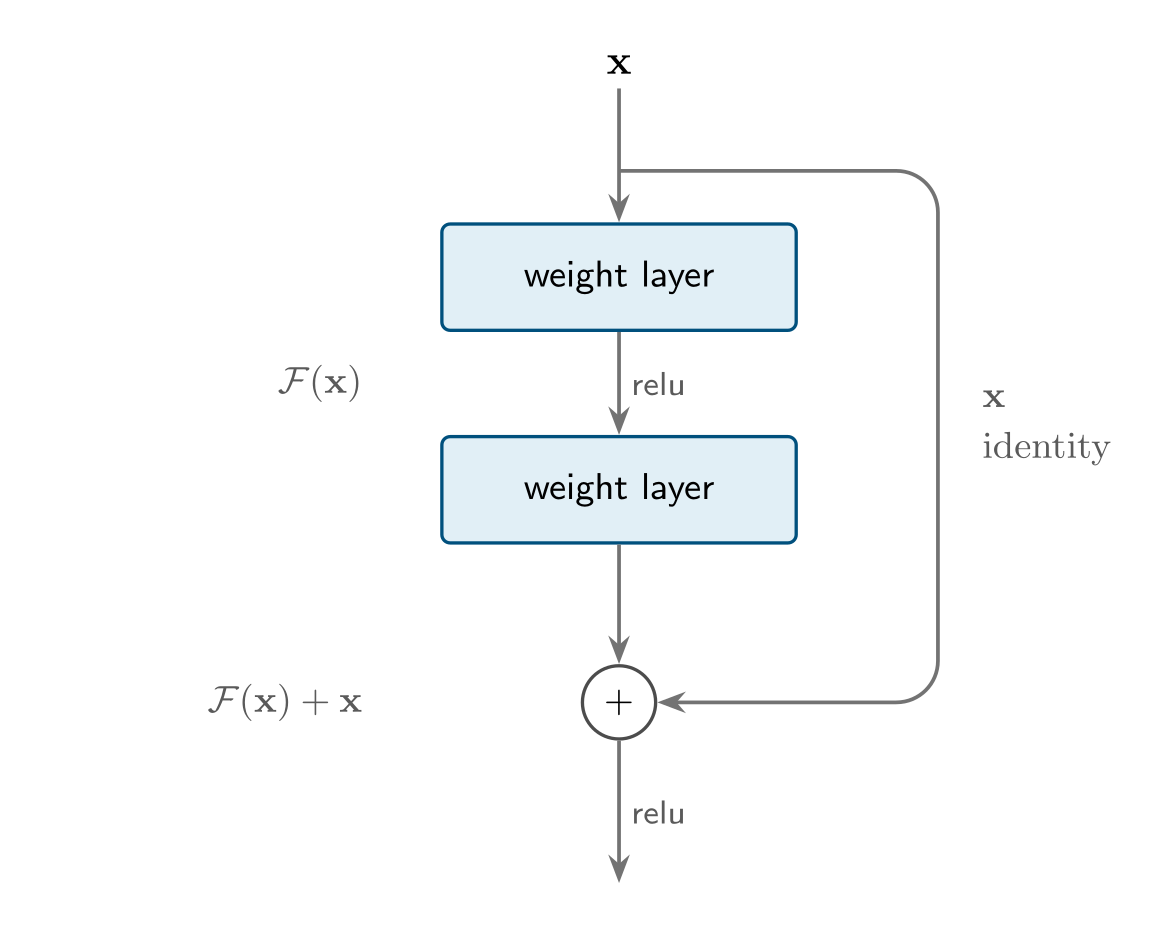
This template draws the residual block of a ResNet: the input x passes through two weight layers with ReLU between them, the identity skip connection bows out to the right and rejoins at a ⊕ node, and the sum F(x) + x goes through a final ReLU. The weight layers come from a \foreach over a list of labels, so adding a label adds a layer, and everything below them (the sum, the output, the side labels) is positioned from the number of layers the loop counted. The skip connection is a single path whose corner uses the perpendicular coordinate (skipright |- sum).
Contents
The figure and its code
% ResNet block
% Source: https://github.com/opentikz/opentikz/blob/359befbf8e8af7ce08e7e387b2c2a198e0ca735d/templates/resnet-block/template.tex
% By OpenTikZ contributors, dedicated to the public domain (CC0 1.0).
\documentclass[border=10pt]{standalone}

% --- packages (mirror these in template.meta.json "requires") ---
\usepackage{tikz}
\usetikzlibrary{arrows.meta}

% --- palette (canonical source: reference/color-palettes/color-palettes.md; light variant) ---
\definecolor{otblue}{HTML}{0072B2}
\definecolor{otorange}{HTML}{E69F00}
\definecolor{otteal}{HTML}{009E73}
\definecolor{otpurple}{HTML}{CC79A7}
\definecolor{otgray}{HTML}{5A5A5A}

\begin{document}
% ==== parameters (edit these) ============================================
% Labels of the weight-layer boxes in the residual branch, top to bottom.
% The number of entries IS the number of stacked layers (classic block = 2).
\def\branchlabels{weight layer,weight layer}
\def\actlabel{relu}                              % activation between layers and after the sum
\def\inputlabel{$\mathbf{x}$}                    % top input
\def\residuallabel{$\mathcal{F}(\mathbf{x})$}    % side label for the residual branch
\def\outputlabel{$\mathcal{F}(\mathbf{x})+\mathbf{x}$} % side label at the sum
\def\skiplabel{$\mathbf{x}$}                      % identity / skip-path label (upper)
\def\identitylabel{identity}                      % identity / skip-path label (lower)
\def\blocksep{1.8}   % vertical centre-to-centre distance between stages (cm)
\def\blockw{3.0}     % weight-layer box width (cm)
\def\blockh{0.9}     % weight-layer box height (cm)
\def\skipbow{2.7}    % how far right the identity skip connection bows out (cm)
% =========================================================================

\begin{tikzpicture}[
    >={Stealth[length=2.4mm]},
    wlayer/.style={
      draw=otblue!70!black, fill=otblue!12, rounded corners=2pt,
      line width=0.8pt, align=center, font=\sffamily\small,
      minimum width=\blockw cm, minimum height=\blockh cm,
    },
    addop/.style={
      circle, draw=otgray!85!black, line width=0.8pt,
      inner sep=1.4pt, minimum size=0.62cm, font=\small,
    },
    flow/.style={draw=otgray!85, line width=0.9pt, ->},
    skip/.style={draw=otgray!85, line width=0.9pt, ->, rounded corners=10pt},
    actlbl/.style={font=\sffamily\footnotesize, text=otgray, inner sep=2.5pt},
    sidelbl/.style={font=\small, text=otgray},
  ]

  % --- input ---
  \node[font=\bfseries] (xlabel) at (0,0) {\inputlabel};

  % --- residual branch: stack the weight-layer boxes, relu between them ---
  \foreach \lab [count=\i, remember=\i as \previ (initially 0)] in \branchlabels {
    \pgfmathsetmacro{\yy}{-\i*\blocksep}
    \node[wlayer] (wl\i) at (0,\yy) {\lab};
    \ifnum\i=1
      \draw[flow] (xlabel) -- (wl\i);
    \else
      \draw[flow] (wl\previ) -- node[actlbl, right] {\actlabel} (wl\i);
    \fi
    \global\let\nlayers\i
  }

  % --- summation node and output ---
  \pgfmathsetmacro{\sumy}{-(\nlayers+1)*\blocksep}
  \node[addop] (sum) at (0,\sumy) {$+$};
  \draw[flow] (wl\nlayers) -- (sum);
  \pgfmathsetmacro{\outy}{\sumy-0.85*\blocksep}
  \coordinate (out) at (0,\outy);
  \draw[flow] (sum) -- node[actlbl, right] {\actlabel} (out);

  % --- identity skip connection: branches off the input line, bows right,
  %     and re-enters the sum from the right ---
  \coordinate (branch)    at (0,{-0.5*\blocksep});
  \coordinate (skipright) at (\skipbow,{-0.5*\blocksep});
  \draw[skip] (branch) -- (skipright) -- (skipright |- sum) -- (sum);

  % --- side labels ---
  \pgfmathsetmacro{\leftx}{-\blockw/2-0.55}
  \pgfmathsetmacro{\midy}{-(1+\nlayers)/2*\blocksep}
  \node[sidelbl, anchor=east] at (\leftx,\midy)  {\residuallabel};
  \node[sidelbl, anchor=east] at (\leftx,\sumy)  {\outputlabel};

  \pgfmathsetmacro{\skmy}{(-0.5*\blocksep+\sumy)/2}
  \node[sidelbl, anchor=west] at (\skipbow+0.25,\skmy+0.32) {\skiplabel};
  \node[sidelbl, anchor=west] at (\skipbow+0.25,\skmy-0.10) {\identitylabel};

\end{tikzpicture}
\end{document}Preamble and palette
Lines 4–15 of the code
A standalone page with border=10pt, TikZ with arrows.meta only, and five named colours defined by hex code with \definecolor{…}{HTML}{…} (the blue, orange, teal and purple are Okabe–Ito colours, which stay distinct with colour-vision deficiency). The figure uses the blue for the layers and the grey for lines and labels.
Parameters, including the list of layers
Lines 18–32 of the code
The block is configured with macros. \def\branchlabels{weight layer,weight layer} is a comma-separated list, and its comment states the rule that drives the whole figure: the number of entries is the number of stacked layers. The other macros hold the activation label, the five mathematical labels, the vertical spacing \blocksep (1.8 cm from centre to centre), the box size and \skipbow, how far right the skip connection bows out.
Styles
Lines 34–49 of the code
wlayer sizes the boxes from the parameters, minimum width=\blockw cm and minimum height=\blockh cm (a macro followed by a unit), with align=center so a label could have line breaks. addop is the ⊕ circle with minimum size=0.62cm. flow is a straight arrow and skip the same arrow with rounded corners=10pt, used only for the skip connection. actlbl and sidelbl set the small grey label fonts.
The layers from a loop that counts
Lines 51–64 of the code
\foreach \lab [count=\i, remember=\i as \previ (initially 0)] in \branchlabels walks the label list (a macro can stand where the braces of a list would be). count=\i numbers the iterations from 1, and remember=\i as \previ keeps the previous number, so each box can be connected to the one before it. Each box goes to \pgfmathsetmacro{\yy}{-\i*\blocksep}, 1.8 cm lower each time. \ifnum\i=1 decides which arrow to draw: from the input to the first box, or from the previous box with a relu label to its right.
The last line of the loop, \global\let\nlayers\i, matters: the body of a \foreach runs inside a TeX group, so a normal assignment would be forgotten after the loop. Copying the count globally leaves \nlayers equal to the number of layers (2) for the rest of the picture.
The sum and the output
Lines 66–72 of the code
With \nlayers known, the ⊕ node goes one spacing below the last layer, -(\nlayers+1)*\blocksep, and the arrow from (wl\nlayers) reaches it whatever the number of layers. The output is a coordinate 0.85 spacings lower, and the last arrow carries the final relu label.
The skip connection
Lines 74–78 of the code
The identity path needs only two named points: (branch) on the input line, halfway between x and the first layer, and (skipright) \skipbow centimetres to its right. \draw[skip] (branch) -- (skipright) -- (skipright |- sum) -- (sum); then goes right, down to the height of the sum and left into it. (skipright |- sum) is the point with the x of skipright and the y of sum, so the corner is always level with the sum, and the skip style’s 10pt rounded corners turn the two right angles into curves. The last segment ends on the circle’s border because (sum) is a node.
Side labels at computed positions
Lines 80–88 of the code
The labels are placed with arithmetic rather than anchors. \leftx is half a box width plus 0.55 cm left of the centre line; F(x) goes there at \midy, the middle of the residual branch, and F(x) + x at the height of the sum, both with anchor=east so they end at that x. The two skip labels sit right of the skip path at the middle of its vertical part, one 0.32 cm above and one 0.10 cm below, so “x” and “identity” read as a pair. With three layers, every one of these positions moves with the block.
Techniques used
- Loops with count and remember
count=\inumbers the layers andremember=\i as \previjoins each one to the previous one. - Perpendicular coordinates
(skipright |- sum)keeps the skip connection’s corner level with the sum. - Rounded elbow lines one path with
rounded corners=10ptfor the skip connection. - Labels on arrows
node[actlbl, right]inside--puts relu beside each arrow. - Neural network diagrams residual blocks, skip connections and how they are drawn in papers.
Variations
Our own code, written for this page and typeset with TeX Live 2026 like the figure above. Each one is a complete example: copy it, or open it in the TikZ editor and change it. This code is CC0 1.0, free to use without conditions.
A bottleneck block with a projection shortcut
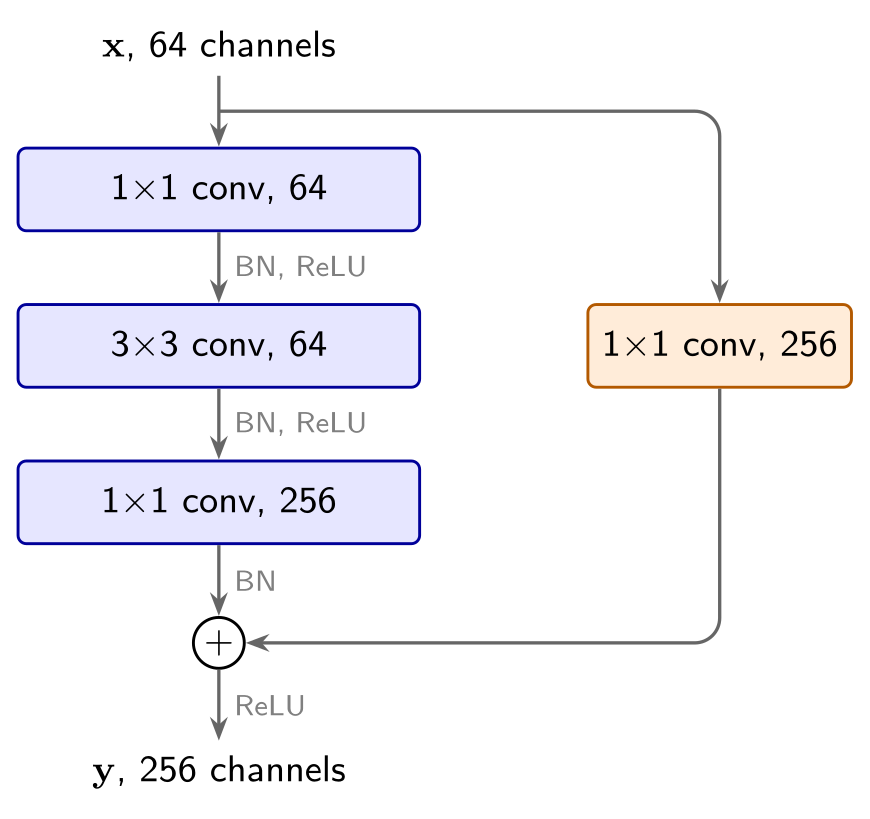
Deeper ResNets use a bottleneck block: 1×1, 3×3 and 1×1 convolutions, with batch normalisation and ReLU between them and the last ReLU after the sum. When the block changes the number of channels, here from 64 to 256 as in the first block of ResNet-50, the shortcut cannot be the identity and becomes a 1×1 convolution (a projection). The layers are stacked with below=of, and the shortcut leaves from ([yshift=-3mm]x.south) and returns with |- into the sum.
\usepackage{tikz} \usetikzlibrary{positioning, arrows.meta}\begin{tikzpicture}[
>={Stealth[length=2mm]}, node distance=6mm, font=\sffamily\small,
conv/.style={draw=blue!60!black, fill=blue!10, rounded corners=2pt, line width=0.7pt,
minimum width=34mm, minimum height=7mm},
proj/.style={conv, draw=orange!70!black, fill=orange!15, minimum width=22mm},
act/.style={font=\sffamily\scriptsize, text=gray, right},
flow/.style={->, line width=0.8pt, draw=gray!80!black},
]
\node (x) {$\mathbf{x}$, 64 channels};
\node[conv, below=of x] (c1) {1$\times$1 conv, 64};
\node[conv, below=of c1] (c2) {3$\times$3 conv, 64};
\node[conv, below=of c2] (c3) {1$\times$1 conv, 256};
\node[circle, draw, line width=0.7pt, inner sep=1pt, below=of c3] (sum) {$+$};
\node[below=6mm of sum] (y) {$\mathbf{y}$, 256 channels};
\draw[flow] (x) -- (c1);
\draw[flow] (c1) -- node[act] {BN, ReLU} (c2);
\draw[flow] (c2) -- node[act] {BN, ReLU} (c3);
\draw[flow] (c3) -- node[act] {BN} (sum);
\draw[flow] (sum) -- node[act] {ReLU} (y);
% 64 channels in, 256 out: the shortcut needs a projection to match
\node[proj, right=14mm of c2] (p) {1$\times$1 conv, 256};
\coordinate (split) at ([yshift=-3mm]x.south);
\draw[flow, rounded corners=6pt] (split) -| (p);
\draw[flow, rounded corners=6pt] (p) |- (sum);
\end{tikzpicture}Full document
\documentclass[border=4pt]{standalone}
\usepackage{tikz}
\usetikzlibrary{positioning, arrows.meta}
\begin{document}
\begin{tikzpicture}[
    >={Stealth[length=2mm]}, node distance=6mm, font=\sffamily\small,
    conv/.style={draw=blue!60!black, fill=blue!10, rounded corners=2pt, line width=0.7pt,
                 minimum width=34mm, minimum height=7mm},
    proj/.style={conv, draw=orange!70!black, fill=orange!15, minimum width=22mm},
    act/.style={font=\sffamily\scriptsize, text=gray, right},
    flow/.style={->, line width=0.8pt, draw=gray!80!black},
  ]
  \node (x) {$\mathbf{x}$, 64 channels};
  \node[conv, below=of x] (c1) {1$\times$1 conv, 64};
  \node[conv, below=of c1] (c2) {3$\times$3 conv, 64};
  \node[conv, below=of c2] (c3) {1$\times$1 conv, 256};
  \node[circle, draw, line width=0.7pt, inner sep=1pt, below=of c3] (sum) {$+$};
  \node[below=6mm of sum] (y) {$\mathbf{y}$, 256 channels};
  \draw[flow] (x) -- (c1);
  \draw[flow] (c1) -- node[act] {BN, ReLU} (c2);
  \draw[flow] (c2) -- node[act] {BN, ReLU} (c3);
  \draw[flow] (c3) -- node[act] {BN} (sum);
  \draw[flow] (sum) -- node[act] {ReLU} (y);
  % 64 channels in, 256 out: the shortcut needs a projection to match
  \node[proj, right=14mm of c2] (p) {1$\times$1 conv, 256};
  \coordinate (split) at ([yshift=-3mm]x.south);
  \draw[flow, rounded corners=6pt] (split) -| (p);
  \draw[flow, rounded corners=6pt] (p) |- (sum);
\end{tikzpicture}
\end{document}Several blocks in a row
A ResNet stage repeats the block, each with its own skip. Drawn left to right, each block is a box and a ⊕ placed by one \foreach; a second loop with count=\n from 2 joins each sum to the next block, and a third draws the skips, each leaving the line 6 mm before its block, rising 0.9 and dropping into its sum with -|.

\usepackage{tikz} \usetikzlibrary{arrows.meta}\begin{tikzpicture}[
>={Stealth[length=2mm]}, thick, font=\sffamily\small,
blk/.style={draw, rounded corners=2pt, fill=blue!10, minimum width=16mm, minimum height=9mm},
add/.style={circle, draw, inner sep=1pt},
]
\node (in) at (0,0) {$\mathbf{x}$};
% three residual blocks in a row, each followed by its sum
\foreach \k in {1,2,3} {
\node[blk] (f\k) at (3.2*\k-1.3, 0) {$\mathcal{F}_{\k}$};
\node[add] (s\k) at (3.2*\k, 0) {$+$};
\draw[->] (f\k) -- (s\k);
}
\draw[->] (in) -- (f1);
\foreach \k [count=\n from 2] in {1,2}
\draw[->] (s\k) -- (f\n);
% each skip leaves the line just before its block and rejoins at its sum
\foreach \k in {1,2,3}
\draw[->, gray, rounded corners=4pt] ([xshift=-6mm]f\k.west) -- ++(0,0.9) -| (s\k);
\node (out) at (10.8,0) {$\mathbf{y}$};
\draw[->] (s3) -- (out);
\end{tikzpicture}Full document
\documentclass[border=4pt]{standalone}
\usepackage{tikz}
\usetikzlibrary{arrows.meta}
\begin{document}
\begin{tikzpicture}[
    >={Stealth[length=2mm]}, thick, font=\sffamily\small,
    blk/.style={draw, rounded corners=2pt, fill=blue!10, minimum width=16mm, minimum height=9mm},
    add/.style={circle, draw, inner sep=1pt},
  ]
  \node (in) at (0,0) {$\mathbf{x}$};
  % three residual blocks in a row, each followed by its sum
  \foreach \k in {1,2,3} {
    \node[blk] (f\k) at (3.2*\k-1.3, 0) {$\mathcal{F}_{\k}$};
    \node[add] (s\k) at (3.2*\k, 0) {$+$};
    \draw[->] (f\k) -- (s\k);
  }
  \draw[->] (in) -- (f1);
  \foreach \k [count=\n from 2] in {1,2}
    \draw[->] (s\k) -- (f\n);
  % each skip leaves the line just before its block and rejoins at its sum
  \foreach \k in {1,2,3}
    \draw[->, gray, rounded corners=4pt] ([xshift=-6mm]f\k.west) -- ++(0,0.9) -| (s\k);
  \node (out) at (10.8,0) {$\mathbf{y}$};
  \draw[->] (s3) -- (out);
\end{tikzpicture}
\end{document}Frequently asked questions
How do I draw a residual (skip) connection in TikZ?
Draw it as one path from a point on the main line, out to the side, down to the height of the sum node and into it: \draw[->, rounded corners] (branch) -- (side) -- (side |- sum) -- (sum);. The perpendicular coordinate (side |- sum) keeps the corner level with the sum.
How do I add a third layer to this ResNet block?
Add a third entry to \branchlabels, for example \def\branchlabels{weight layer,weight layer,weight layer}. The loop draws three boxes, counts them into \nlayers, and the sum, the output and the side labels move down by themselves.
Why does the loop use \global\let?
Each pass of a \foreach runs inside a TeX group, so a value set inside the loop disappears when the loop ends. \global\let\nlayers\i copies the counter outside the group, so later lines know how many layers were drawn.
References
- opentikz/opentikz at commit 359befb: templates/resnet-block/template.tex (CC0 1.0)github.com
- PGF/TikZ manual, §13.3.1 Intersections of Perpendicular Lines (|- and -|)tikz.dev
- PGF/TikZ manual, §14.5 Rounding Cornerstikz.dev
- PGF/TikZ manual, §17.8 Placing Nodes on a Line or Curve Explicitlytikz.dev
- PGF/TikZ manual, §88 Repeating Things: The Foreach Statement (count, remember)tikz.dev
- PGF/TikZ manual, §94.1.1 Commands (\pgfmathsetmacro)tikz.dev
- He, Zhang, Ren and Sun, Deep Residual Learning for Image Recognition (arXiv:1512.03385): bottleneck blocks and projection shortcutsarxiv.org
The walkthrough was checked against these sources and the pictures are the code typeset with TeX Live 2026. The original figure is by OpenTikZ contributors, under the CC0 1.0; the variations on this page are ours, CC0 1.0.
Change this figure in your browserOpen the figure or any variation in the free TikZ editor: it is typeset with TeX Live as you type, with errors pointed at their line.
Open the figure in the TikZ editor